


Power Platform
Public Group
Active 5 weeks ago
Power Platform
Organizer:
- JOSE Organized by
-
-

Need help figuring out how to give days between incidents
-
Need help figuring out how to give days between incidents
Posted by John Heck on January 18, 2021 at 11:22 am-
Hello,
I have an Excel list with the following columns: Installs, Installs Completed on Time, Installs Completed 1st Time Correctly, and Install Issues. The Install Issues is a free form text the users enter information into. I need to calculate the number of days between the last text entered to today. For example, if on January 12 a user entered some text in the Install Issues column and the current date is January 18 then the number 6 will be displayed in either a Card or KPI visualization (if these are the best to use) to represent the number of days since the last Install Issues was recorded.
Thank you in advance for any help.
——————————
John Heck
—————————— -

Jeremy Dennis
MemberJanuary 19, 2021 at 10:36 AM
How/where are you capturing when the ‘Install Issues’ text box was last updated?Assuming you are already doing that some where the DAX is pretty straight forward:
Days Since Last Issue = DATEDIFF('Table'[Updated], TODAY(), DAY)?You will want to make this a new column in your data set as opposed to a measure. I’ve attached the pbix from the screen grab below:
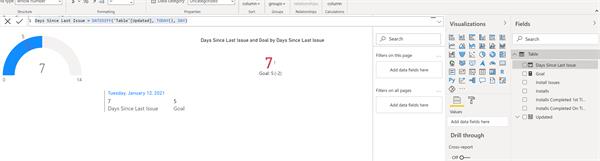
Hope this helps!Kind regards,
-J
——————————
Jeremy Dennis
Director of Analytics
——————————
——————————————- -
Hello Jeremy,
I am updating the “Install Issue” text box in the Excel file for that given date. The column layout in the Excel file is Date, Installs, Installs Completed on Time, Installs Completed 1st Time Correctly, and Install Issues. For example a row in the Excel file could look like
1/10/2021 3 2 2 Did not receive all items for one of the racks
1/11/2021
1/12/2021 1 1 1
1/13/2021 1 1 1
…With the issue entered on 1/10/2021 and today being 1/20/2021 the number of days since last issue would be 10.
Kind regards,
John——————————
John Heck
——————————
——————————————- -
Randy Etheridge
MemberJanuary 20, 2021 at 9:48 AM
ok so basically the answer is above, but I have updated the DAX formula for your field name
Days Since Last Issue = DATEDIFF('Table'[Date], TODAY(), DAY)?Of course this is a very simple calculation. So if the updated Date field is say Wed, and you refresh the data on the following week Tuesday, this formula will answer 7. But if you do not want to count weekends, then the answer would need to be 5 and the formula would be much different. Just take that into consideration
——————————
Randy Etheridge
Veritiv Corporation
P&F USA Inc
Torrance CA
770-315-9670
——————————
——————————————- -
Hello Jeremy,
I am only capturing the when the ‘Install Issues’ text box was last updated in the list itself. I am not keeping that information any where else? Do you have a suggestion as to how I should be capturing that information?
Are you suggesting that when the ‘Install Issues’ column is completed that it updates another cell, that can be directly referenced, with the date that the comment was entered? One of the issues that I could run into is that a user enters a ‘Install Issues’ comment and then removes it because of a mistake.
Thank you in advance for your help.
Kind regards,
John——————————
John Heck
——————————
——————————————- -
Jeremy Dennis
MemberFebruary 8, 2021 at 10:35 AM
Hi John,Yes, I’m suggesting that there be a column dedicated to the date an install issue was recorded/updated. How you want to do that is up to you, whether having it auto-populated with some formula or manually entered by the user. I’d prefer the former personally…I would much rather rely on a machine to do my data entry than a person.
I hope this helps!
Kind regards,
-J
——————————
Jeremy Dennis
Director of Analytics
——————————
——————————————-
John Heck replied 5 years, 9 months ago 1 Member · 0 Replies -
-
0 Replies
Sorry, there were no replies found.
The discussion ‘Need help figuring out how to give days between incidents’ is closed to new replies.
