
LineChart with calculated data

  • LineChart with calculated data

    Posted by DSC Communities on August 16, 2021 at 8:20 am
    • Fabian Heil

      Member

      August 16, 2021 at 8:20 AM

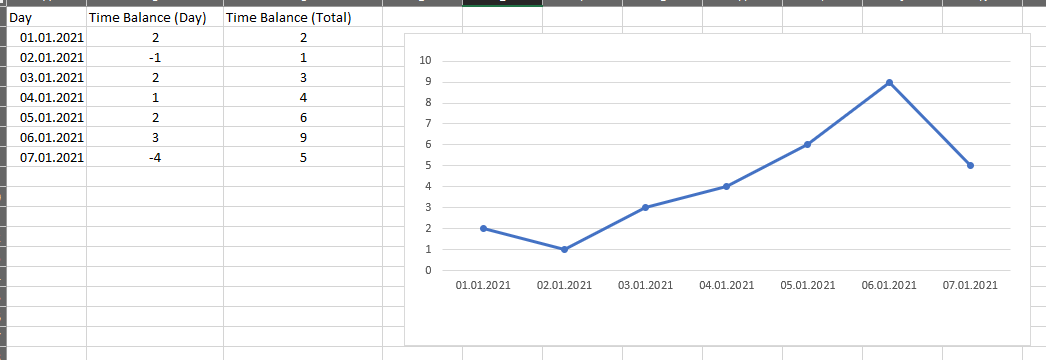
      I“m currently struggeling with how to store data correctly to show it in a line chart.
      My app is about work time bookings and holiday and i am storing the following data in a SharePoint list

      • Day
      • Time Balance (day) – e.g. +2h or -8h (absence)

      I dont want to store the calculated total time balance in every time booking, as the order of bookings is not always the same and e.g. canceling a booking would affect all items in the future.

      Example:Ā 


      I only have the value “Day” and “Time Balance (Day)” in SharePoint.
      Can i work with calculated values (Time Balance Total) in a line chart without having the cumulated value for every day in the sharepoint list?

      Hope, you understand my issue šŸ™‚

      ——————————
      Fabian Heil
      ——————————

    • Brian Scott

      Member

      August 17, 2021 at 7:10 AM

      You can just save the data you have in the screenshot as a Collection and use the Collection to drive the chart

      ——————————
      Brian Scott
      Chief Creative Officer
      Concord NC
      ——————————
      ——————————————-

    DSC Communities replied 4 years, 10 months ago 1 Member · 0 Replies
  • 0 Replies

Sorry, there were no replies found.

The discussion ‘LineChart with calculated data’ is closed to new replies.

Start of Discussion
0 of 0 replies June 2018
Now

Welcome to our new site!

Here you will find a wealth of information created for peopleĀ  that are on a mission to redefine business models with cloud techinologies, AI, automation, low code / no code applications, data, security & more to compete in the Acceleration Economy!