Get the Source information (URL) when getting data from Dynamics 365

  • Get the Source information (URL) when getting data from Dynamics 365
    Posted by DSC Communities on February 2, 2021 at 12:47 pm
    • R Bastos

      Member

      February 2, 2021 at 12:47 PM

      I’m not expert in Power BI, so it took me some time to discover this, then I decided to share, as someone else can have the same problem.

      I created a report that show data from Dynamics 365 and it’s embedded in Dynamics form (Contact).
      As I’m dealing with specific records, I’m using fetchXml to get the data.

      I had a requirement to open the Dynamics record showed in the report.
      But the biggest problem was:
      how to get the Dynamics URL from the PowerBI Source so that it could be used to open the record?

      The way I found to do it is:
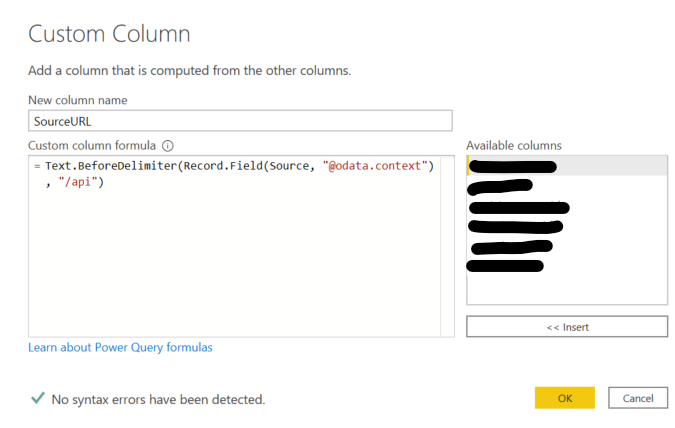
      In Power BI, select the option “Transform Data”, then “Add Column”.
      The code added here will get the Dynamics URL from the Source.

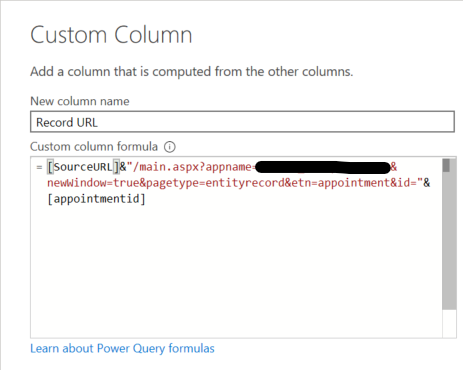
      After that, I created another column that uses this one and creates the URL to open the Dynamics record


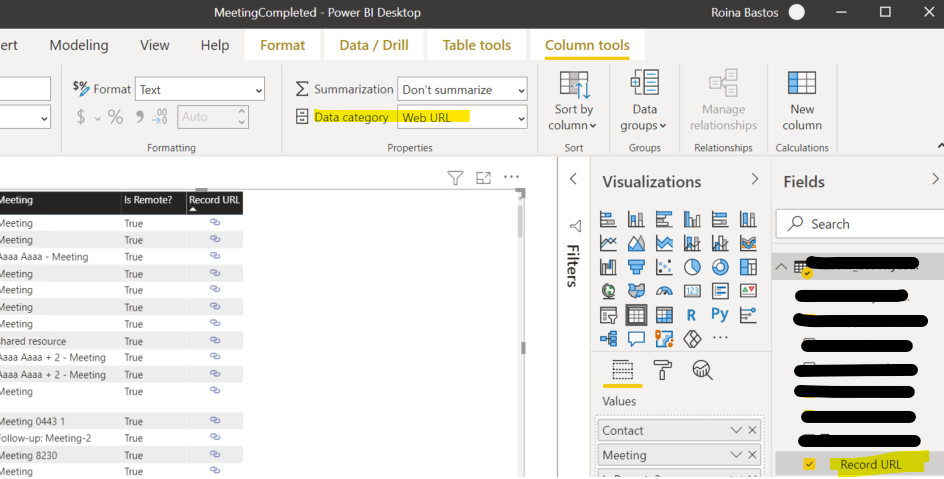
      To allow the record to work as link, the column must have the Data CategoryĀ Web URL.

    DSC Communities replied 5 years, 1 month ago 1 Member · 0 Replies
  • 0 Replies

Sorry, there were no replies found.

The discussion ‘Get the Source information (URL) when getting data from Dynamics 365’ is closed to new replies.

Start of Discussion
0 of 0 replies June 2018
Now

Welcome to our new site!

Here you will find a wealth of information created for peopleĀ  that are on a mission to redefine business models with cloud techinologies, AI, automation, low code / no code applications, data, security & more to compete in the Acceleration Economy!