Eliminate lines with data that only exists once

  • Eliminate lines with data that only exists once
    Posted by DSC Communities on November 27, 2019 at 5:05 am
    • Jacob Birk

      Member

      November 27, 2019 at 5:05 AM


      I have a set of data containing one column with IDnumbers, another with some categoriesĀ 

      E.G.Ā 
      IDnumbers Ā  Ā  Ā  Ā  Ā  Ā  Ā  Ā  Ā  Ā  Ā Ā  Categori
      1001 Ā  Ā  Ā  Ā  Ā  Ā  Ā  Ā  Ā  Ā  Ā  Ā  Ā  Ā  Ā  Ā  Carrot
      1002 Ā  Ā  Ā  Ā  Ā  Ā  Ā  Ā  Ā  Ā  Ā  Ā  Ā  Ā  Ā  Ā Ā  Apple
      1002 Ā  Ā  Ā  Ā  Ā  Ā  Ā  Ā  Ā  Ā  Ā  Ā  Ā  Ā  Ā  Ā  Orange
      1007 Ā  Ā  Ā  Ā  Ā  Ā  Ā  Ā  Ā  Ā  Ā  Ā  Ā  Ā  Ā  Ā  Apple
      1009 Ā  Ā  Ā  Ā  Ā  Ā  Ā  Ā  Ā  Ā  Ā  Ā  Ā  Ā  Ā  Ā  Carrot
      1011 Ā  Ā  Ā  Ā  Ā  Ā  Ā  Ā  Ā  Ā  Ā  Ā  Ā  Ā  Ā  Ā  Carrot
      1011 Ā  Ā  Ā  Ā  Ā  Ā  Ā  Ā  Ā  Ā  Ā  Ā  Ā  Ā  Ā  Ā  Orange
      1014 Ā  Ā  Ā  Ā  Ā  Ā  Ā  Ā  Ā  Ā  Ā  Ā  Ā  Ā  Ā  Ā  Carrot

      I would like to eliminate all the data where the ID number occurs only once and keep all the datalines from ID’s that have more lines.Ā 

      How do I approch this?

      ——————————
      Jacob Birk
      ——————————

    • Aurelien BETBEUI KWANDJEU

      Member

      November 27, 2019 at 5:33 AM

      Hello Jacob,

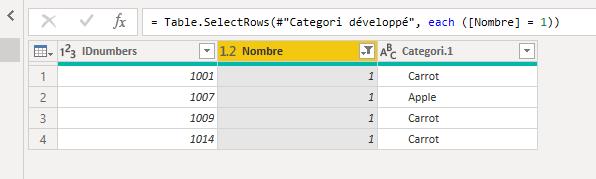
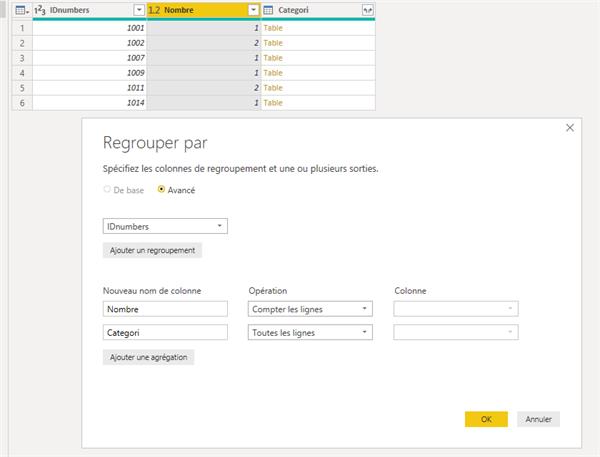
      load data in power bi and group it by IDnumbers, create indicator that count the number of IDnumbers and add another column to complet the categori.

      After do that develop column categori and filter data with Nombre = 1

      Thanks you,

      ——————————
      Aurelien BETBEUI KWANDJEU
      CHIEF DATA OFFICER (BI & DWH)
      ——————————
      ——————————————-

    • Ben Howard

      Member

      November 27, 2019 at 5:56 AM

      Hi, To compliment Aurelien’s excellent answer, I’ve added a screen shot in English in case your French isn’t too good. Ā  Also, I’ve added a couple of additional steps in the query editor.Ā  i)Ā  Filter where the number of columns is > 1 and ii)Ā  remove the columns you don’t need. Ā  I’ve also uploaded the .pbix file I created so you should be able to follow the steps.

      ——————————
      Ben Howard
      Warrington
      ——————————
      ——————————————-

    • ganesh kumar

      Member

      November 27, 2019 at 5:53 AM

      Hi

      please find the attachment.

      i have created the new column to find duplicate, used in slicer .

      Ā 

      ?

      ——————————
      ganesh kumar
      Business Analyst
      9500990994
      ——————————
      ——————————————-

    • Tim Dyeson

      Member

      November 27, 2019 at 10:54 AM

      Hi Jacob,

      One other approach is this: In the Query Editor window, select the ID column and use the Keep Rows button and select Keep Duplicates.Ā 

      Tim

      ——————————
      Tim Dyeson
      Performance Measurement Manager
      ——————————
      ——————————————-

    DSC Communities replied 6 years, 4 months ago 1 Member · 0 Replies
  • 0 Replies

Sorry, there were no replies found.

The discussion ‘Eliminate lines with data that only exists once’ is closed to new replies.

Start of Discussion
0 of 0 replies June 2018
Now

Welcome to our new site!

Here you will find a wealth of information created for peopleĀ  that are on a mission to redefine business models with cloud techinologies, AI, automation, low code / no code applications, data, security & more to compete in the Acceleration Economy!