


Power Platform
Public Group
Active 20 hours ago
Power Platform
Organizer:
- JOSE Organized by
-
-

dax query for returning latest ID
-
dax query for returning latest ID
Posted by DSC Communities on November 26, 2019 at 12:18 pm-

Fidzani Kilibe
MemberNovember 26, 2019 at 12:18 PM
Good Day, kindly assist with a DAX query for returning an ID with the latest Capacity from each month based on “from Date” then sum the capacity. see the below sample table.Thanks
create date ID capacity from date to date 4/1/2019 XYZ 2 3/25/2019 3/31/2019 4/1/2019 XYZ 5 4/1/2019 4/30/2019 4/1/2019 ABC 10 4/1/2019 4/30/2019 5/1/2019 XYZ 5 5/1/2019 5/31/2019 5/1/2019 ABC 10 5/1/2019 5/31/2019 5/1/2019 EFG 45 4/25/2019 4/30/2019 5/1/2019 EFG 10 5/1/2019 5/31/2019 6/1/2019 XYZ 50 6/1/2019 6/30/2019 6/1/2019 ABC 100 6/1/2019 6/30/2019 6/1/2019 EFG 10 6/1/2019 6/30/2019 ——————————
Fidz——————————
-
Hi Fidz, I am seeking to understand your question. In the dataset you provided, would you expect that April 2019 = 104, May 2019 = 454, and June 2019 = 100? Then do you want to sum across these months (i.e., 658)? Please clarify any misunderstanding.
Tim
——————————
Tim Dyeson
Performance Measurement Manager
WA State Health Care Authority
——————————
——————————————- -
Fidzani Kilibe
MemberNovember 28, 2019 at 11:18 AM
Dear Tim, thank you for the feedback. i’ve attached the original file as i’ve noticed that the details got corrupted when i was pasting.I expect to have a sum broken down per month. but if from date is say April (for example row 7) then it should be accounted for under create date which falls in April which means the sample set for April will be made up of the following rows (2,3,4 and 7) therefore the result will be as highlighted and sum for capacity in April =(5+10+45). the same logic will apply for the subsequent months. the 1st row will be accounted for under March.
I hope the above make sense.
create date ID capacity from date to date 4/1/2019 XYZ 2 3/25/2019 3/31/2019 4/1/2019 XYZ 5 4/1/2019 4/30/2019 4/1/2019 ABC 10 4/1/2019 4/30/2019 5/1/2019 XYZ 5 5/1/2019 5/31/2019 5/1/2019 ABC 10 5/1/2019 5/31/2019 5/1/2019 EFG 45 4/25/2019 4/30/2019 5/1/2019 EFG 10 5/1/2019 5/31/2019 6/1/2019 XYZ 50 6/1/2019 6/30/2019 6/1/2019 ABC 100 6/1/2019 6/30/2019 6/1/2019 EFG 10 6/1/2019 6/30/2019 ——————————
Fidzani Kilibe
IT Manager
21512345612
——————————
——————————————- -
Rajat Jaiswal
MemberDecember 1, 2019 at 10:30 AM
Hi,
If I understand your problem correctly by attaching excel.
You have to follow below steps
1. Add 3 Columns Month, Year, Monthly SumMONTHNumber = MONTH(Sheet1[from date])
Year = Year( Sheet1[From Date])
Monthly SUM = SUMX(FILTER(Sheet1,AND(Sheet1[MONTHNumber] =EARLIER(Sheet1[MONTHNumber]),Sheet1[Year] = EARLIER(Sheet1[Year]))),Sheet1[capacity])**
Please, make sure you have sort your data by from date see below snap for more detail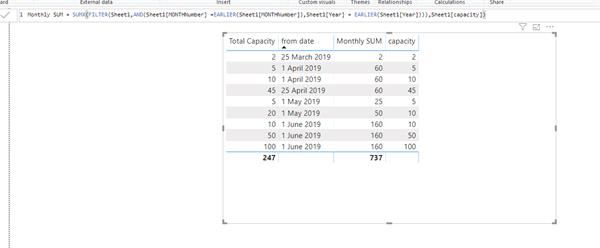
——————————
Rajat Jaiswal
Developer
Indore
——————————
——————————————- -
Hi Fidz,
If I understand you correctly, then it’s possible to solve this more simply by using a date dimension table connected to your fact table on From Date. If you then use a Yr-MMM column to group the Capacity column, you get the sum. If this helps, I’ve attached a date table that we use.
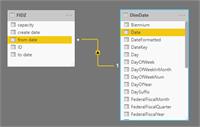
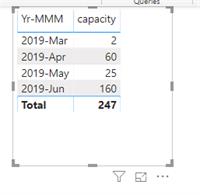
——————————
Tim Dyeson
Performance Measurement Manager
WA State Health Care Authority
——————————
——————————————- -
Fidzani Kilibe
MemberDecember 3, 2019 at 1:23 PM
Hi Tim apologies for the delayed response, let me have a look at your proposed solution and get back to you, is it possible to share a contact number to call you on?——Original Message——
Hi Fidz,If I understand you correctly, then it’s possible to solve this more simply by using a date dimension table connected to your fact table on From Date. If you then use a Yr-MMM column to group the Capacity column, you get the sum. If this helps, I’ve attached a date table that we use.
——————————
Tim Dyeson
Performance Measurement Manager
WA State Health Care Authority
——————————
DSC Communities replied 6 years, 4 months ago 1 Member · 0 Replies -
-
0 Replies
Sorry, there were no replies found.
The discussion ‘dax query for returning latest ID’ is closed to new replies.
