


Power Platform
Public Group
Active 20 hours ago
Power Platform
Organizer:
- JOSE Organized by
-
-

Dashboard for Dummies!!!
-
Dashboard for Dummies!!!
Posted by DSC Communities on March 31, 2017 at 11:55 am-

Pablo Mendoza
MemberMarch 31, 2017 at 11:55 AM
We are trying to create a dashboard for our CEO And President, where all they need to do is click on an icon desktop, and it would open their BI dashboard.If they have to log on to PBI, and go through several steps, they will not use.Question: Is there a way to create an icon for a user that will present them their Dashboard, when clicked?Thanks!Pablo -
Monica Carvajal
MemberMarch 31, 2017 at 3:04 PM
How you think share the dashboard? because you could created a simple dashboard jut pin a icon which is in the report then they just have to click and open the report, or if you want that they open the report in a cellphone for example you could generate a QR code, then when they scan it they could open the report.Hope this help.
——————————
Monica Carvajal
Consultant
3144118829
——————————
——————————————- -
Amr Atya
MemberApril 3, 2017 at 3:27 AM
Hi,Using the mobile application as Monica suggested will be a great one.Another thing you can make, is to embed the code of the report to the company portal website for example, or in his regular visited homepage, so he can see it without using to enter any credentials.
Also, If you shared the Dashboard with his email, so he will need to enter credentials in the first time only visiting the shared link, then you can set the browser to remember the username and password, and make a shortcut for this link to his desktop. Everything he need to do is to click on the shortcut, he will get the page asking for username and password, which is already remembered and written by the browser, he will only click login and he will see the dashboard.
——————————
Amr Atya
Software Tester
Cairo
01061200985
——————————
——————————————- -
Ron Hall
MemberApril 3, 2017 at 9:27 AM
You could try this, instead of a dashboard build all of your reports. Publish them. Then create a “Linked Dashboard” in a report and publish it. Provide just the link to their “Linked Dashboard” and they have access to all of their data. You can add that link to their dashboard from your browser.Example:
Lets say you have a PBI reports for Sales, Staffing and Inventory. Publish them to the web. Then create a report using a text box:
- Sales Report
- Current Staffing
- Inventory
Link each to their respective PBI reports. Publish this to the web and provide a link to it.
Now your senior team has one place to go and they can access all of their reports. You can add to it easily, you could create different linked dashboards or different people in your organization depending on their needs and give them only the PBI Reports they need to see. You can update easily and without changing how they operate. Not to mention none of them need Power BI access to use them.
Be sure they all know however, anyone the link gets shared with will have access to the data.
——————————
Ron Hall
Data Analyst
Phoenix AZ
4802874219
——————————
——————————————- -
Daniel Espinoza
MemberApril 3, 2017 at 9:43 AM
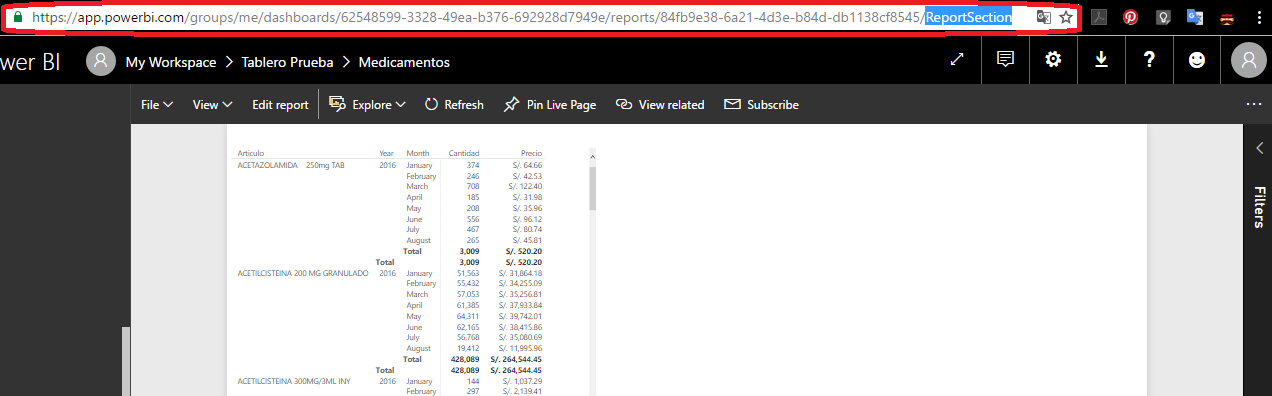
Hello!!Here is the link 🙂
Where it says “Report Section”
——————————
Daniel Espinoza
——————————
——————————————- -
Tom Robey
MemberApril 7, 2017 at 10:42 AM
I had the same request from our Executive Director, and I just subscribed him to the report and every morning at 11am he receives an email with a screen capture of the report with a link to view the full report. Our report has 3 pages so he gets 3 emails (one for each report). If he needs to access the reports he can do so very easily from the emails. This is also very useful when he is on his mobile device. It was the best “catch all” for his desktop and mobile device.——————————
Tom Robey
IT Manager
Fairfax VA
7035374814
——————————
——————————————- -
Marcelo Assis
MemberMay 18, 2017 at 10:46 AM
Hi Tom!Im a bit confused by the solution you found, specially because I have the same need here.
Your CEO receives an e-mail with a screen capture of the REPORT or the DASHBOARD?
I have no idea how to share a REPORT using e-mail to in-company members, only on DASHBOARDS.
——————————
Marcelo
Belo Horizonte – Brasil
——————————
——————————————-
DSC Communities replied 8 years, 11 months ago 1 Member · 0 Replies -
-
0 Replies
Sorry, there were no replies found.
The discussion ‘Dashboard for Dummies!!!’ is closed to new replies.
