


Power Platform
Public Group
Active a day ago
Power Platform
Organizer:
- JOSE Organized by
-
-

Count Based on day selection
-
Count Based on day selection
Posted by DSC Communities on April 16, 2020 at 1:19 pm-

Ganesh Kumar
MemberApril 16, 2020 at 1:19 PM
Hi All,i need help in counting the stockrooms in daily data, but for Tuesday and Thursday i don’t want count some stockrooms in my measure
example
4/1/2020, 4/3/2020,4/6/2020,4/8/2020,4/10/2020,4/13/2020 and 4/15/2020 are fall under Monday, Wednesday and Friday,
when ever my slicer selection fall under “Monday, Tuesday, and Friday i want to count(distinct count) all the stockroom in my daily data,
but for Tuesday and Thursday i want to exclude table (M-W-F) in my calculation. so please tell me how can i use “selectedvalue” to identify the day
and exclude the data from another table. attached my for your reference.
Thanks in advance ….
——————————
Ganesh Kumar
Analyst
—————————— -
Christopher Schnaars
MemberApril 17, 2020 at 5:43 AM
Could you add a day_of_week column to your calendar table and filter on that?——————————
Christopher Schnaars
Laboratory Testing Inc.
Hatfield, Pennsylvania
——————————
——————————————- -
Ganesh Kumar
MemberApril 17, 2020 at 5:55 AM
hIthanks,, but am not able to understand exactly …if i apply filter on calendar for “Tuesday, Thursday” then when am clicking Monday or Wednesday this filter apply for those day … it wont give my out put…
——————————
Ganesh Kumar
Analyst
——————————
——————————————- -
Christopher Schnaars
MemberApril 17, 2020 at 6:41 AM
My apologies. I guess I misunderstood the problem. I opened your .pbix file and took a closer look. So what you are trying to do is exclude the three stockrooms in your M-W-F file from your Total Stockroom and Visited Stockroom measures on Tuesdays and Thursdays. Is that right?I could not figure out an easy way to filter out these three stockrooms on Tuesdays and Thursdays with your existing data model. If it were me, I’d just add a Boolean column to your Total Stockroom table, use that to flag these three stockrooms and get rid of M-W-F. Then you could add a day_of_the_week column to Calendar and use both that and your new Boolean column ignore those stockrooms in your measures on Tuesdays and Thursdays. I’ll agree this feels a little silly (and hopefully someone else can offer a more elegant solution) when you’re talking about excluding just three stockrooms.
——————————
Christopher Schnaars
Laboratory Testing Inc.
Hatfield, Pennsylvania
——————————
——————————————- -
Ganesh,
I took a look at your data model and I agree with Christopher’s analysis. I would recommend you expand your Calendar table. You can add two additional columns.
Day of Week = WEEKDAY(‘Calendar'[Date])MWF = if(‘Calendar'[Day of Week] = 2, “YES”, if(‘Calendar'[Day of Week] = 4, “YES”, If(‘Calendar'[Day of Week] = 6, “YES”,”NO”)))Once you have these two columns you can use MWF as a filter in your distinct count measure
MWF Distinct Count = CALCULATE(DISTINCTCOUNT(‘Daily Data'[Stockroom Name]),’Calendar'[MWF]=”YES”)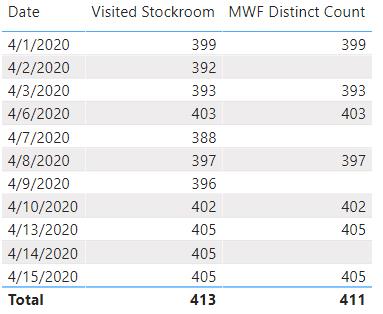
Hopefully that is the information you are looking for, but if not just let me know.——————————
Dan Edwards
Senior Manager
Crowe LLP
Huntington Beach CA
714-231-2202
dan.edwards@crowe.com
——————————
——————————————- -
Ganesh Kumar
MemberApril 20, 2020 at 11:05 AM
?Thanks for the formation ,,, i think its very close … but am using my measure in “cards” so based on date selection in slicer my measure output should change.
in same card i like show alternative day selection output. and i do not want to show that in table format in my visual.——————————
Ganesh Kumar
Analyst
——————————
——————————————- -
Ganesh,
I am not sure I understand your desired output. The measure should work in a card and it should change based on a slicer or filter, if the day selected is MWF. I am not sure what you mean by alternative day selection output. If you can provide an example, maybe I can figure out a solution.
——————————
Dan Edwards
Senior Manager
Crowe LLP
Huntington Beach CA
714-231-2202
dan.edwards@crowe.com
——————————
——————————————- -
Ganesh Kumar
MemberApril 20, 2020 at 3:23 PM
HiMy apologies , am little bit confused ….i ll explain my requirement again
“Total stockroom” is the my denominator value for SLA %, so whenever my slicer selection date fall under Tuesday and Thursday i should not add M-W-F table stockroom ( Three stockrooms) in my denominator . rest of the day (Monday, Tuesday, and Friday) i can add it in denominator
sorry again for confusion …
?
——————————
Ganesh Kumar
Analyst
——————————
——————————————- -
Christopher Schnaars
MemberApril 21, 2020 at 6:34 AM
Hi, Ganesh:I agree with Dan that your report should work as he suggested, and your card will still be a card. You won’t have to display your data as a table. You’re using a slicer to filter your data regardless of whether it’s a table, a card or some other visual. Give it a try, and if you don’t get the desired output, please tell us the wrong value you’re getting and what the correct value should be, post an updated .pbix file and we’ll try to help. But Dan’s suggestion shoudl work. I think using the M-W-F table just makes the relationships you’ve defined more complicated than they need to be.
——————————
Christopher Schnaars
Laboratory Testing Inc.
Hatfield, Pennsylvania
——————————
——————————————-
DSC Communities replied 5 years, 11 months ago 1 Member · 0 Replies -
-
0 Replies
Sorry, there were no replies found.
The discussion ‘Count Based on day selection’ is closed to new replies.
