Configuration File Options

  • Configuration File Options

    Posted by DSC Communities on April 18, 2019 at 11:12 am
    • James Hale

      Member

      April 18, 2019 at 11:12 AM

      I have been writing some Powerapp applications pretty much since it came out and mostly through trial and error.Ā  I’m in the process of seeking out some training, of which there didn’t appear to be any when I first started.

      However, in trying to develop my own “best practices”, I’ve tried to standardize some of the application parameters by creating a list in Sharepoint which contains specific configuration options for the specific Powerapp application.Ā  For instance, if I load one of my apps, I have an “About” screen that shows all the configuration options, which can be modified to adjust layout, colors, field references, etc. for that application.

      With the advent of Powerapps Components, I tried to take one of my footers and create a component from it.Ā  This specific footer also contains version number and release date in it, which I display on the bottom bar of the application, which is part of the configuration file.Ā  It displays just fine on the “about” screen that I display all the configuration info on, but for some reason, when I reference the field name that the configuration file references, the component option can’t find it.

      How would I get the component to display an item that is read from Sharepoint?Ā  Would I include it in the OnStart properties somehow?Ā  Any help would be greatly appreciated.

      ——————————
      James Hale, Senior I/T Technician
      brad.hale@kcmo.org
      Kansas City MO
      816-300-8811
      816-674-2232
      ——————————

    • Jamie Willis-Rose

      Member

      April 19, 2019 at 10:32 AM

      I haven’t played with components yet, but from what I read and saw, you can’t connect components to a data source. Ā 

      Here are some links to resources on Components:

      Shane Young:
      Intro PowerApps Components including Input and Output properties

      Laura Rogers:
      Intro PowerApps Components including Input and Output properties
      Ā 
      Brian Knight:
      PowerApps Reusable Component Beginner Tutorial

      Microsoft PowerApps (Brian Dang):
      An Introduction to Components

      Rory Neary:
      PowerApps Tuesday Tutorials #41 Components

      Good luck! Ā 
      -Jamie

      PS – You should follow all these folks on Twitter if you don’t already

      ——————————
      Jamie Willis-Rose
      Supervisor Technical Operations
      Discovery
      Sterling VA
      ——————————
      ——————————————-

    • Robert Sep

      Member

      April 20, 2019 at 3:49 AM

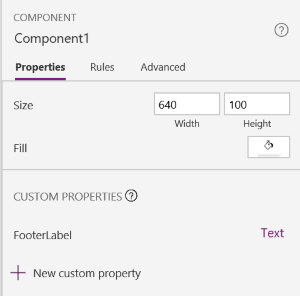
      You need to create a custom property for your component:


      Next make sure that within your component you reference the custom property as the value for the textbox that you want the SharePoint content to be displayed:


      Now when you use the component on one of your screens set the value of “FooterLabel” property to a SharePoint list item value. For example like this (in which ‘Test’ is the name of my SharePoint list and ‘Title’ the column name):

      ——————————
      Robert Sep
      Chief Qoder
      ——————————
      ——————————————-

    DSC Communities replied 6 years, 11 months ago 1 Member · 0 Replies
  • 0 Replies

Sorry, there were no replies found.

The discussion ‘Configuration File Options’ is closed to new replies.

Start of Discussion
0 of 0 replies June 2018
Now

Welcome to our new site!

Here you will find a wealth of information created for peopleĀ  that are on a mission to redefine business models with cloud techinologies, AI, automation, low code / no code applications, data, security & more to compete in the Acceleration Economy!