


Power Platform
Public Group
Active 2 days ago
Power Platform
Organizer:
- JOSE Organized by
-
-

Calculate time spent at each process stage
-
Calculate time spent at each process stage
Posted by DSC Communities on September 6, 2020 at 9:54 pm-

Jonathan Perry
MemberSeptember 6, 2020 at 9:54 PM
I’m trying to find a way to calculate the time each vehicle spends at each process stage from the data provided.
When the process stage changes, it triggers the end of the time of the previous process… e.g.
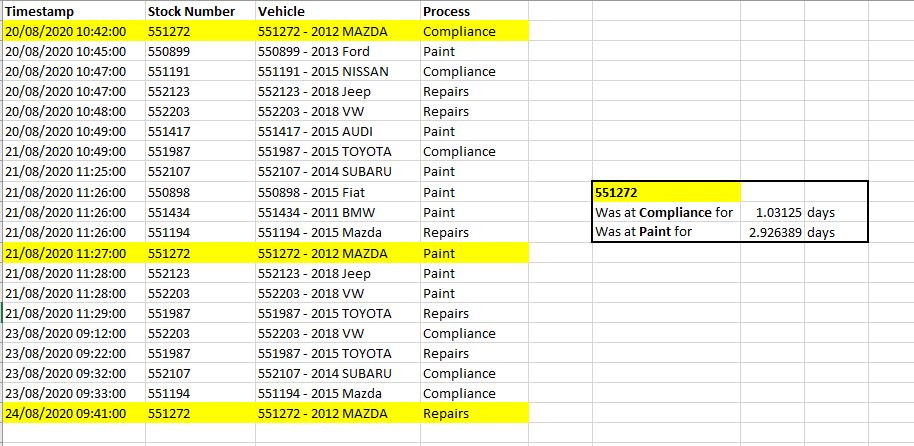
Sample doc with the data is attached.
Any help would be much appreciated 🙂
——————————
Jonathan Perry
—————————— -
Marc Schroyen
MemberSeptember 7, 2020 at 7:36 AM
Hi Jonathan,
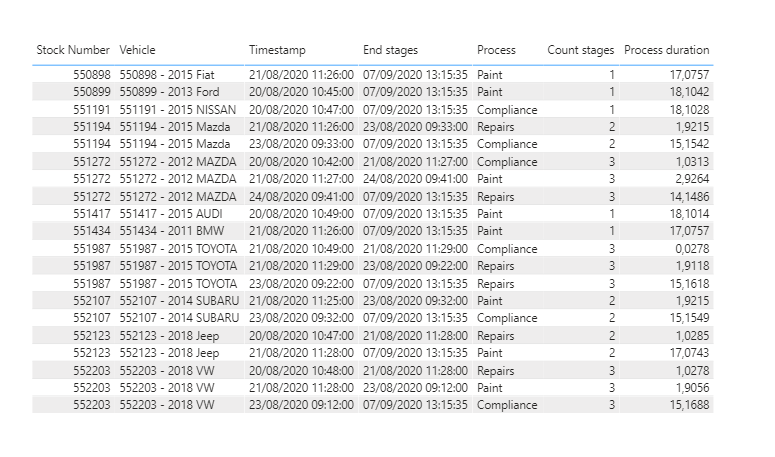
The end of last stage is missing!
In the sample, I took today as the end of all the stages for a stock number.
The idea is to group by stock number to find the end of each stages, that is the start time of next row.Power query M:
let

    Source = Table.FromRows(Json.Document(Binary.Decompress(Binary.FromText("pZJBa8JAEIX/ypKzxZ3ZTXc3t1gRLESLMUorHpaaQ6DVYD311zd0m6lJEzfQ22Pge29n5+12AfIx12PkyBnwSGIwCsIQUP0KdseQA7IkfpnG1fTh9F6+Ffb4mgf70R+D8Jvj2hgSzkCw2el8qIZPtjheulDlIsEACYeGbDFP03jhDXcOCChIOAfNHvO8rIarvLTF+aML1o5BLkjU8GZ7G3W7ggRFon55nE3nzaWhCzVakajR9fJ5ue768SsHiDD82ZUrEs5BsjSbxKusN76C7+sraRJ1/KywFz8KUkgSDgU2SbYDSDCSRB2a2M+DbX92k1b+ivYma29BfGhvPXrBIRdurCsI5yYC9OS2y9GgEf8VLnBAt24+QAj/rdsG8tpAgv/ctMD+Cw==", BinaryEncoding.Base64), Compression.Deflate)), let _t = ((type nullable text) meta [Serialized.Text = true]) in type table [Timestamp = _t, #"Stock Number" = _t, Vehicle = _t, Process = _t]),

    #"Changed Type" = Table.TransformColumnTypes(Source,{{"Timestamp", type datetime}, {"Stock Number", Int64.Type}, {"Vehicle", type text}, {"Process", type text}}),

    #"Sorted Rows" = Table.Sort(#"Changed Type",{{"Stock Number", Order.Ascending}, {"Timestamp", Order.Ascending}}),

    #"Added Index table" = Table.AddIndexColumn(#"Sorted Rows", "Index", 1, 1, Int64.Type),

    #"Grouped Rows by stock number" = Table.Group(#"Added Index table", {"Stock Number"}, {{"stock number.1", each _, type table [Timestamp=nullable datetime, Stock Number=nullable number, Vehicle=nullable text, Process=nullable text]}, {"Count stages", each Table.RowCount(_), Int64.Type}}),

    #"Added Index stock number" = Table.TransformColumns(#"Grouped Rows by stock number", {{"stock number.1", each Table.AddIndexColumn(_, "Index stock number" , 1, 1)}}),

    #"Expanded stock number.1" = Table.ExpandTableColumn(#"Added Index stock number", "stock number.1", {"Timestamp", "Vehicle", "Process", "Index", "Index stock number"}, {"Timestamp", "Vehicle", "Process", "Index", "Index stock number"}),

    #"Changed Type1" = Table.TransformColumnTypes(#"Expanded stock number.1",{{"Index", Int64.Type}, {"Vehicle", type text}, {"Process", type text}, {"Timestamp", type datetime}, {"Index stock number", Int64.Type}}),

    #"Added Column end stages" = Table.AddColumn(#"Changed Type1", "End stages", each if [Index stock number] < [Count stages] then #"Changed Type1"{[Index]}[Timestamp] else DateTime.LocalNow(), type datetime)

in

    #"Added Column end stages"
In DAX, you can now compute the elapsed time:
Process duration =

DIVIDE (

    DATEDIFF ( MAX ( 'Table'[Timestamp] ), MIN ( 'Table'[End stages] ), MINUTE ),

    1440,

    0

)
——————————
Marc Schroyen
Liège Belgium
——————————
——————————————- -
Imran Ahmed
MemberSeptember 7, 2020 at 9:35 AM
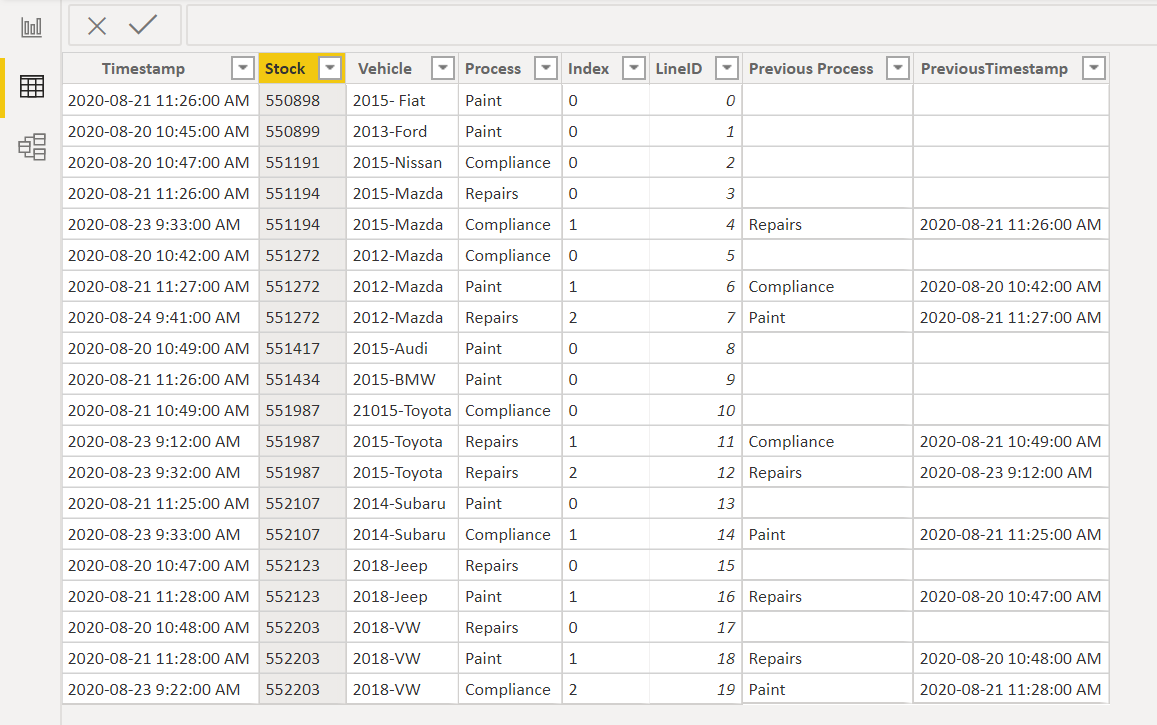
Hi ?I worked on your problem and attached is the workbook.
Basically you have to add few columns using power query and once you have them its a matter of basic time calculations. I hope this would serve your purpose.
Thanks
——————————
Imran Ahmed
——————————
——————————————- -
Jonathan Perry
MemberSeptember 8, 2020 at 6:53 PM
Thank you and for your help with this problem. I was able to use parts of both of your responses to get the outcome I needed. Much appreciated!??——————————
Jonathan Perry
——————————
——————————————-
DSC Communities replied 5 years, 6 months ago 1 Member · 0 Replies -
-
0 Replies
Sorry, there were no replies found.
The discussion ‘Calculate time spent at each process stage’ is closed to new replies.
