


Power Platform
Public Group
Active 17 hours ago
Power Platform
Organizer:
- JOSE Organized by
-
-

Build Multi Process Application
-
Build Multi Process Application
Posted by DSC Communities on July 9, 2020 at 9:50 am-

Fabian Heil
MemberJuly 9, 2020 at 9:50 AM
Im currently building my second PowerApps application and it will be a bigger one.
It will cover 16 different processes/requests, and i started with the first one now.
My first draft looks like this. There are some fields to fill and it contains three steps (Create/Approve/Process).
Depending on the current status, the steps are yellow/gray or green and contain the users to approve or the user who already approved.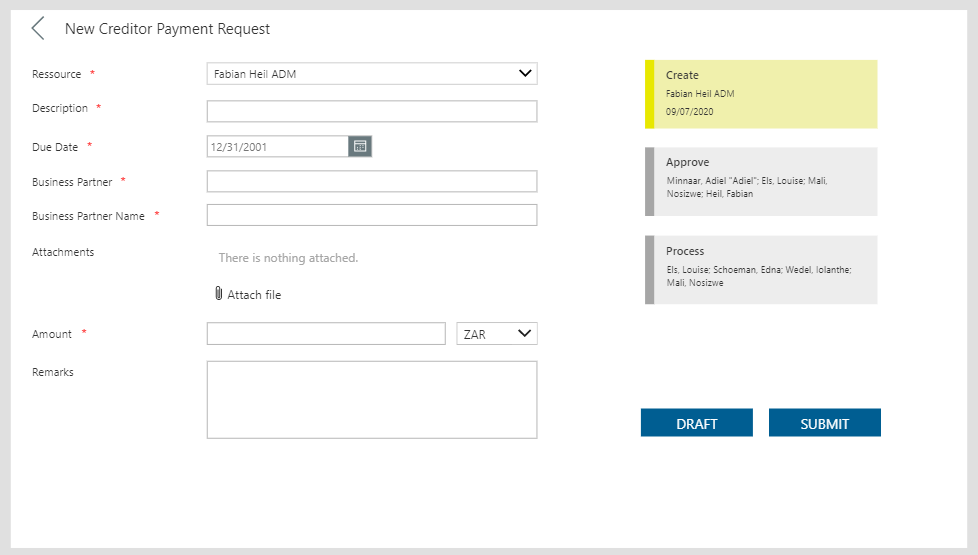
So in general, the other processes will have a pretty similar structure. Some fields on the left and 3 or 4 approval steps on the right.
Currently, i built this with an EditForm and some additional objects.What would be best practice in your opinion?
1.) Building a separate screen with a separate form for every other process?
2.) Building a different form for every process but show it on the same screen?
3.) Building one biiiiig form with a lot of logic, which fields to show and hide?Additionally i´m thinking if it would be possible to make the processes flexible and maintain the processes and steps dynamically in a SharePoint list. Do you think, this would be possible? Did someone develop something similar?
Hope you can share some experience with me 🙂
——————————
Fabian Heil
IT Consultant SharePoint Applications
—————————— -
Brian Scott
MemberJuly 9, 2020 at 11:07 AM
You can add a column into the SP list to keep track of where you are in the process. Set it to a different value depending on where you are in the process. (“Create” “Approval”, “Final” etc) You can use those values to determine colors and which screen to show and which projects to show in galleries.
There would be arguments for and against the various ways of doing this. I would make separate screens for the various steps personally. There will be less to keep track of. Depending on your process flow, you may want to make separate apps. We have a process that takes 2 separate approvals. To keep people from ever seeing the SP list I make 3 separate apps and used Flows to alert people to when an approval was pending with a link to the correct app that would just handle that step. You caould make one app and use Deep Linking to achieve the same thing I suppose.——————————
Brian Scott
Chief Creative Officer
Concord NC
——————————
——————————————- -
Fabian Heil
MemberJuly 27, 2020 at 3:44 AM
In theory, this sounds great, but i dont know how to build it. So one example:My process has 3 Steps-boxes and 5 status.
Step “Create” is active, when status is Draft or Rejected
Step “Approve” is active, when status is Open
Step Process” is active, when status is Approved
All boxes should be green, when status is ProcessedStatus Draft:

Status Open:

Status Approved:

Status Processed:

Status Rejected:

I was able to hardcode this, but a flexible list would be awesome. How should i structure this list to show these status boxes and colors in a gallery?
Thank you so much for your input
——————————
Fabian Heil
IT Consultant SharePoint Applications
——————————
——————————————- -
Brian Scott
MemberJuly 27, 2020 at 7:15 AM
If you have already hard-coded it then the hard work is done. Add a column to the list that will hold the step and another to hold the approval status. You can make then text fields as the choice can be set up in the app. In the OnStart create 2 collections for the choices in the 2 fields. Use those as the Items for dropdowns for the fields if they need to be set by a user. If they will be set programatically, depending on workflow, then you will not need that step.
When a new record is created set the step to “Create” and the status to “Draft”. You can do this with hidden fields, just set the default values and they will be recorded correctly. After that the step and status will need to be set by either the approver or whoever else is managing the process. Again, they may be explicitly set – maybe you have a button for Accept and another for Reject and that sets the value. Or they may be set “behind the scenes” using some variables that track the process.
You can then use the value of the fields to create the colors – If( Step=”Create” And Status = “Draft”, Yellow, Gray). You will probably need to use the Switch command as it will end up being easier than all the nested If statements.
I don’t know that I can get more specific without a greater knowledge of the process, but hopefully this will help move things down the road.——————————
Brian Scott
Chief Creative Officer
Concord NC
——————————
——————————————-
DSC Communities replied 5 years, 6 months ago 1 Member · 0 Replies -
-
0 Replies
Sorry, there were no replies found.
The discussion ‘Build Multi Process Application’ is closed to new replies.
