


Power Platform
Public Group
Active 23 hours ago
Power Platform
Organizer:
- JOSE Organized by
-
-

Average of Averages – Transactions
-
Average of Averages – Transactions
Posted by DSC Communities on November 26, 2019 at 2:04 pm-

Christian ArltX
MemberNovember 26, 2019 at 2:04 PM
Sorry title is a little off – it’s more the (Average of Counts)I have a table (OperationLog) of transactions by CustomerId. I need to figure out the total transactions for each CustomerId and then the average of all the totals in one Dax formula. My hope is to use my linked date table (In Power BI) to see a month view of the overall average number of transactions based on different levels (Year and Month Mostly).
——————————
Beau Arlt
Business Analyst
Holland MI
989-400-7812
—————————— -
ganesh kumar
MemberNovember 27, 2019 at 5:02 AM
Hi ,please find the attachment,
?my table columns are ” region, product,sales,avg”, to achieve average of average i have created the new column(sale*avg) in my table and multiplication of (Sale*avg = Sheet1[Avg]*Sheet1[Sales])
then i have created new measure called “Avg of avg”
Avg of avg = SUM(Sheet1[Sale*avg])/SUM(Sheet1[Sales])please try this may be this logic will work for you.
——————————
ganesh kumar
Business Analyst
9500990994
——————————
——————————————- -
Simon Lamb
MemberNovember 27, 2019 at 6:34 AM
Hi ,If I read you right you’re trying to get the averages number of transactions per customer, and to plot that against dates from your calendar.
If each row in your OperationLog is a transaction then you just need to count the rows in the table to get the total transactions.
To get the total number of customers you need to do a distinct count of CustomerId.
The average transactions is then the one divided by the other and it will plot quite happily against the calendar dates.Count Transactions = COUNTROWS( 'OperationLog' ) Count Customers = DISTINCTCOUNT( 'OperationLog'[CustomerID] ) Transactions per Customer = DIVIDE( [Count Transactions], [Count Customers], 0 )
?Personally I find it’s better to calculate averages from their constituent parts instead of using the AVERAGE function as it can be confusing.
I hope I haven’t misunderstood your question and that this gets you closer to a solution.
Regards,
——————————
Simon Lamb
IT Consultant, Method Excel Ltd.
——————————
——————————————- -
Christian ArltX
MemberNovember 27, 2019 at 8:59 AM
I’m more trying to get:The Average of the total number of transactions per customerid
——————————
Beau Arlt
Business Analyst
Holland MI
989-400-7812
——————————
——————————————- -
Christian ArltX
MemberNovember 27, 2019 at 9:48 AM
Now that I’m thinking about it… I’m not quite sure what I am trying to do is possible.Need:
I need to figure out the total transactions for each CustomerId and then the average of all the total transactions – hopefully being able to use my date table to specify (Month or Year)Possible Options:
1. I could add a column of the total number of transaction in the table (OperationLog) for each CustomerId. And then create a measure that averages the counts.. but the only problem would be that every customer record (row) would have the (total transactions count) in the newly created column.. which would throw off the average… if I wanted to use my date table for (Month or Year) 🙁2) I could make a DAX formula which creates a table of unique customer IDs and then adds the count of all occurrences from the (OperationLog) table… and then averages the counts, but I wouldn’t be able to use my date table.. as the table would only have the unique record of each customer id.. right?
——————————
Beau Arlt
Business Analyst
Holland MI
989-400-7812
——————————
——————————————- -
Simon Lamb
MemberNovember 27, 2019 at 10:42 AM
Hi ,
It’s difficult to understand exactly what you’re after without seeing your table. Maybe if you posted an example we could work it out.
Your second option looks very much like the suggestion from on your other post on this topic:Measure = AVERAGEX( SUMMARIZE( OperationLog, 'OperationLog'[CustomerID], "Transaction count", COUNTROWS(OperationLog) ), [Transaction count] )?
The table is created dynamically inside the measure so it can still be filtered by your date table.
I have a sneaking suspicion there’s another complication we’re not aware of though . . .Regards,?
——————————
Simon Lamb
IT Consultant, Method Excel Ltd.
——————————
——————————————- -
Christian ArltX
MemberNovember 27, 2019 at 1:37 PM
Let me know if this helps!——————————
Beau Arlt
Business Analyst
Holland MI
989-400-7812
——————————
——————————————- -
Simon Lamb
MemberNovember 27, 2019 at 2:15 PM
Hi ,All the measures work with this data. The only wrinkle is the customers with zero transactions: you’ve included these in your average calculation but the DAX measures ignore them because they . . . don’t exist.
If you need to find the inactive customers then you need a measure like this:Total Inactive Customers = COUNTROWS( FILTER( ALL( OperationLog[CustomerId] ), [Total Customers] = 0 ) )?
?I’m sure there are other ways of doing it but this works fine. Add this number to the [Total Customers] measure in your [Transactions per Customer] calculation and you get the results on your spreadsheet:
(3) Transactions per Customer =
DIVIDE(
    [Total Transactions],
    [Total Customers] + [Total Inactive Customers],
    0
)?
Whether this a valid measurement on a larger version of your dataset is another matter altogether. I’ll leave that to you to decide.
See attached pbix. Hope this helps,
——————————
Simon Lamb
IT Consultant, Method Excel Ltd.
——————————
——————————————- -
Christian ArltX
MemberNovember 27, 2019 at 4:43 PM
Thank you for all the help Simon – I was able to duplicate your results and that is exactly what I needed. I was confused for a bit.. until I realized the 0 totals in my summary section was actually changing the average total. But all is good now. Working on imp as we speak! Happy Thanksgiving!——————————
Beau Arlt
Business Analyst
Holland MI
989-400-7812
——————————
——————————————- -
Shrikesh Pattni
MemberNovember 27, 2019 at 7:57 AM
Hi Beau
I think I get the gist of what your trying to do
I think key thing with this is your need to iterate. Thats the key thing to bear in mind as you want to average over the Dates Tables.and the natural filtering logic to run over the months.Similar example to what your want
See below my example:-Transactions:
=COUNTROWS(Orders)-Avg Transactions
=AVERAGEX(VALUES(Dates[Date]),[Transactions])Hope this helps
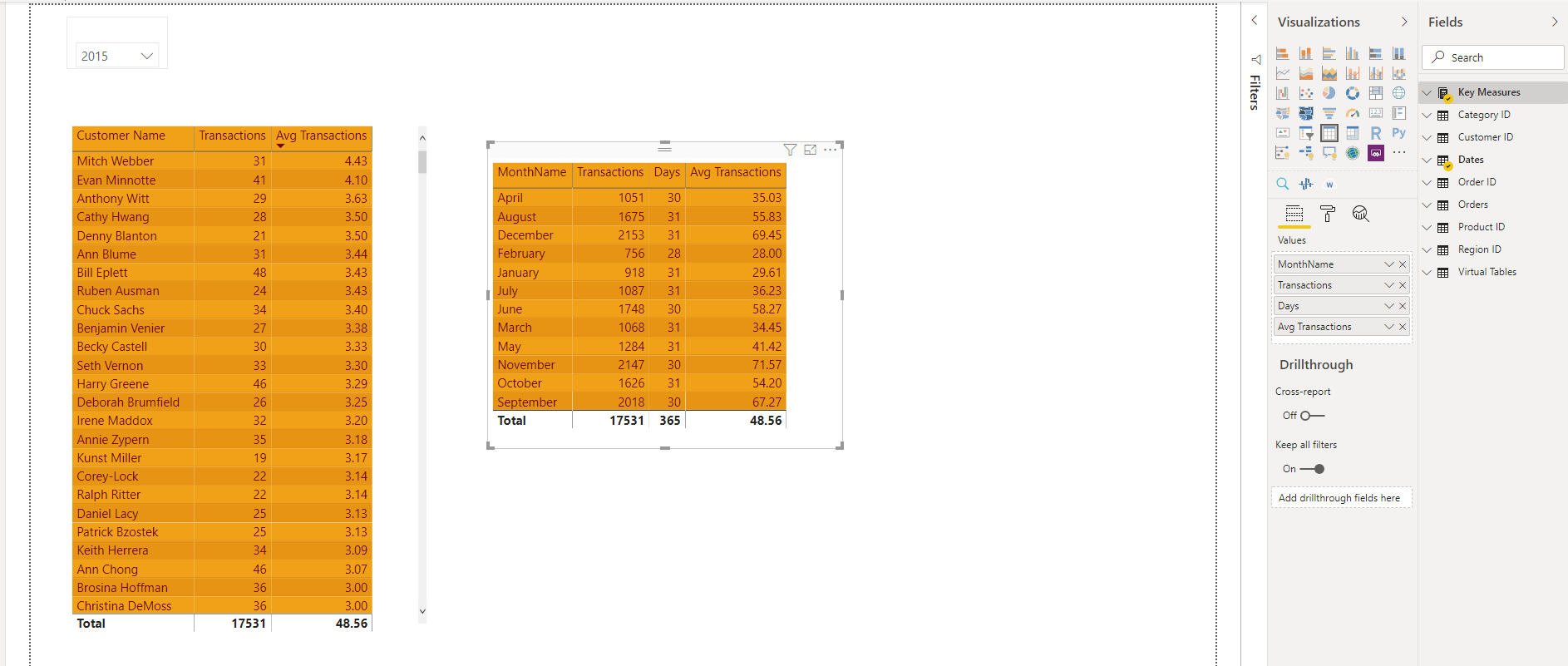
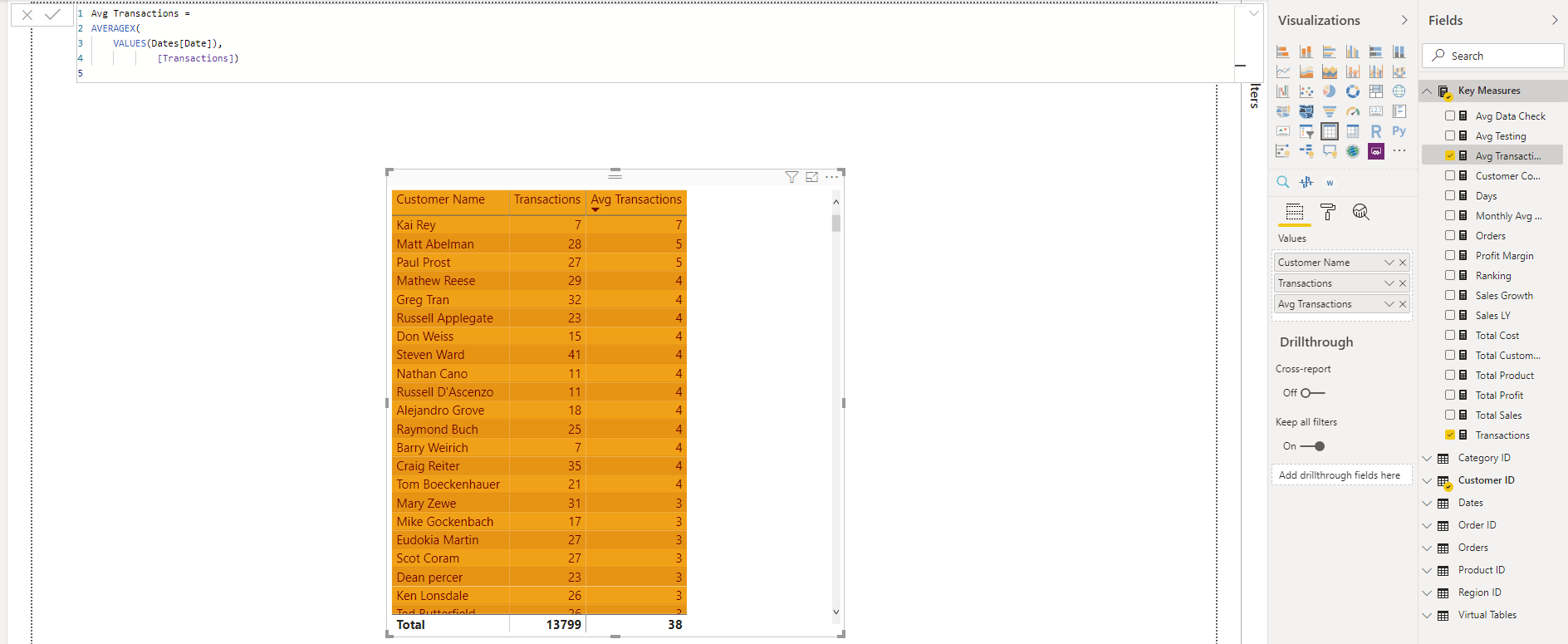
——————————
Shrikesh Pattni
Birmingham
7946665639
Shrikesh Pattni
Analytics Insights ConsultantM: 0794-666-5639
E:shrkpattni@gmail.comVisit my personal analytics portfolio
—————————————————————————————————————
“Never Stop Asking How”
Power BI Consultancy: https://shrikpattni.wordpress.com/power-bi-consultancy/
Tableau: https://shrikpattni.wordpress.com/tableau/
Alteryx: https://shrikpattni.wordpress.com/alteryx-analytics/——————————
——————————————-
DSC Communities replied 6 years, 4 months ago 1 Member · 0 Replies -
-
0 Replies
Sorry, there were no replies found.
The discussion ‘Average of Averages – Transactions’ is closed to new replies.
