I need some advise on mapping data on the ArcGIS tool. I tend to get UK Postcodes map across the World, amongst a few other tasks that I find a challenge. Any advise would be most welcome>
—————————— Philip Weston Project Manager Uponor Kettering 01923927000 ——————————
Niels Skytte
Member
March 29, 2017 at 2:57 AM
Hi
Look at this thread Problem with map and postal code I’m guessing you’re seeing the same issue. So try to add United Kingdom before the postcodes.
regards Niels
—————————— Niels Skytte Architect Copenhagen K 93979808 —————————— ——————————————-
Dennis Jung
Member
March 29, 2017 at 5:02 AM
Hey,
i had the same issue and made a separate column for ArcGIS:
TableStreet and co. are columns in my dataset (need to change it to your columns)
—————————— Dennis Jung Head of IT Kammerstein 91789969990 —————————— ——————————————-
Natalia GarcĆĀa
Member
March 29, 2017 at 7:51 AM
There is a quick workaround that may help you and it is to use the option for “all points are in one country” and then you select the country. That has worked for me in the past, but I have not used zip codes before so you would need to try it.
—————————— Natalia GarcĆĀa
—————————— ——————————————-
David Wynn
Member
March 29, 2017 at 7:53 AM
Philip,
What is your base dataset?
Are you doing any kind of zip code validation before importing into PowerBI?
Do you want to see zip codes from the US only?
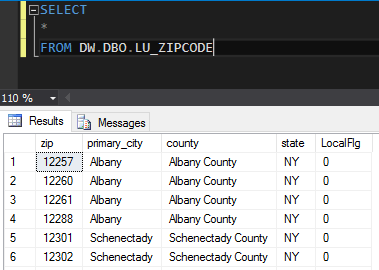
I had an issue where the data wouldn’t map correctly using a county or state name. I used the zip code instead after using an inner join on a zip code look up table, it fixed my problem.
Thanks,
______________________________________________ David Wynn Business Intelligence & Application Developer
South Carolina Aquarium 100 Aquarium Wharf Charleston, SC 29401
I need some advise on mapping data on the ArcGIS tool. I tend to get UK Postcodes map across the World, amongst a few other tasks that I find a challenge. Any advise would be most welcome>
—————————— Philip Weston Project Manager Uponor Kettering 01923927000 ——————————
Andrea Martorana Tusa
Member
March 29, 2017 at 8:22 AM
I want to add a tip to the previous (correct) answers. You can force Power BI to recognize your data as a geographic attribute. Select the data field and in the menu ribbon choose Modeling > Data Category and you can set the geographic category for your field.
Combining zip codes & a custom code with my country name worked for me. Eg: [ZipCode] & ” ,Italia” => 40011, Italia.
—————————— Andrea Martorana Tusa Senior BI Developer Banco Popolare —————————— ——————————————-
Please note:
This action will also remove this member from your connections and send a report to the site admin.
Please allow a few minutes for this process to complete.

Report
You have already reported this .
Welcome to our new site!
Here you will find a wealth of information created for peopleĀ that are on a mission to redefine business models with cloud techinologies, AI, automation, low code / no code applications, data, security & more to compete in the Acceleration Economy!