


Dynamics GP
Public Group
Active 3 days ago
Dynamics GP
Organizer:
- JOSE Organized by
-
-

Vendor Prompt Payment Discounts
-
Vendor Prompt Payment Discounts
Posted by DSC Communities on March 20, 2019 at 7:14 pm-

Dale McCormick
MemberMarch 20, 2019 at 7:14 PM
??Hi, I was looking for a step by step process to take vendor prompt payment discounts and I find the user manual challenging.Has anyone successfully recently completed this process that would be willing to offer some advice, i.e. what cards, utilities, etc?
Thanks in advance.
——————————
Dale McCormick
CFO
Havtech
—————————— -
Windi Epperson
MemberMarch 22, 2019 at 10:26 AM
If I’m reading this correctly, using this function is driven by the selections in the Build Payment (Check) Batch process.
Using the Due Date/Discount Date Cutoff selection criteria, you can build a batch based on invoice due date and discount date.You can also use the “Take Non-Qualifying Discounts” option to force the early pay discount to be applied even if you missed the discount date.
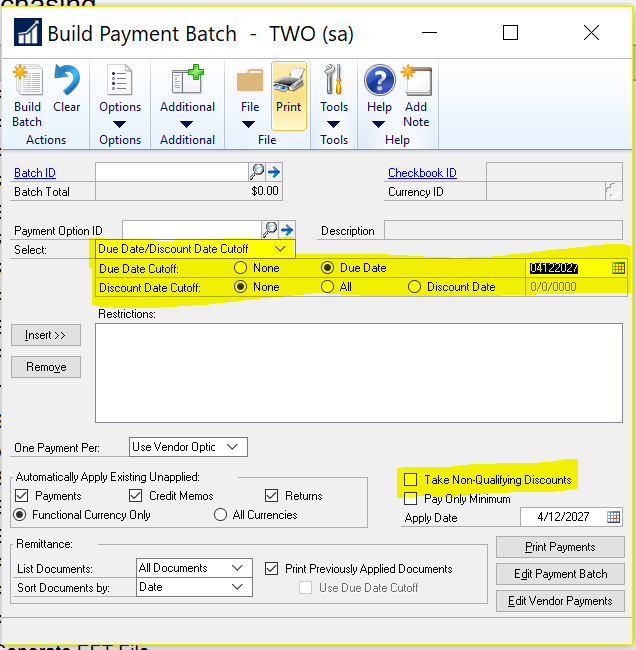
I’d say play around with building batches using this functionality and see if it does what you’re looking for.
Thanks
Windi?——————————
Windi Epperson
President/GP Senior Consultant
Advanced Integrators, Inc.
norman OK
405-946-1774 ext. 102
——————————
——————————————- -
Dale McCormick
MemberMarch 22, 2019 at 10:36 AM
?Thanks, I am aware of the check process, but I was looking for more of the set up type issues, so utilities, routines, cards, that type of thing.Thanks
——————————
Dale McCormick
CFO
Havtech
——————————
——————————————- -
Windi Epperson
MemberMarch 22, 2019 at 11:10 AM
Gotcha – then we’ll go that route 🙂The discount date calculated during transaction entry is based on the Payment Term selected on the Options window for the vendor.
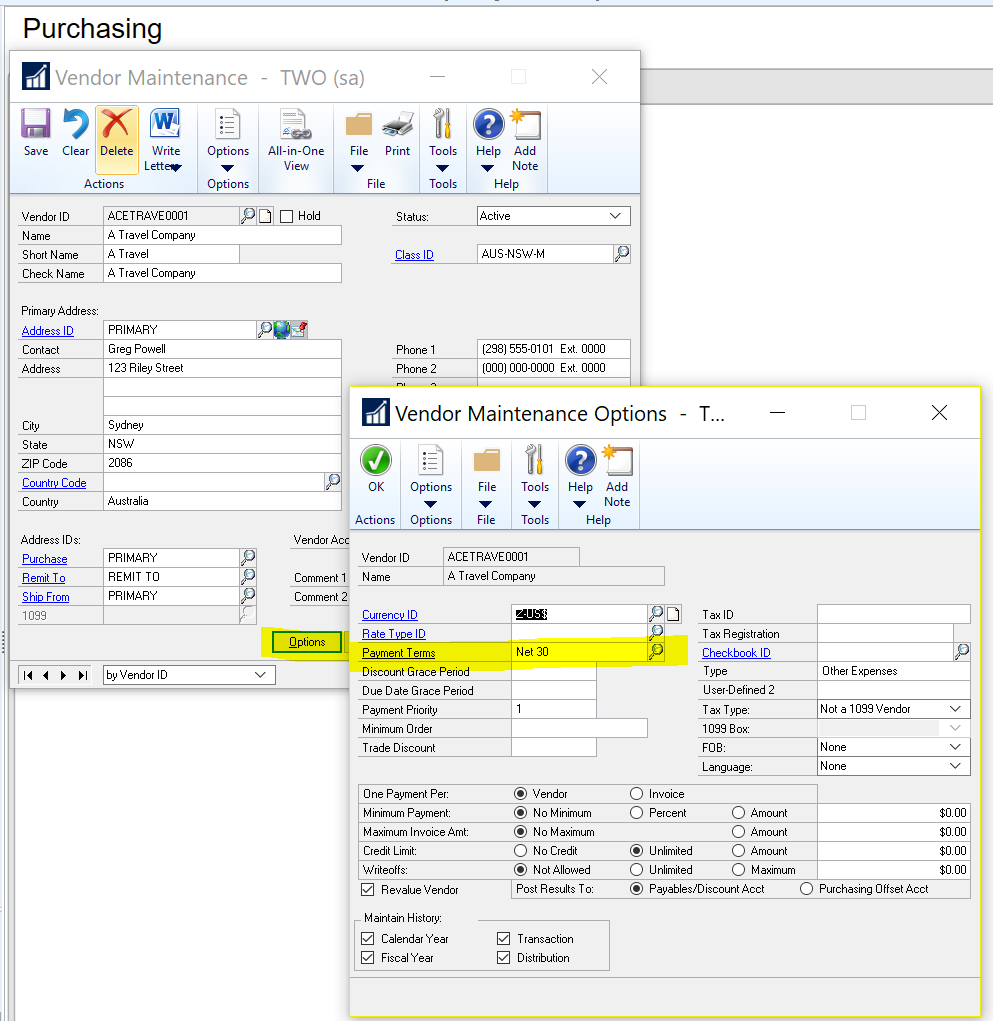
This can be overridden during data entry by clicking the expansion button beside Payment Terms on the Transaction Entry window. You can then enter invoice specific discount dates and amounts.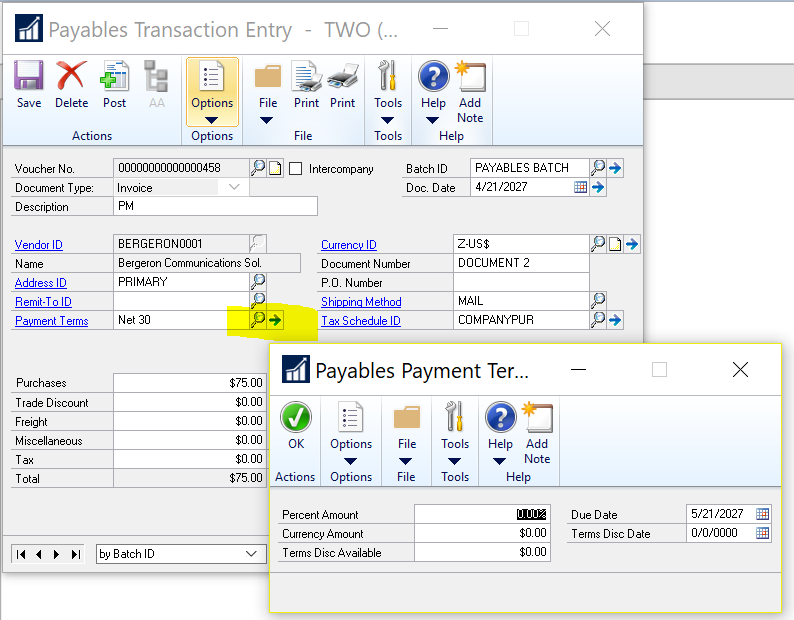
One step back from that is creating the Payment Terms. This is under AdministrationSetupCompanyPayment Terms.
The calculate button at the top of this window is really useful. You can enter your payment terms, click calculate and GP will give you an example of how your setup will function.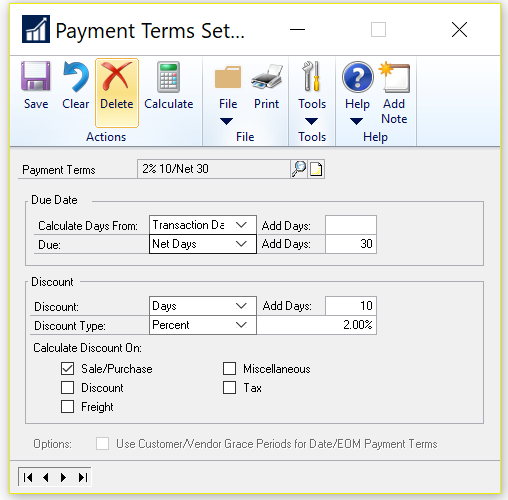
The other discount related setup is in the Payables Setup Window. If you check the box to track discounts payable in the GL,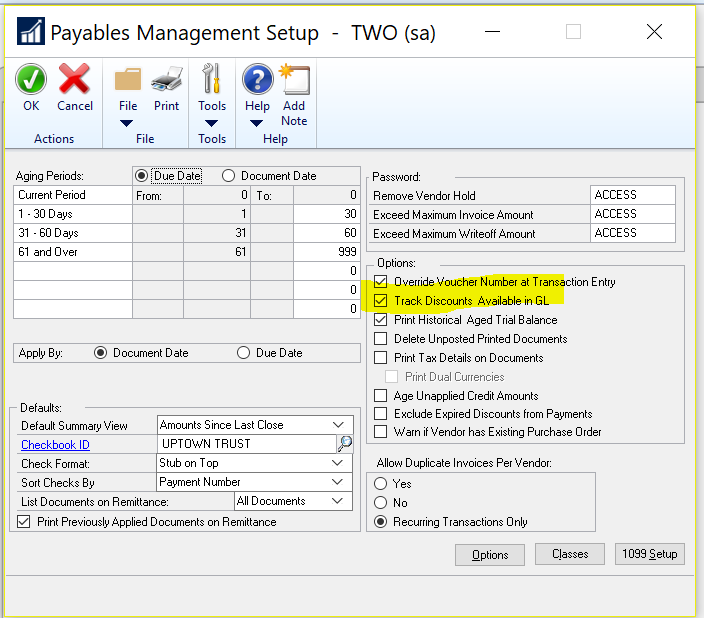
Here is the help blurb for what the field does:Track Discounts Available In GL
If this option is marked, you can track payment terms discounts available amounts in a separate General Ledger account. The terms discounts available to your company posts to the account you assigned to Discounts Available in the Vendor Account Maintenance window (or the account specified in Posting Accounts Setup window, if you haven’t specified a Discounts Available account in the Vendor Account Maintenance window).
If this option is unmarked, the terms discounts available amounts don’t post to a separate General Ledger account. The terms discounts available amount posts to the account you assigned to Accounts Payable in the Vendor Account Maintenance window or the Posting Accounts Setup window.
If you’re using a German installation, this field might not be available.
Does that get you closer to what you were looking for?
Thanks
Windi——————————
Windi Epperson
President/GP Senior Consultant
Advanced Integrators, Inc.
norman OK
405-946-1774 ext. 102
——————————
——————————————-
DSC Communities replied 7 years, 1 month ago 1 Member · 0 Replies -
-
0 Replies
Sorry, there were no replies found.
The discussion ‘Vendor Prompt Payment Discounts’ is closed to new replies.
