


Dynamics GP
Public Group
Active 4 weeks ago
Dynamics GP
Organizer:
- JOSE Organized by
-
-

Terminal Server Suggested Capacity
-
Terminal Server Suggested Capacity
Posted by Jim Lines on August 9, 2018 at 1:40 pm-
Greetings,
We’re running a heavy install of GP 2013 – many modules and many users. Currently we have a TS Farm spread over two beefy terminal servers. We’ve got at least 100 users logged into the TS and GP throughout the day. The farm/load balancing is doing it’s job and splitting the load 50/50 over the 2 servers. However, as we grow, we want more terminal servers to increase performance, support, fail over, etc. etc. To back up my request I need to find out if Microsoft has recommendation of how many users should be running GP on a single server. I feel that 40-50 users on one server is well past the max, but that’s just my opinion. I’ve looked through all the system requirements for GP, but found no recommendation about terminal server usage.Can someone point me in the right direction if that information exists? Any feedback from other TS users would be appreicated too!
Thanks!
Jim——————————
Jim Lines
Sr. IT Analyst
Glidewell Laboratories
Newport Beach CA
Celebrating 20 Years of GP Fun!
—————————— -

Thaddeus Suter
MemberAugust 9, 2018 at 2:24 PM
Our current profile is one server per 25 GP Full users max. All published RDWeb (GP, Office, etc.) Four in the Farm plus a Dev/Clone. VM is fine but not on the same VM Host as the SQL Servers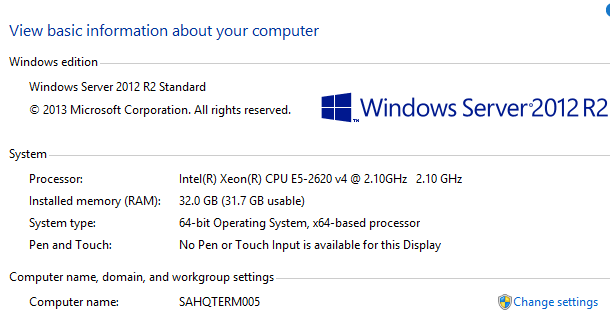
——————————
Thaddeus Suter
Retus, Inc
HELOTES TX
——————————
——————————————- -
Beat Bucher
MemberAugust 10, 2018 at 12:00 PM
Hi
I too would say that 25-30 users is pretty much the max, but again it depends on the TS server HW specs & configuration.
I recall a paper from Microsoft back in 2013 when the Web Client was introduced (or maybe it was at Convergence), that Microsoft said the Web client was to reduce the load on the TS and would accommodate as much as twice a regular TS.. so if you had sized for 25 users in full client mode, then you could expect as much as 50 concurrent Web sessions for the same server..Microsoft Technet had published back in 2010 a paper regarding the sizing of TS/RDS servers.. it’s all about RAM & CPU..
https://blogs.technet.microsoft.com/iftekhar/2010/02/10/rds-hardware-sizing-and-capacity-planning-guidance/Knowing that each GP Session that you launch on the TS server consumes up to 400MB per user, plus the session overhead for the user profile, you can count that to accommodate about 50 users, you need to have at least 64GB of RAM and Quad-core CPU’s (2)..
This article is more recent (2015) and possibly more realistic in terms of calculation :
https://www.linkedin.com/pulse/rds-hardware-sizing-capacity-planning-guidance-girish-jain/
?——————————
Beat Bucher
Business Analyst, Dynamics GP SME
Montreal QC/Canada
@GP_Beat http://www.gp-geek.com
Montreal QC GPUG Chapter Leader
MBS MVP (2015-2018)
——————————
——————————————- -
Hi
I agree with Thaddeus 25 would be the max for one Terminal Server. I prefer a max of 15-20 myself, but if the TS is beefy enough then 25-30 might work.
Review the System Requirement for the version of GP you are on and follow all the links to the additional setup information.??
——————————
Kindest Regards,Jo deRuiter , MCP, DCP
“That GP Red Head”
Advanced Credentialed Professional-Dynamics GP
GPUG Academy Instructor
GPUG GP Credentialing Exam Committee
Chairman, GPUG Partner Advisory Board
Dexpro Dynamics LLC
Senior Consultant
Milwaukee, WI
770-906-4504 (Cell)
——————————
——————————————- -
Thaddeus, , ,
Thank you ??for your input! I figured those were the average number of users in a GP environment. I’ll review all the information and follow up with questions… but I think this does it!
Have a great weekend!
Jim——————————
Jim Lines
Sr. IT Analyst
Glidewell Laboratories
Newport Beach CA
Celebrating 20 Years of GP Fun!
——————————
——————————————- -
Hi Jim,
This is an open ended question…
TS and users are based on the physical machines design and the requirements that you need Dynamics GP to do. There is a difference in requirements with a GP user that does data entry all day and those that process large reports – like Project Accounting.So to start to answer your question a little more info about the environment would be needed.
But a starting point to understand if you are maxing out you TS server is the performance monitor and its tools.
What are your cpu, memory and network usage peeks and demands. This will tell you how well you are performing.
One BIG difference in any larger Dyn GP design (25+ users) you should always have the SQL server on is own 10g lan to the TS/Citrix environment. Have the second LAN for the normal client traffic, but don’t restrict the SQL data – this will be your bottle neck
You could build a super TS server that could handle all the users with no issue, but is it worth that cost and no redundancy?
Let me know if you need more help…
——————————
Kerry Hataley
CEO & President
Nanook Software, Inc
——————————
——————————————- -
Hi
We’ve got a very beefed up environment. We have 8 GP terminal servers, but only 2 are farmed/load balanced. All the servers have matching specs, we simply restrict access to the other 6 because of their use (Payroll, A/R, Manufacturing…). Those servers have an average of 10 people on them so they are not a concern. I’d like to throw in 2 more TS servers on the farm, but need to provide justification (i.e. suggested max users). Currently (like this minute), I have 85 users split between the two farmed servers. We don’t get many complaints on performance, other than the slowness caused by a mass amount of 3rd parties and customization (60 entries in SET file). Additionally, we have 2 SQL servers set up as fail-over (not sure that’s the right term). By no means are we lacking horsepower. Thankfully!Thanks for your input, it’s greatly appreciated! Have a good weekend!
PS: 126 users and still growing!
——————————
Jim Lines
Sr. IT Analyst
Glidewell Laboratories
Newport Beach CA
Celebrating 20 Years of GP Fun!
——————————
——————————————- -
@Beat Bucher, and anyone else …?
“…Knowing that each GP Session that you launch on the TS server consumes up to 400MB per user, plus the session overhead for the user profile, you can count that to accommodate about 50 users, you need to have at least 64GB of RAM and Quad-core CPU’s (2)..? “Beat, I would like to peel this back calculation just a bit more. The calculation above 400MB x 50 users is only 20 GB. Where is the rest used in that scenario?
******
Assuming the general consensus of 25 GP Sessions on the Terminal server, what are people really using for CPU and RAM? Somewhere above the GP 2018 Microsoft published requirements, I assume?I am doing some preliminary capacity planning for GP 2018, 82 Concurrent GP Users, and Windows Server 2016 Terminal Services. Planning on medium to power users with Word Templates, email, and Collections Management, for many of the users. We currently use 4 old Citrix Servers set up with load-balancing.
To get the server specs that will give my users the best possible response times, management here will want concrete real-world numbers that I can back up. Suggestions?
Later we would like to offload many to the Web Client, but that will be a separate phase that will be dependent on product support for our various 3rd party plug-ins.
——————————
David Morinello
Senior Dynamics GP Systems Architect
Ascend Learning, LLC
Leawood KS
——————————
——————————————-
Jim Lines replied 8 years, 2 months ago 1 Member · 0 Replies -
-
0 Replies
Sorry, there were no replies found.
The discussion ‘Terminal Server Suggested Capacity’ is closed to new replies.
