


Dynamics GP
Public Group
Active 4 weeks ago
Dynamics GP
Organizer:
- JOSE Organized by
-
-

Table that contains hours worked by date
-
Table that contains hours worked by date
Posted by MARY MALLAZZO on May 6, 2021 at 3:11 pm-
Hello
We need to produce data that contains hours and date worked.
Table UPR30300 has the hours worked but not the date worked. Is their a table that will provide us with this?Thank you
——————————
Mary Mallazzo
Fromkin Brothers
Edison NJ
—————————— -

Beat Bucher
MemberMay 6, 2021 at 6:30 PM
Hi Mary,
Are you looking for Time entered by Employees against Projects or simply hours entered in the HR module ?——————————
Beat Bucher
Business Analyst, Dynamics GP SME
Montreal QC/Canada
@GP_Beat http://www.gp-geek.com
Montreal QC GPUG Chapter Leader
MBS MVP (2015-2018)
——————————
——————————————- -
Hello
We use Key2Act to track job costs. Unfortunately we have realized that the hours in JC tables do not match the hours in the UPR tables, We have verified that the UPR tables sum up to the W2’s so we want to use those. We need to generate data that shows the hours an employee worked and the date worked.Thank you
——————————
Mary Mallazzo
Fromkin Brothers
Edison NJ
——————————
——————————————- -
Beat Bucher
MemberMay 7, 2021 at 8:45 AM
Mary,
I’ve one client that uses K2A, though I’m not sure they track hours with job costing for payroll, but I could ask how they do the reporting on hours.
The K2A JC documentation stipulates that JC has its own reports about payroll hours:Reports > Job Cost > Labor Reports > Certified Payroll.
Then in SSRS, JC has also some employee reports, like the Union Report, which according to their doc can provide also some details about the hours..
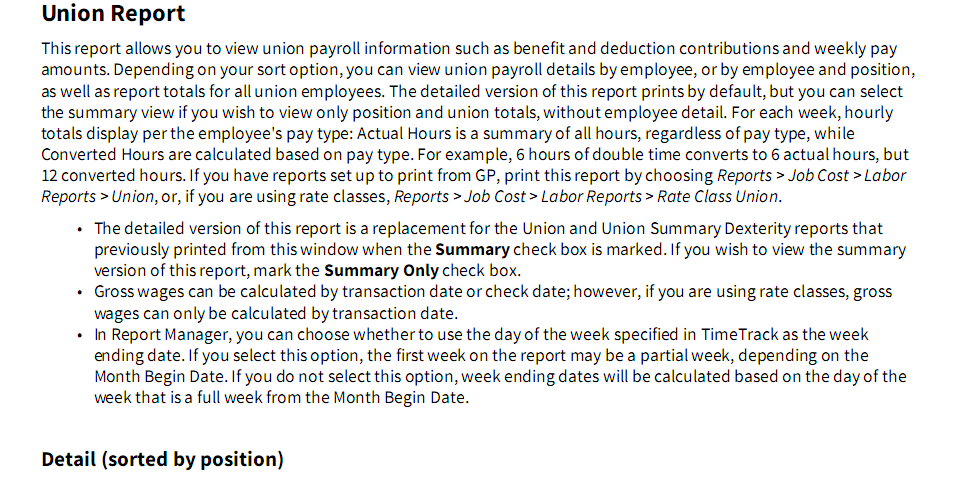
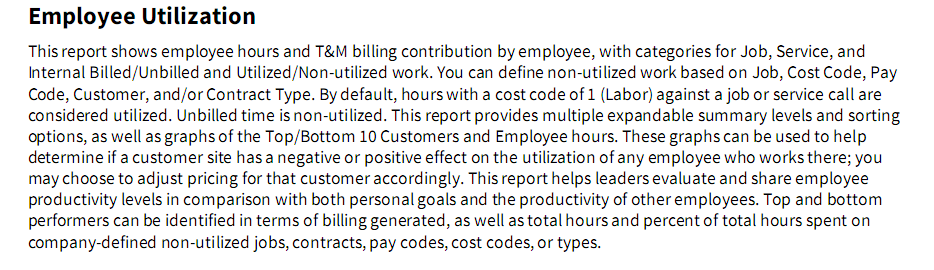
Apparently there is a notion of “converted” hours which can be based on the specific JC setup, so no wonder some of your hours might be off between the UPR and JC tables.. In doubt, I’d contact the K2A support, they are very helpful in general.PS: K2A has a wealth of SSRS reports when deployed, which outnumbers by much the built-in GP reports.. Check the SSRS Time Track reports:
——————————
Beat Bucher
Business Analyst, Dynamics GP SME
Montreal QC/Canada
@GP_Beat http://www.gp-geek.com
Montreal QC GPUG Chapter Leader
MBS MVP (2015-2018)
——————————
——————————————- -
Hi
Try the WS30702 table.
I’m a bit of a Key2Act fan and have a LOT of clients on that software so I’ve become Waayyyy too familiar with their tables and functionality, lol
——————————
Jo deRuiter
?? GPUG ALL STAR
??Granite Award Winner
Atlanta Chapter Leader
Aisling Dynamics Business Solutions
Business Applications Practice Manager
jo.deruiter@aislingdynamics.com
9518674366
aislingdynamics.com
——————————
——————————————- -
Unfortunately the Key2Act tables do not match the GP payroll tables. That is why we cannot use the Key2Act tables. The Key2Act tables are missing data.
Are there any GP tables that contain the date and hours worked?——————————
Mary Mallazzo
Fromkin Brothers
Edison NJ
——————————
——————————————- -
Hi
Do you know why they do not match? That may be a clue as to where to find what you are looking for.
But, I’m with Beat, your best bet for this is likely Key2Act support and they are pretty responsive these days.?
——————————
Jo deRuiter
?? GPUG ALL STAR
??Granite Award Winner
Atlanta Chapter Leader
Aisling Dynamics Business Solutions
Business Applications Practice Manager
jo.deruiter@aislingdynamics.com
9518674366
aislingdynamics.com
——————————
——————————————- -
OK. Waiting for Key2Act. But meanwhile, so there are no GP tables that have hours worked by date?
——————————
Mary Mallazzo
Fromkin Brothers
Edison NJ
——————————
——————————————- -
Hi Mary,
The closest would be UPR30300 and the pay code records (PYRLRTYP = 1) but they are (usually) summarized across the dates by the pay period. So 40 hours of REG pay for the pay week, not per day. I had a client that brought in daily hours from a third-party time tracking system, but the pay stubs were ugly and we ended up running a process to pre-summarize the hours by pay code for the period . Otherwise we would get five lines of REG pay at 8 hours per line for the weekly pay period. So if the entry is in Key2Act the detail would only be in that system.
Hope that helps,
——————————
Mark Wiley
Dynamics Credentialed Professional
Senior Solutions Architect
GraVoc
Ohio Office
——————————
——————————————- -
I’m not sure of your or someone on your staff’s level of expertise in SQL and I am also assuming that payroll is processed through Dynamics GP but if there is data in the UPR30300 table, then a batch is probably transferred over from Key2Act which means that the UPR10301 table(Payroll Batch) and UPR10302 (Payroll Transaction Detail) gets populated. It is this UPR10302 table that will have the detail that you are asking for but the problem is that once payroll is processed, you lose this detail since the data is combined and moved to the UPR 30300 table. One solution is to create a matching table and a SQL trigger that fires when data gets inserted into the UPR10302 table. The trigger will copy data from the UPR10302 table and insert it into the matching table. That way, you won’t lose this transaction data once payroll is processed. You can then create a SQL job that runs occasionally to clear out any data in your matching table older than a specified date so that your new table doesn’t grow too large.
I can explain in more detail if I need to…
——————————
Greg Wahl
IT Applications Supervisor
Owensboro Municipal Utilities
Owensboro KY
——————————
——————————————-
MARY MALLAZZO replied 5 years, 5 months ago 1 Member · 0 Replies -
-
0 Replies
Sorry, there were no replies found.
The discussion ‘Table that contains hours worked by date’ is closed to new replies.
