

Dynamics GP
Public Group
Active 5 weeks ago
Dynamics GP
Organizer:
- JOSE Organized by
-
-

SQL Server Maxing Memory constantly
-
SQL Server Maxing Memory constantly
Posted by DSC Communities on January 24, 2017 at 2:46 pm-

Angela Harris
MemberJanuary 24, 2017 at 2:46 PM
I tried searching on here but could not find it, unless I did not go back far enough. We are having an issue with our SQL Server maxing out the memory within 2 days of a restarting. I tried running a trace could not find anything out of the norm. We have found that when we are using MR, it spikes the memory to be at full capacity and it never goes back down. When we typically restart it, it’s fine for a few hours and then it will spike high again. We are using GP2013, SQL 2012, we do have other calls happening as well from KeCommerce set of several DB’sAny advice on how to keep it from max all the time??
Thanks for any help
——————————
Angela Harris
Territorial Financial Systems Administrator
The Salvation Army Central Territory
Hoffman Estates IL
—————————— -
We have experienced this in the past and our IT department repaired it by setting memory allocation limits on the SQL server for MR and GP.
——————————
Kelly Hobart
Business Data Analyst
Mount Pleasant Waterworks
Mount Pleasant SC
——————————
——————————————- -
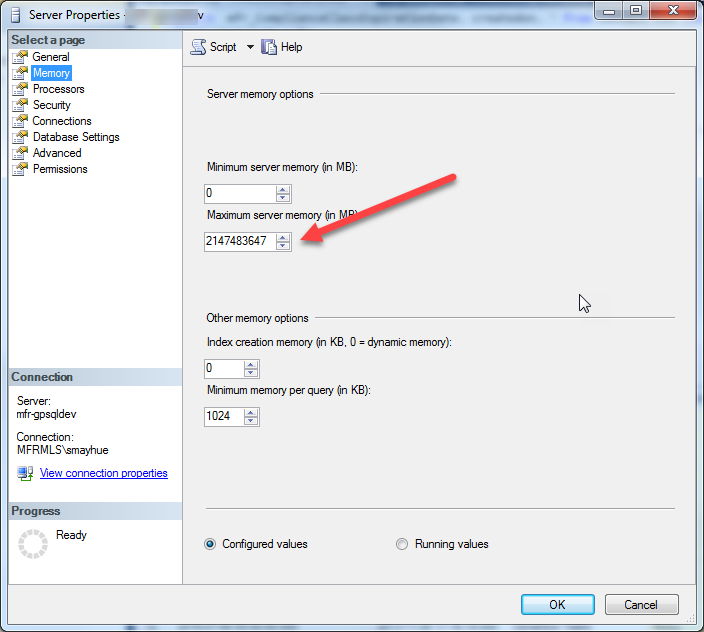 This is an issue with SQL Server properties. If max memory is not set to allow for OS then it will continue to take memory without releasing it. The screenshot below shows default memory allocation after setup. This should be adjusted by your DBA or IT department.
——————————
Steven Mayhue
Lead Developer/DBA
My Florida Regional MLS
Maitland FL
——————————
——————————————- -
if the system continues to run, this is not necessarily a problem SQL Server will automatically take all the memory available to it. is the system having other problems?
here’s an excellent post about a free resource to look at your SQL server settings by a SQL Server MVP/MCM
Brent Ozar on memory——————————
Adam Jacobson
President
Red Three Consulting, Inc.
Bronx NY
——————————
——————————————- -
Beth Burrell
MemberJanuary 25, 2017 at 8:23 AM
This is normal behavior for SQL.
SQL will always steal every ounce of memory available to it if you do not set the limits as stated by all the others in this thread.
Be careful not to set the limit too small or you will run into performance issues. There are best practices out there depending on what else is running on your SQL server.
——————————
Beth Burrell
CRM Customer Success Coach
Tribridge
Tampa FL
——————————
——————————————- -
Ken Allgood
MemberJanuary 25, 2017 at 8:39 AM
From what I’m reading on your situation, I would have to say, this is how SQL is designed to work. It maxes out because SQL needed that memory at some point. Now, just because SQL used that memory at one point (like during indexing, backups, etc), it doesn’t mean it’s using that memory at the moment. If the OS requires that memory, it will request it from SQL, and SQL will release it. SQL will use as much memory as it can to give users the best performance. Every process you run, such as a query, indexing, backing up, etc, requires memory, and requires an execution plan. It keeps as many of these plans cached in memory as it can. To experience what the caching does, run a select query that you normally don’t run, it will take it a few seconds, maybe 10-15 sec on a larger one. Run it immediately afterwards, and it takes less than a second. That’s because the plan is cached. When you limit the memory of the system, you limit how many of these plans it can cache, so it has to recreate the plan every time it runs the query. Now, SQL keeps track of how often a plan is used, it rates each plan as to its importance. The more important ones stay at the top of the list, and usually don’t get removed, while the less important ones get released if the OS requests that memory. I strongly suggest not changing memory settings without having an experienced SQL DBA take a look at it, and yes, MR is a memory hog.Similar thing with the transaction log, admins will truncate their log every couple of days. If the log grew that big, it needed that space for a backup or large query, and if it keeps happening, then it really does need it. By truncating it, you’re forcing it to re-allocate that space as it grows, hindering performance.
——————————
Ken Allgood
Saratoga Technologies, Inc.
Johnson City TN
——————————
——————————————- -
Angela Harris
MemberJanuary 27, 2017 at 9:46 AM
Thanks everyone. I did check we have it maxed, We just see it spike and stay when we use MR a lot.
We are going to try a few things and see what happens!!Have a great weekend!!
——————————
Angela Harris
Territorial Financial Systems Administrator
The Salvation Army Central Territory
Hoffman Estates IL
——————————
——————————————-
DSC Communities replied 9 years, 9 months ago 1 Member · 0 Replies -
-
0 Replies
Sorry, there were no replies found.
The discussion ‘SQL Server Maxing Memory constantly’ is closed to new replies.