


Dynamics GP
Public Group
Active 4 weeks ago
Dynamics GP
Organizer:
- JOSE Organized by
-
-

SmartList won’t pull up a vendor
-
SmartList won’t pull up a vendor
Posted by Pam Palmer on August 7, 2019 at 11:57 am-
I was trying to pull up a particular vendor within SmartList under Purchasing.
I can get information under “Purchase Orders” but when I try to bring up the Line Items, SmartList will not return anything.
If I look for all vendors which begin with “M” it will leave this one vendor out. I have checked to make sure the vendor is active and not on hold. I can try and bring up one of their open PO’s, and again, SmartList will not return anything.
However, if I go to SQL Mgmt Server and do an SELECT statement in SQL, I can pull up all the line items within the table.
WHAT would cause SmartList to not provide any line items for this vendor?
We are truly flummoxed.
we are using DynGP v2018
Thank you
Palmer——————————
Pam Palmer
Project Mgr/Database Admin
Temple, Inc.
Decatur AL
—————————— -

Steve Burney
MemberAugust 7, 2019 at 4:24 PM
Hello Pam.
I would love to see the Search window that you have for this Smartlist report to see what criteria you are choosing.
Can you reply to this with a screenshot of the Search window?
Also I am assuming you are not using the double quotations in the Search Value field.
Thanks.
Steve——————————
Steve Burney
Senior Systems Architect
Nissan Trading Corporation, Americas
Lebanon, TN United States
steve.burney@us.nitco.coChairman, Nashville (TN) GPUG Chapter
GPUG Ruby Award 2018
GPUG All Star 2017
Twitter @SteveBurneyGP2016 R2
MRCU14
——————————
——————————————- -
Correct, I am not using double-quotes.
This is the same search window I use for all my other vendors – I have randomly selected other vendors to search on that have open PO’s and everyone will pull up except one.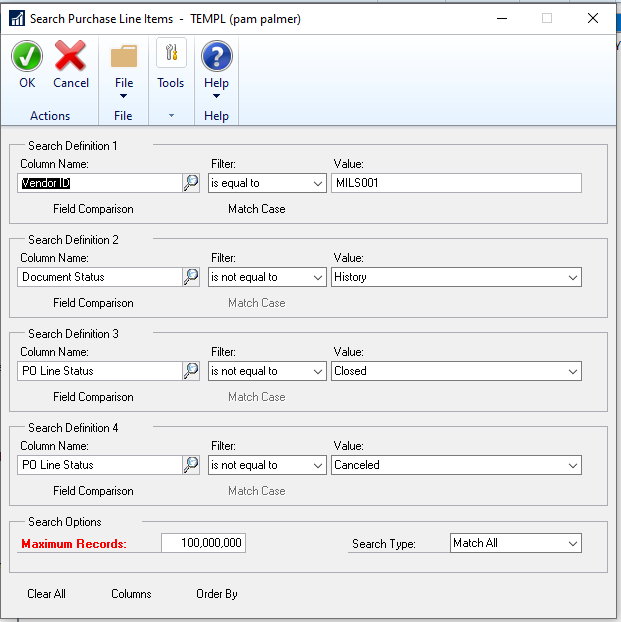
——————————
Pam Palmer
Project Mgr/Database Admin
Temple, Inc.
Decatur AL
——————————
——————————————- -
Mark LeRette
MemberAugust 7, 2019 at 4:50 PM
Have you tried changing your vendor id filter to “Begins With”?I have seen instances where a field value has extra blank characters at the end that throw off an “is equal to” match.
——————————
Mark LeRette
Application System Analyst II
Muscatine Power and Water
Muscatine IA
——————————
——————————————- -
Yes, I have tried “begins with” – M
I have tried every variation I can come up with INCLUDING removing all the other search criteria other than “vendor id begins with” M
I have changed the vendor ID to one of this particular vendors open PO’s and left the other lines as they are as well as deleting the other search criteria other than one of this vendor’s open po’s.I have tried it under another user name. I have tried having others on their machines and we all get nada.
——————————
Pam Palmer
Project Mgr/Database Admin
Temple, Inc.
Decatur AL
——————————
——————————————- -
Deanne Rasmussen
MemberAugust 8, 2019 at 9:28 AM
Have you tried this using the ‘sa’ account?——————————
Deanne Rasmussen
ePlanPartners
Houston TX
——————————
——————————————- -
I hadn’t until I read your message, logged in as SA and still nothing.
Pam
?——————————
Pam Palmer
Project Mgr/Database Admin
Temple, Inc.
Decatur AL
——————————
——————————————- -
Mark LeRette
MemberAugust 8, 2019 at 9:59 AM
You could try refreshing the cache and lists. Each process can be run from Tools > SmartlistBuilder > Maintenance.——————————
Mark LeRette
Application System Analyst II
Muscatine Power and Water
Muscatine IA
——————————
——————————————- -
Ryan Galang
MemberAugust 8, 2019 at 5:05 PM
Hi Pam,Any chance that the database that you’re querying via SQL isn’t the same one as the live database – i.e. the SQL query is referencing the test company… maybe?
——————————
Ryan Galang
BTP Technologies LLC
CHANTILLY VA
——————————
——————————————- -
Hi, Pam.
I assume when you ran your SQL query you were running directly against the POP tables and not running the SmartList query. If you were to run the below query in SQL (please make sure the database and vendor ID are correct), do you see results?
select
* from (select * from TEMPL..slbPurchaseOrderLines with (NOLOCK)) T1
where VENDORID = ‘MILS001’Thank you,
——————————
Jamie Evenson
Owner
Najaxa Software
Fargo NV
——————————
——————————————- -
– we did try refreshing the cache and lists – did not improve things
– the db was the live db
– I did try your script and located results
I did have a consultant stream in with me and they reviewed the issue and they believe it has been narrowed down to a possible corruption within SmartList since we are using SmartList Builder. They think that someone may have accidentally clicked ‘modify’ at some point recently and “broke” SmartList. We are going to be working on working the issue from that angle and I will post the results once that has been handled.
Thank you every one for your input. We have a great community.
?????——————————
Pam Palmer
Project Mgr/Database Admin
Temple, Inc.
Decatur AL
——————————
——————————————- -
Deanne Rasmussen
MemberAugust 9, 2019 at 9:08 AM
A possible workaround for this might be to create a new vendor and combine the new one with this vendor. That way, all your history is safe. Then you can use the new vendor going forward……?——————————
Deanne Rasmussen
ePlanPartners
Houston TX
——————————
——————————————- -
Thank you, Pam.
The query I had you run is the query that is “attached” to that default SmartList. So, if you are seeing results in SQL, then you should also see results returned from SmartList (as I am certain you already suspected).
Have you run a SQL profiler trace while refreshing the SmartList to see if there is any error or to at the very least, capture the exact query that is being run (with all the where clauses)?
Thanks again!
——————————
Jamie Evenson
CEO
Najaxa Software
Las Vegas, NV
——————————
——————————————- -
Hi ?
I see the SmartList Query is looking for the PO in history. Are you certain that all of the PO’s from that vendor are in the history tables?
Try removing that criteria from the search and let us know if it returns anything. The query on the SmartList view that was posted on here includes a Union All with Open and History tables.
——————————

——————————
——————————————- -
Thank you to all of you who offered excellent suggestions and thoughts on how to correct this issue.
I’m embarrassed to admit that I overlooked one thing (that I would have sworn i had checked) was whether a RESTRICTION had been added to this particular Smartlist via MODIFY.
Evidently it was “operator error”…..I must have accidentally brought up this particular Smartlist to modify/restrict ANOTHER Smartlist and left the restriction on this one – and it had to have been me because I couldn’t figure out at first why the one with the restriction wasn’t working and I had to refix it!
Mortification has set in. I wasted my time and every one else’s.
But we have a great community!
——————————
Pam Palmer
Project Mgr/Database Admin
Temple, Inc.
Decatur AL
——————————
——————————————-
Pam Palmer replied 7 years, 3 months ago 1 Member · 0 Replies -
-
0 Replies
Sorry, there were no replies found.
The discussion ‘SmartList won’t pull up a vendor’ is closed to new replies.
