


Dynamics GP
Public Group
Active 4 weeks ago
Dynamics GP
Organizer:
- JOSE Organized by
-
-

Smartlist for Customer sales
-
Smartlist for Customer sales
Posted by Cathy Huggett on August 27, 2018 at 3:20 pm-
Hello all. I need to know if there is any way I can create a smartlist of customer sales, EXCLUDING a few specific customers.
I can eliminate one using a range, but have 3 more I do not want.
I am using smartlist out of the box within 2015R2.Any help would be most appreciated.
Thank you.
——————————
Cathy Huggett
Accounting Manager
Persolvent/Simek’s
St. Paul Park, MN
—————————— -
Hi ?
If it were me, I’d create an Excel Refreshable Report that replicates the Customer Sales SmartList. If it is the Sales Line Item or the Sales Header, you can point GP to those from Excel and have it report on your live data (refresh up to the minute data). You already own all that you need to do this.
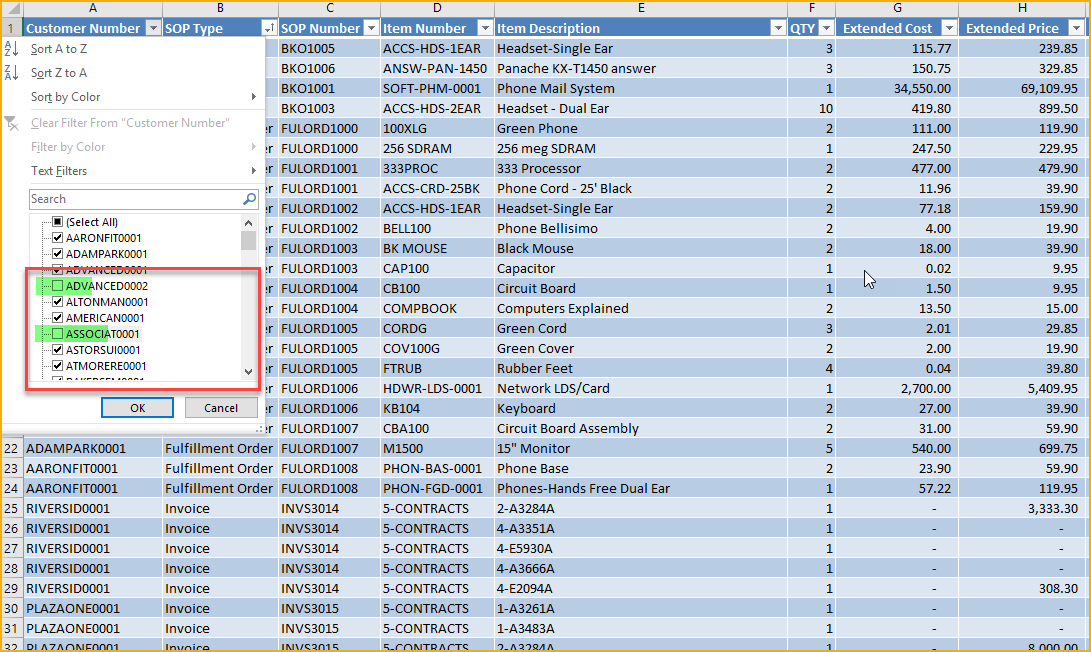
From there you can just use regular Excel Functionality to include or exclude whichever customers you’d like in the report.
Tomorrow at 11am Eastern I’m giving a 1 hour webinar on how to do this very thing. It’s free if you’re a GPUG member, feel free to join us. Just go to “Learn and Engage>Upcoming Webinars” here on the GPUG site…. but here’s a quick screenshot on how to exclude on a Sales Report in Excel –
To answer your question fully, I do not know of a way to exclude customers directly in SmartList that are not in a range…. but perhaps someone else here can help.
——————————
Kindest Regards,Jo deRuiter , MCP, DCP
“That GP Red Head”
Advanced Credentialed Professional-Dynamics GP
GPUG Academy Instructor
GPUG GP Credentialing Exam Committee
Chairman, GPUG Partner Advisory Board
Dexpro Dynamics LLC
Senior Consultant
Milwaukee, WI
770-906-4504 (Cell)
——————————
——————————————- -

Windi Epperson
MemberAugust 31, 2018 at 8:58 AM
Hi
If you have what you need in SmartList but just can’t get it restricted, take a look at this article by on using wildcards in SmartList searches.Also, you could use the Navigation List instead since you can do and/or searches. I’m not sure if you use Sales or Receivables so the pic below is for receivables.
Go to Sales on your Navigation Tab, then click the applicable transaction listing. You’ll be able to add restrictions at the top. My below are customer id begins with m OR customer id begins with w.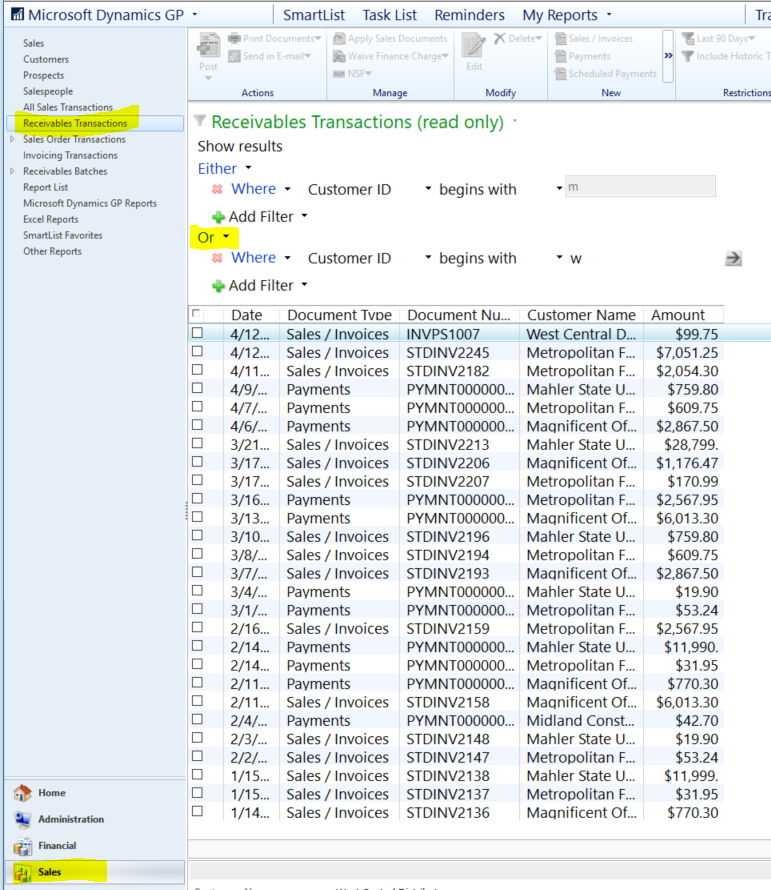
Hope this works for you since it’s super easy to use!
Thanks
Windi??——————————
Windi Epperson
President/GP Senior Consultant
Advanced Integrators, Inc.
Norman OK
405-946-1774 ext. 102
——————————
——————————————- -
Cathy,
If you only have 4 different restrictions you need to use in the SmartList, you could enter all 4 as search criteria on SmartList as search criteria and if you set it to Match All, it will eliminate all 4. If you have more than that though and want the list in SmartList, you would have to create a list in SmartList Designer and use the filters there as you can have more than 4.
Otherwise, using something like the Excel Refreshable Reports or Navigation Lists might be a better option. The out of the box ones may work for you if one of the default SmartLists is working. With the Excel reports or Navigation Lists, you aren’t restricted to the 4 search criteria.
There are other options you can purchase to make this easier in SmartList or a SmartList like format as well. But this is how you could maybe do it with what you have in GP already.
——————————
Nicole Albertson
Product Manager
eOne Solutions
——————————
——————————————- -
Kirk Livermont
MemberSeptember 4, 2018 at 7:54 PM
Create a new view directly in SQL then bring it into smartlist (or excel). I have a more polished version of this at work I can send you tomorrow if you would like. Sorry for the formatting but this is not the most friendly text editor.select SH.SOPNUMBE as ‘Document Number’, SH.DOCAMNT as ‘Document Amount’, COUNT(SL.ITEMNMBR) as ‘# of Line Items’, SUM(SL.QTYTOINV) as ‘Total QTY of Items Invoiced’, CM.CUSTCLAS as ‘Customer Class’from SOP30200 SHleft outer join SOP30300 SLon SH.SOPNUMBE = SL.SOPNUMBEand SH.SOPTYPE = SL.SOPTYPEleft outer join RM00101 CMon CM.CUSTNMBR = SH.CUSTNMBRwhere SH.SOPTYPE = ‘3’and SH.VOIDSTTS = ‘0’and SH.POSTEDDT > ‘2017-01-01 00:00:00.000’
and SH.CUSTNMBR NOT IN (‘Customer1′,’Customer2′,’Customer3’)group by SH.SOPNUMBE , SH.DOCAMNT, CM.CUSTCLAS–GO–Grant Select on JR_SalesTransactions to [rpt_purchasing agent]——————————
Kirk Livermont
Assistant Operations Manager
J. Rousek Toy Company Inc.
Bishop CA
——————————
——————————————-
Cathy Huggett replied 8 years, 2 months ago 1 Member · 0 Replies -
-
0 Replies
Sorry, there were no replies found.
The discussion ‘Smartlist for Customer sales’ is closed to new replies.
