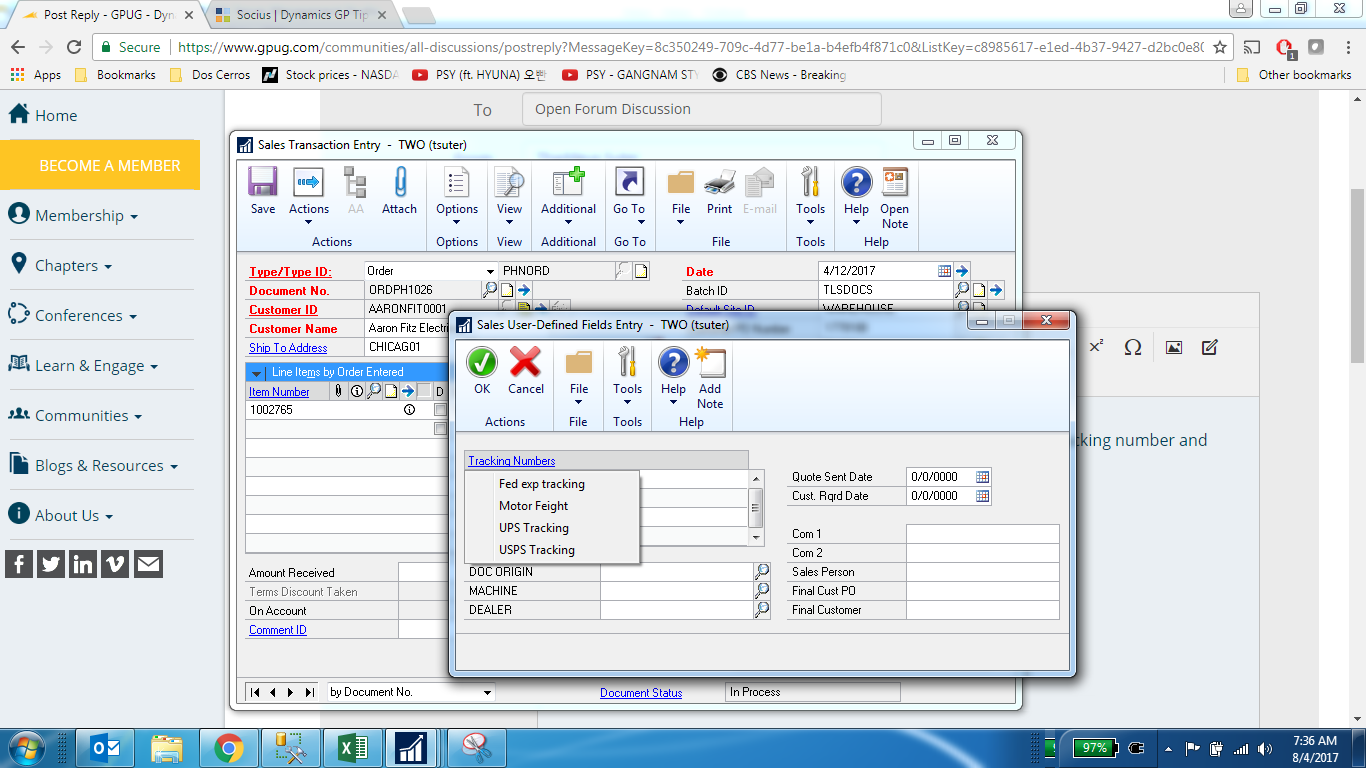
When we enter an order we often select “MOTOR FREIGHT” as the shipping method because the person entering the order does not know which motor freight company will be chosen.
We have custom links set up for all the various freight/shipping companies, and it used to be (until a couple of days ago) that when an order shipped MOTOR FREIGHT and we wanted to get tracking, we would go to User-Defined and hover over the TRACKING NUMBERS link and it would “show” all the various freight companies. Ā All we needed to do then was select Ā freight company the tracking number represents, click on that particular freight company and go directly to the tracking page of that company. (or if someone didn’t know which freight company they could take minutes out of their day by selecting all of them one at a time and see if the tracking number showed up).
Unfortunately, this is not happening now. Ā If the shipping method is not changed prior to posting and left as MOTOR FREIGHT, we can hover over TRACKING NUMBERS (and get the pointer finger) but no options for the various freight companies show up. Ā ONLY when the shipping method has been changed to the correct freight company will anything show.
People are starting to grumble and I need a solution. Ā Where do I go to fix this? Ā Nothing has been updated in the Custom Links section, no new modifications etc. Ā I know the smart thing is for the person posting the order to simply take the time to change the shipping method to the correct method….(enough said).
I appreciate your time and responses. pam
—————————— Pam Palmer Projects/Database Admin Temple, Inc. Decatur AL ——————————
Hi Pam, I believe we have a solution for your problem. We are currently implementing Dynamics TMS at another GP company that had similar issues. Call me at your convenience 847-963-0007 x 112 – Ari SmithĀ
—————————— Ari Smith President & CEO Next Generation Logistics Inverness IL —————————— ——————————————-
Thaddeus Suter
Member
August 4, 2017 at 8:40 AM
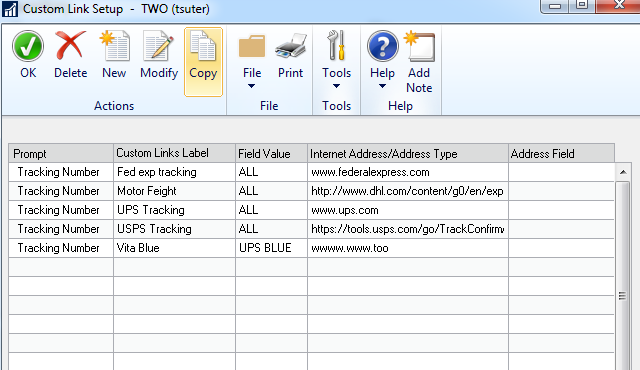
Pam, For “ALL” shipping method options to show up when you select the tracking number and hover on the Tracking Number Zoom ( see first screen shot) The custom links must be set to ALL, not to a specific field value in sample Vita Blue will not show but the other four will and do. See second screen shot. Second screenshot shows setup for ‘All” feature.
Please note:
This action will also remove this member from your connections and send a report to the site admin.
Please allow a few minutes for this process to complete.
Report
You have already reported this .
Welcome to our new site!
Here you will find a wealth of information created for peopleĀ that are on a mission to redefine business models with cloud techinologies, AI, automation, low code / no code applications, data, security & more to compete in the Acceleration Economy!