


Dynamics GP
Public Group
Active 3 weeks ago
Dynamics GP
Organizer:
- JOSE Organized by
-
-

Save and Print buttons grayed out after upgrade
-
Save and Print buttons grayed out after upgrade
Posted by Richard Barney on August 23, 2019 at 10:32 am-
?We recently upgraded from GP 2016 to GP 2018 and we have reports of the save and print buttons being grayed out randomly. We have never seen this type of behavior and wasn’t sure if anyone else had seen this with their GP 2018 upgrade. This is something that we cannot reproduce as there seems to be no pattern to when it happens (or that we can pinpoint). These are users that have been users of the system for years and security for them has been unchanged as well. Other than the upgrade, no changes have been made. ?
?We recently upgraded from GP 2016 to GP 2018 and we have reports of the save and print buttons being grayed out randomly. We have never seen this type of behavior and wasn’t sure if anyone else had seen this with their GP 2018 upgrade. This is something that we cannot reproduce as there seems to be no pattern to when it happens (or that we can pinpoint). These are users that have been users of the system for years and security for them has been unchanged as well. Other than the upgrade, no changes have been made. ??We recently upgraded from GP 2016 to GP 2018 and we have reports of the save and print buttons being grayed out randomly. We have never seen this type of behavior and wasn’t sure if anyone else had seen this with their GP 2018 upgrade. This is something that we cannot reproduce as there seems to be no pattern to when it happens (or that we can pinpoint). These are users that have been users of the system for years and security for them has been unchanged as well. Other than the upgrade, no changes have been made.?We recently upgraded from GP 2016 to GP 2018 and we have reports of the save and print buttons being grayed out randomly. We have never seen this type of behavior and wasn’t sure if anyone else had seen this with their GP 2018 upgrade. This is something that we cannot reproduce as there seems to be no pattern to when it happens (or that we can pinpoint). These are users that have been users of the system for years and security for them has been unchanged as well. Other than the upgrade, no changes have been made. ??We recently upgraded from GP 2016 to GP 2018 and we have reports of the save and print buttons being grayed out randomly. We have never seen this type of behavior and wasn’t sure if anyone else had seen this with their GP 2018 upgrade. This is something that we cannot reproduce as there seems to be no pattern to when it happens (or that we can pinpoint). These are users that have been users of the system for years and security for them has been unchanged as well. Other than the upgrade, no changes have been made. ?——————————
Richard Barney
Supv., System Administration and Support
Samson Energy Company, LLC
Tulsa OK
—————————— -

Jeff Pfershy
MemberAugust 23, 2019 at 11:27 AM
Hi ,I’m curious – does the same behavior happen if the user preference is set to use the ‘Menu Bar’ or ‘Action Pane Strip’? (In the user preferences window on the home screen shortcut bar or from the menu Microsoft Dynamics GP > User Preferences)?
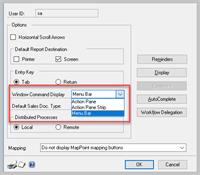
I know it sounds odd, but I’ve seen some crazy things in the past when the ‘Action Pane’ is used.
Since the problem is random and not repeatable, maybe have one user use the Action Pane Strip (smaller icons) and another use the ‘classic GP’ style menu bar.
——————————
Jeff Pfershy
Sr Business Analyst
BluJay Solutions Inc
Holland MI
——————————
——————————————- -
Bruce Strom
MemberAugust 23, 2019 at 11:56 AM
Do you use field level security?
Are you using VBA?——————————
Bruce Strom
Programmer Analyst
Associated Grocers of Florida / Supervalu
Sunrise FL
——————————
——————————————- -
Rob Klaproth
MemberAugust 23, 2019 at 6:09 PM
Based on your screen shot your payables transaction entry window is NOT the standard GP window. The standard window does not have the title centered. However, your window title does not have a . in front of it so it’s not a modified window from Modifier, but it could have that appearance from a 3rd party customization. I would disable as many of the 3rd parties as you can and see if the behavior repeats itself.——————————
Rob Klaproth
Dynamics Certified Professional
(GP Install & Configure)
Sr. GP Consultant
GPUG All-Star voting is open until 8/30 – https://www.surveymonkey.com/r/GPUGAllStar2019Voting——————————
——————————————- -
Looking at the v18 source code, the only way (in core code) to have those buttons disabled is when Workflow has disabled them. Have you enabled Workflow for Payables transactions?
The window title being in the middle is more likely related to the version of windows or a windows theme rather than anything in Dynamics GP.
It is also possible that there is a customisation that is disabling the save button dur to some additional business logic.
Regards
David?
——————————
David Musgrave MVP, GPUG All-StarManaging Director
Winthrop Development ConsultantsPerth, Western Australia
http://www.winthropdc.com
——————————
——————————————-
Richard Barney replied 7 years, 2 months ago 1 Member · 0 Replies -
-
0 Replies
Sorry, there were no replies found.
The discussion ‘Save and Print buttons grayed out after upgrade’ is closed to new replies.
