


Dynamics GP
Public Group
Active 3 weeks ago
Dynamics GP
Organizer:
- JOSE Organized by
-
-

“Sales Rep” User Setup with access to Inventory Quantities and entering Sales Quotes only-but no other sensitive info
-
“Sales Rep” User Setup with access to Inventory Quantities and entering Sales Quotes only-but no other sensitive info
Posted by Clay Tait on February 24, 2021 at 11:01 am-
We are a very small company with about 8 employees (currently on 5 have access to Dynamics GP). I am looking to setup some Sales Reps to have very limited access in our Dynamics GP 2018 (18.3.1200 (2020)). At this point I only want them to have access to 2 main things -1) the “Inventory Quantities Maintenance” window (so they can see and what is Quantities On Hand, Allocated, Sold, Returned … Back Ordered, … On Order. and so on that is on that screen, and 2) the ability – in Sales – to enter quotes for their dealers – without being able to adjust pricing. It is important in any screens that they can see that they do NOT have access our Current Cost or Standard Cost, because like with many typical Sales Reps, once they know our cost, they often decide that the company can afford to give their special customer a “bit” better deal (happens way to often). So viewing Item Costs anywhere in the system, and having the ability to adjust selling prices or customers discount levels is not to be left to them. Is there an expert out there that can quickly do this for us? Our partner has given it a shot several times spending hours on it (and charging us for some of those hours). The Partner has tried this going back over the years (their latest attempt was in 2019) but I still have not given our sales reps access because our partners solution still isn’t quite right, and frankly I have no idea where to start.
——————————
Clay Tait
Tait Distributors
Edmonton AB
—————————— -

Beat Bucher
MemberFebruary 24, 2021 at 3:23 PM
Hi Clay,
This is indeed something that requires a down deep knowledge of security in GP and possibly also a little coding/programming to avoid some screen to allow Sales Reps to get to data they shouldn’t be able to see. Field Level security might come into play as well.
I don’t know at which level and how many hours your partner has spent on this, nor how close they got to make this work..
has a GP Add-on called GP Power Tools ?that is extremely powerful as it adds some programming capabilities to GP to do things that are not possible with the out-of-the-box product, namely adding some logic based on user/company to do or prevent actions in GP screens.
PM me if you want some help and if you don’t mind sending me more details about the actions that have been tried so far.——————————
Beat Bucher
Business Analyst, Dynamics GP SME
Montreal QC/Canada
@GP_Beat http://www.gp-geek.com
Montreal QC GPUG Chapter Leader
MBS MVP (2015-2018)
——————————
——————————————- -
Thaddeus Suter
MemberFebruary 25, 2021 at 8:37 AM
They need a simple user Role and a new Task plus DefaultUserWindows for Inquiry: Do not give then Item Quantities Maintenance. Only the Inquiries.
Item Inquiry
Item Allocation Inquiry
Sales Transaction Inquiry Zoom
Sales Item Detail Inquiry Zoom
Sales Customer Detail Inquiry ZoomWindows for Entry:
Sales Transaction Entry
Sales Item Detail Entry
Sales Ship To Address Entry
Sales Customer Detail Entry
Sales Batch Entry if you want them to maintain their own batches of quotes.About six or eight fields need to be made either non editable or invisible in GP Modifier for price, cost, soptypeon these windows.
Deploy the modified windows thru an Alternate/Modified Form and Reports ID assigned to these sales persons.@Beat Bucher can do this in GP Modifier faster than it took me to type the response……
??
——————————
Thaddeus Suter
Retus, Inc
HELOTES TX
——————————
——————————————- -
Thaddeus Suter
MemberFebruary 25, 2021 at 8:48 AM
To restrict them to Quotes only, assign only Quotes in the new Task you make for Document Access. The rest is Modifier.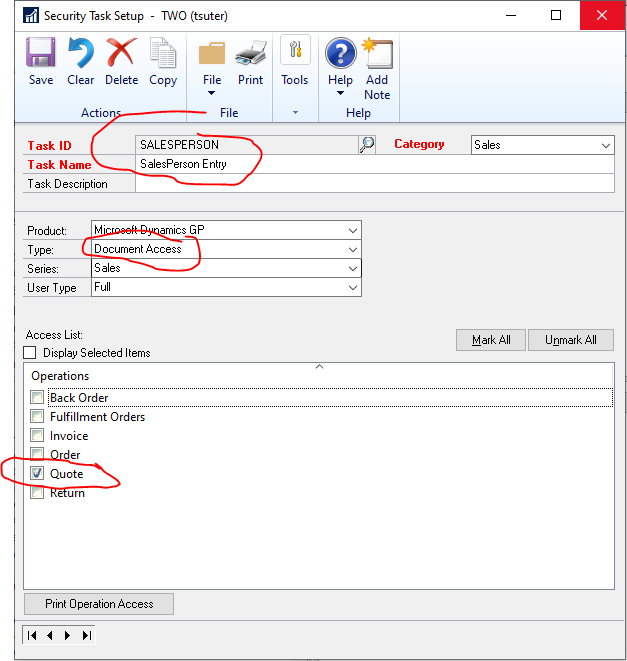
——————————
Thaddeus Suter
Retus, Inc
HELOTES TX
——————————
——————————————- -
Andrew Kennedy
MemberFebruary 25, 2021 at 8:51 AM
Hi Clay,
I agree with Beat that you may need to do some simple screen modifications. Based on the requirements you listed I would try a few things.
1) Rather than access to Item Quantity Maintenance, give them access to Item Inquiry. This will show the quantities but not the cost. One draw back here is that if they click on the Allocations drill back and inquire on a sales order they could see the costs on the line item inquiry. So you would need to modify the Sales Transaction Inquiry Zoom to hide this from them.
2) There is an option in SOP setup if Costs are visible during entry. Go to Sales >> Setup >> Sales Order Processing under preferences “Display Item Unit Cost”. Uncheck this and they would not see the cost in SOP entry (but still available in SOP inquiry). From this same window click the Options button to get the sales options setup. Uncheck “Override prices” to keep them from changing the price. You can put a password on it to allow authorized users to change the pricing.
In security, you could also consider setting up access to only Quote document types, if that helps.
I’ve also had customers use Process holds to force someone to review documents before they are printed or transferred. Though this adds manual work for someone to review each Quote.
Let us know if there are additional requirements.
Thanks——————————
Andrew Kennedy
Principal Consultant
Velosio
Seven Hills OH
——————————
——————————————- -
Check out the solution from GP Elementz called SalesHQ: https://www.gpelementz.com/saleshq.html
——————————
Kim Peterson
701-261-7307
Kim@DynamicsConnections.com
#KimPetersonGP
——————————
——————————————- -
Excellent, thank you all for your posts, It is much appreciated!
——————————
Clay Tait
Tait Distributors
Edmonton AB
——————————
——————————————-
Clay Tait replied 5 years, 8 months ago 1 Member · 0 Replies -
-
0 Replies
Sorry, there were no replies found.
The discussion ‘“Sales Rep” User Setup with access to Inventory Quantities and entering Sales Quotes only-but no other sensitive info’ is closed to new replies.
