


Dynamics GP
Public Group
Active 5 weeks ago
Dynamics GP
Organizer:
- JOSE Organized by
-
-

Sales Orders and fulfillment Orders
-
Sales Orders and fulfillment Orders
Posted by DSC Communities on January 15, 2017 at 1:17 pm-

Kyana Brooks
MemberJanuary 15, 2017 at 1:17 PM
I am using GP 2013 and I am looking for an efficient way to track Sales Orders by line item for partial shipments.
We are a make to order company. As a result of this 90% of our orders are back orders that we fulfill by line. Line items are then fulfilled in partial shipments. For that matter, we want to follow that line item through completion so we can report on it. Also, the packing slip number never changes when we ship that line several times. Why is this?
Right now we are only using SOP to fulfill. Will using the Workflow feature in GP be useful? Can we use standard orders and Fulfillment orders at the same time? Can we use Sales orders, Fulfillment orders and Back orders? Please see below for an example of what we do today and what I would like to do.
ACTUAL
1.Customer PO for 20 PCB boards (10-0006-15)
2.Item 10-0006-15 is not in stock
3.Create a Sales order
4.Items are made and ready to fulfill
5.Allocate and fulfill
6.Transfer Sales Order to Invoice
7.Sales order is verified to show remaining Balance
8. Repeat steps 4-7 until complete——————————
Kyana Brooks
EIZO Rugged Solutions Inc.
Altamonte Springs, FL 32746
407-262-7113
—————————— -
Martha Machado
MemberJanuary 16, 2017 at 1:26 AM
I’m not sure what you are looking for when you say a way to track – do you mean a report that shows the open orders? Many new users like the smartlists, but if you can find an Excel Report it would be faster. I’m not really sure what you’re looking for but the process you listed makes sense.——————————
Martha Machado
CPA / Consultant
CPA Projects
Pompano Beach FL
——————————
——————————————- -
Keith Paul
MemberJanuary 16, 2017 at 9:23 AM
You should be able to track the balance open (back ordered) on a sale order line using an open order report. We do that regularly. You will need to review your settings to determine if you have set them to allow back orders. I’d recommend using refreshable Excel reports. Each shipment will have its own invoice once each is posted.——————————
Keith Paul
VP Business Management Systems
Unicom Engineering, Inc.
Plano TX
——————————
——————————————- -
Kyana Brooks
MemberJanuary 16, 2017 at 5:25 PM
Martha,
Track for me means that I want to watch the path of each order we fulfill. The ship by date can change several times depending on the customers preferences or ours. We are ISO regulated as well so there are a few reports that I want to be able to run without much manipulation. If I do have to manipulate reports I will.
I looked into setting up fulfillment and I tested a couple of theories in my test database and it appears to track the documents very well. My only concern is tracking the fulfillment orders back to the original sales order. Some of our Sales orders can stay open for quite some time. So I trying to find a better way of proving how each order tracks back to the original in GP. Maybe the refreshable excel reports will help.
This is the path I would like to take with my sales orders
1. Customer PO for 20 PCB boards (10-0006-15) due 2/1/17 and 20 PCB boards (10-0007-15) due 3/1/17.
2. Both Items not in stock
3. Create a Sales order SO9456
4. Transfer to Back Order (document) #BO9456. (reserve SO9456 for transfer back to original doc)
5. MO created for each item to fulfill 20 pieces to customer and 10 to stock
6. 5 pieces are ready for fulfillment only on item 10-0006-15
7. BO9456 is reduced to 15 pieces of item no 10-0006-15
8. BO9456 transfer 5 pieces back to Sales Order SO9456
9. Transfer SO9456 line item 1. qty of 5 pieces of 10-006-15 to Invoice INV9456.1
10. Sales order is verified to show remaining Balances
11. Repeat steps 4-10 until completeKeith,
We do track the Back Orders using that report but the issue is the packing slip number never changes when we ship 1 line item in separate shipments. The invoice lines are never problem. We don’t want to have to rely strictly on the invoices for shipping detail. When a shipment isn’t invoiced in error we find it a bit difficult to track it down. Does that happen with you? Any suggestions?
Kyana
——————————
Kyana Brooks
EIZO Rugged Solutions Inc.
Altamonte Springs FL
Kyana
——————————
——————————————- -
Martha Machado
MemberJanuary 16, 2017 at 7:02 PM
Kyana,Try to see if you’ve got Excel Reports deployed because it sounds like you’re good to manipulate in Excel. Below is the left navigation pane in the GP sales module…..notice Excel Reports is available. If you see that, select it and it will open a menu of all the canned versions.
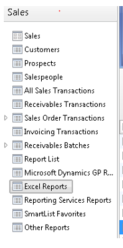 Next, find the one called Open Orders. You might see 2 of them. Run the one with data connection in the menu path.
Click yes or OK if you’re prompted until the report dumps to Excel. It will have just a few columns by default, but change the SQL code in the connection definition to this and you will see all the columns that are available:
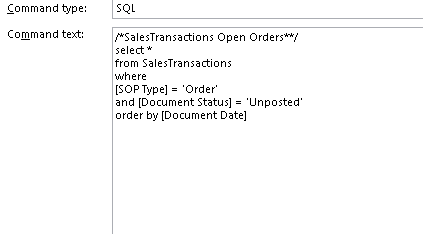
You’ll need to tweak a few things (who doesn’t) but this should get you most of the way. If you get stuck come back here and post where you’re stuck. Good luck!——————————
Martha Machado
CPA / Consultant
CPA Projects
Pompano Beach FL
——————————
——————————————-
DSC Communities replied 9 years, 9 months ago 1 Member · 0 Replies -
-
0 Replies
Sorry, there were no replies found.
The discussion ‘Sales Orders and fulfillment Orders’ is closed to new replies.
