


Dynamics GP
Public Group
Active 4 weeks ago
Dynamics GP
Organizer:
- JOSE Organized by
-
-

Sales Document Print Options
-
Sales Document Print Options
Posted by jim.delmonte@stahls.com on November 15, 2022 at 10:19 am-
We are experiencing an issue when trying to print Sales Orders and Packing Slips. If we click the PRINT button or do File>Print, this window opens: It is like a macro has been created, but we can never get to the point where we can choose to print the order. We have searched for a .mac file but cannot find anything with that extension.
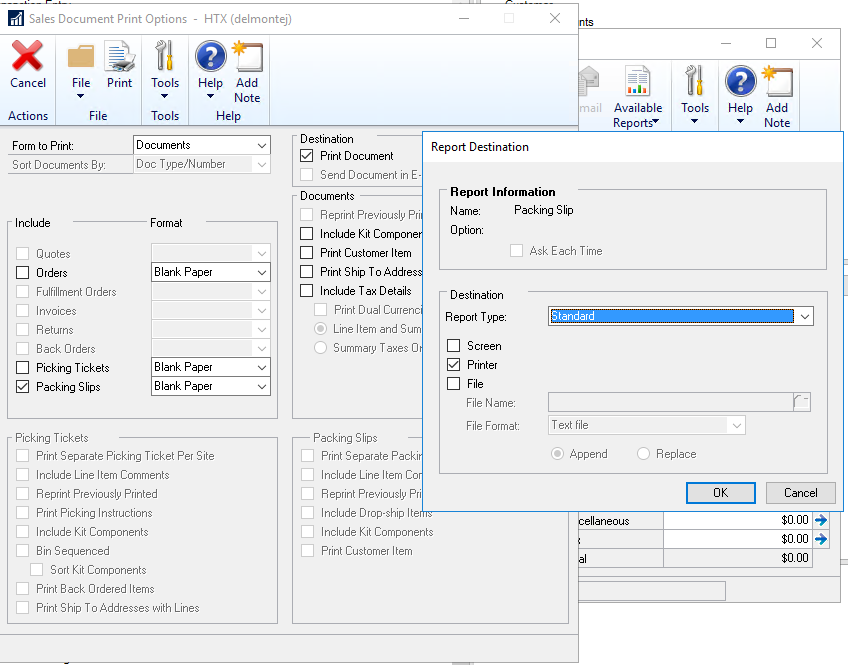
If I go to Options > Quick Print, I get my Quick Print Setup displayed but I also get this window: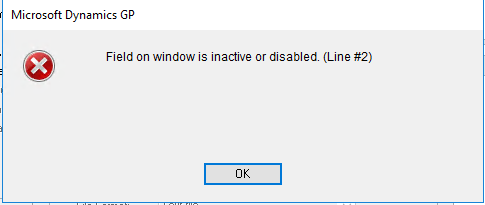
I know this is from another macro but I cannot find the file that is being launched.Any other ideas where I might find the macros causing these errors?
Thank you.
——————————
Jim DelMonte
Director of Enterprise Systems
Groupe Stahl
Mentor OH
—————————— -
I created the SOP Quick Printer functionality as part of Named Printers back in v3.00 of Dynamic?s. It was purchased by GP for v5.5 and became core in v6.0.
It does use a macro to drive the dialogs to get the print to function. The macro should be created in the workstation’s %TEMP% folder.
When you don’t use the Quick Print option, it should not do anything with Macros when you print normally. The Quick Print macro is only created and executed when you use the quick print menu option or press Ctrl-Q.
Regards
David
Original Developer of Named Printers——————————
David Musgrave MVP, GPUG All-StarManaging Director
Winthrop Development ConsultantsPerth, Western Australia
http://www.winthropdc.com
——————————
——————————————- -
David,
Thank you for your response.
FYI – We are running GP18.4.1434 in a Terminal Server environment.
I checked the TEMP folder but did not find anything with a .mac extension. I remember reading some blogs and other articles about the named printers tool. Isn’t something written to the Dex.ini file?
Also, could there be some rogue Dexterity code from our developers causing this?
How can I debug the “Field on window is inactive or disabled (Line2)? This makes me think a macro was started but not completed or ended correctly.Thank you.
Jim
BTW – I subscribe to your blogs and read them always even if I do not understand everything you wrote. But you have saved my company twice by alerting us to changes coming down the road that could have had major impact. Thank you for that.
——————————
Jim DelMonte
Director of Enterprise Systems
Groupe Stahl
Mentor OH
——————————
——————————————- -
Hi Jim
Thanks for the kind feedback. Please do me a favour and review the Benefits Presentation: https://www.winthropdc.com/ftp/pub/GPPowerTools_Benefits.ppsx
Named Printers stores the Machine ID for the current workstation in the Dex.ini using the ST_MachineID Dex.ini setting. ST stood for Sequel Technology which was the name of the company my brother-in-law and I had. That’s why all the Named Printers code and tables is prefixed with ST.
Are you trying to use Quick Print? The macro file is generated, executed and deleted and that all happens very quickly. You probably will not be able to see it happen.
If you are trying to use Quick Print, then I would try disabling any custom code you have running in this section of GP. For example: if your custom code has disabled a field that the Quick Print macro is trying to change (very possible), then the macro will fail.
If you are not using Quick Print, then something else is running a macro that is trying to change a disabled field.
Regards
David
——————————
David Musgrave MVP, GPUG All-StarManaging Director
Winthrop Development ConsultantsPerth, Western Australia
http://www.winthropdc.com
——————————
——————————————- -
Thank you for the info:
Here is my Dex.ini file:
The only ST line is in Bold and Red.
What does that line do?[General]
SQLLogSQLStmt=FALSE
SQLLogODBCMessages=FALSE
SQLLogAllODBCMessages=FALSE
SQLRprtsTimeout=0
ReportViewMode=0
Initial=FALSE
Synchronize=FALSE
AutoDisplayUpdate=TRUE
DynHelpPath=C:Program Files (x86)Microsoft DynamicsGP2018
DexHelpPath=C:Program Files (x86)Microsoft DynamicsGP2018
Word Macro File=C:Program Files (x86)Microsoft DynamicsGP2018DataLettersWordIntegration.dot
Letters Directory=C:Program Files (x86)Microsoft DynamicsGP2018DataLetters
Workstation=WINDOWS
Workstation2=Windows
WindowMax=TRUE
BTInterface=NoLoad
Pathname=DYNAMICS/dbo/
FileHandler=SQL
SQLQueryTimeout=0
SQLProcsTimeout=0
DPSInstance=1
BuildSQLMessages=FALSE
OLEPath=C:Program Files (x86)Microsoft DynamicsGP2018DataNotes
ReportDictionaryPath=C:Program Files (x86)Microsoft DynamicsGP2018Data
FormDictionaryPath=C:Program Files (x86)Microsoft DynamicsGP2018Data
SQLLastDataSource=Dynamics GP 2018
UpdateLogin=https://mbsupdates.microsoft.com/taxupdate/login.aspx
NextEntryID=23740
NextGroupID=22501
LastYearEndUpdate=11/16/2018
LastTaxCodeUpdate=01/20/2017
SQLLastUser=delmontej
Dictionary Version=18.00.0704
GPLastUser=delmontej
RememberUser=FALSE
ZoomFontUnderline=True
ZoomFontColor=Blue
DYNOLD0=C:Program Files (x86)Microsoft DynamicsGP2018Version18.0.641.0BackupDynamics.dic
ReportLayout=704,29,1161,742
LayoutToolbox=1,1,156,382
RWLayoutPropertiesSheetTab=1
RWLayoutPropertiesSheet=822,25,270,349
RWLayoutPropertiesSheetVisible=TRUE
WindowPosX=365
WindowPosY=161
WindowWidth=1285
WindowHeight=876
MagnifyScreenOutput=100
CDANeverArchivedSuppress=TRUE
NoteWindow=968,301,450,299
EmailStmtStatusPath=c:program files (x86)microsoft dynamicsgpstatementreport
ABI_Modules=191919
ST_SOP_Shortcut=528459,0,0,0
STOCKCOUNTLEVEL=10000
LayoutLayout1=202,179,1346,639
LayoutPropertiesSheetTab=1
LayoutPropertiesSheet=1268,259,260,349
LayoutPropertiesSheetVisible=TRUE
ScriptDebugger=TRUE
DebuggerCalls=130,26,432,111
ABI_Modules=191919
ABI_BypassAuth=Y
Debugger=454,26,562,366——————————
Jim DelMonte
Director of Enterprise Systems
Groupe Stahl
Mentor OH
——————————
——————————————- -
The ST_SOP_Shortcut setting contains the settings used by the Quick Print Settings window.
I would have to look at the source code to work out exactly what the values mean.
Have you tested with disabling triggers from third party and ISV products?
Regards
David
——————————
David Musgrave MVP, GPUG All-StarManaging Director
Winthrop Development ConsultantsPerth, Western Australia
http://www.winthropdc.com
——————————
——————————————-
jim.delmonte@stahls.com replied 3 years, 11 months ago 1 Member · 0 Replies -
-
0 Replies

Sorry, there were no replies found.
The discussion ‘Sales Document Print Options’ is closed to new replies.
