


Dynamics GP
Public Group
Active 3 days ago
Dynamics GP
Organizer:
- JOSE Organized by
-
-

Recurring Payables
-
Recurring Payables
Posted by Unknown Member on September 4, 2019 at 10:52 am-
Is there any way to set up a recurring monthly payable (Auto allowance, personal cell phone allowance) outside of Scheduled Payments? It seems that that task is to be used for loan amortization payments only.
——————————
Sue Kapis
Vice President of Operation
Park City Chamber of Commerce Convention & Visitors Bureau
Park City UT
—————————— -

Jeff Pfershy
MemberSeptember 4, 2019 at 12:13 PM
Hi @Sue Kapis,Yes – you can use Recurring batches in AP for any type of simple recurring payable invoices?. You can also change the invoice amounts for the unposted recurring invoices in your recurring batches, such as to reflect an increase in a rent amount or a cell phone allowance.
In the Payables Batch Entry window, create a new batch for your monthlies or a particular type of recurring payments, like MONTHLY RENT, choose the Origin, enter an optional comment on the batch, and choose from a number of ‘Frequencies’ – Weekly all the way to Quarterly and even ‘Miscellaneous’, which allows you to choose the number of days to increment, such as every 3 days.
You can also choose the number of times the batch should post before the batch is no longer available, along with any of the transactions in it.
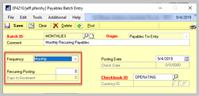
In my screen image below I’ve chosen monthly, so every transaction I add to this batch will increment by one month. I’ve also purposely left the ‘Recurring Posting’ field at 0, so the batch remains until it is manually deleted.
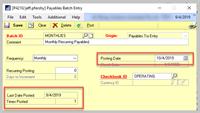
When the batch is posted, GP will append a recurrence number (my term) to the end of the voucher number for an invoice, so the ‘root’ voucher number remains the same throughout all postings for this recurring invoice.Once I’ve posted the batch one time, the invoices in my monthly batch all advance the next invoice date by one month, and in the image below my batch date increments by a month and GP tells me the last date it posted, along with how many times the batch has been posted.
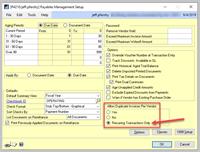
Also, it’s a good idea to make sure that the option ‘Recurring Transactions Only’ radio button is selected for ‘Allow Duplicate Invoices Per Vendor’ in the Payables Setup window as shown below:
Hope this helps!
——————————
Jeff Pfershy
Sr Business Analyst
BluJay Solutions Inc
Holland MI
——————————
——————————————- -
Thanks, I will give it a try.
Sue Kapis
Vice-President of Operations
Park City Chamber/Convention & Visitors Bureau
(435) 649-6100
——Original Message——
Hi @Sue Kapis,
Yes – you can use Recurring batches in AP for any type of simple recurring payable invoices?. You can also change the invoice amounts for the unposted recurring invoices in your recurring batches, such as to reflect an increase in a rent amount or a cell phone allowance.
In the Payables Batch Entry window, create a new batch for your monthlies or a particular type of recurring payments, like MONTHLY RENT, choose the Origin, enter an optional comment on the batch, and choose from a number of ‘Frequencies’ – Weekly all the way to Quarterly and even ‘Miscellaneous’, which allows you to choose the number of days to increment, such as every 3 days.
You can also choose the number of times the batch should post before the batch is no longer available, along with any of the transactions in it.
In my screen image below I’ve chosen monthly, so every transaction I add to this batch will increment by one month. I’ve also purposely left the ‘Recurring Posting’ field at 0, so the batch remains until it is manually deleted.
When the batch is posted, GP will append a recurrence number (my term) to the end of the voucher number for an invoice, so the ‘root’ voucher number remains the same throughout all postings for this recurring invoice.Once I’ve posted the batch one time, the invoices in my monthly batch all advance the next invoice date by one month, and in the image below my batch date increments by a month and GP tells me the last date it posted, along with how many times the batch has been posted.
Also, it’s a good idea to make sure that the option ‘Recurring Transactions Only’ radio button is selected for ‘Allow Duplicate Invoices Per Vendor’ in the Payables Setup window as shown below:
Hope this helps!
——————————
Jeff Pfershy
Sr Business Analyst
BluJay Solutions Inc
Holland MI
—————————— -
Charles Allen
MemberSeptember 5, 2019 at 1:18 AM
You do not need to use scheduled payments only for loan payments. In fact, the first time a client of mine used it was due to an invoice from a vendor that was to be paid in three separate payments. The client did not want to have to worry about the invoice appearing as overdue.
You can also set up recurring payables batches.
Charles Allen
Senior Consulting Manager | BKD
2700 Post Oak Blvd. Suite 1500
Houston, TX 77056
713.499.4629 Direct
713.494.2104 Mobile
 ****** BKD, LLP Internet Email Confidentiality Footer ******
Privileged/Confidential Information may be contained
in this message. If you are not the addressee indicated in
this message (or responsible for delivery of the message
to such person), you may not copy or deliver this message to
anyone. In such case, you should destroy this message, and
notify us immediately. If you or your employer do not consent
to Internet email messages of this kind, please advise us
immediately. Opinions, conclusions and other information
expressed in this message are not given or endorsed by my
firm or employer unless otherwise indicated by an authorized
representative independent of this message.Any tax advice contained in the body of this email was not
intended or written to be used, and cannot be used, by the
recipient for the purpose of avoiding penalties that may be
imposed under the Internal Revenue Code or applicable state
or local tax law provisions.These discussions and conclusions are based on the facts
as stated and existing authorities as of the date of this
email. Our advice could change as a result of changes in the
applicable laws and regulations. We are under no obligation
to update this information if such changes occur. Our advice
is based on your unique facts and circumstances as you
communicated them to us and should not be used or relied
on by anyone else.——Original Message——
Is there any way to set up a recurring monthly payable (Auto allowance, personal cell phone allowance) outside of Scheduled Payments? It seems that that task is to be used for loan amortization payments only.
——————————
Sue Kapis
Vice President of Operation
Park City Chamber of Commerce Convention & Visitors Bureau
Park City UT
—————————— -
Hi
I agree with both of these fine gentlemen! A recurring batch is great for things like rent, auto allowances, etc, and it WILL advance the transaction and posting date depending on you batch recurrance settings.
Scheduled payments is also a bit awesome, but usually reserved for invoices that would charge interest and has a specific pay-off period. For instance, to set that up for a recurring rental payment you would need to enter an invoice for a full year of rent and then setup the scheduled payment for the 12 payments (interest is not necessary). Scheduled payments also adds a ton of unnecessary steps whereas a recurring batch is much more simplified.
However, you MUST remember to post these MONTHLY or they will not get posted. Many users thing that recurring batches will post themselves, but that is not the case. Yet, if you require an auto-batch posting there are several software’s on the market that will post batches for you, and most of them are highly configurable.
Good luck, my vote is for the recurring batch in this one for its simplicity and closer match with the actual need on this.
But, I AM a big fan of Scheduled Payments for anything that needs an amortization chart!?
——————————

——————————
——————————————- -
Thomas Hill
MemberSeptember 5, 2019 at 10:04 AM
Great explanation for Recurring Batches. Is there a way to control the “RECURRENCE NUMBER”. Our system is appending 11-12 digits to the original voucher number. The full voucher number does not even display on reports because it is so long. I am considering alternatives to using recurring batches because of this.——————————
Thomas Hill
Staff Accountant
M&A Technology, Inc.
Carrollton TX
——————————
——————————————- -
Jeff Pfershy
MemberSeptember 6, 2019 at 12:43 PM
Hi @Thomas Hill,I did a bit of testing with this, as I couldn’t find a place where you can set the length of the recurring invoice number. I was initially hopeful that the recurrence number was the same length as the next voucher number, but alas, this does not appear to be the case (I’m using GP 2016 R2).
I may be jumping to conclusions, but it appears that GP fills the entire field (20 characters) when assigning the recurring invoice number.
Example 1
Next Payables Voucher Number (in Payables Setup Options) set to 10 characters ‘APINV00040’.
Recurring Voucher Number becomes ‘APINV000400000000001′ (an additional 10 characters)Example 2
Next Payables Voucher Number (in Payables Setup Options) set to 8 characters ‘APINV041’.
Recurring Voucher Number becomes ‘APINV041000000000001′ (an additional 12 characters!)This would be a great suggestion – configurable recurring voucher numbers.
——————————
Jeff Pfershy
Sr Business Analyst
BluJay Solutions Inc
Holland MI
——————————
——————————————- -
Thomas Hill
MemberSeptember 9, 2019 at 4:41 PM
Thanks for going above the call of duty. You confirmed what I also suspected. I am going to come up with a process using Integration Manager. I have an integration to payables that works. Our forms are not designed for 20-character voucher numbers. ?——————————
Thomas Hill
Staff Accountant
M&A Technology, Inc.
Carrollton TX
——————————
——————————————-
Unknown Member replied 6 years, 4 months ago 1 Member · 0 Replies -
-
0 Replies
Sorry, there were no replies found.
The discussion ‘Recurring Payables’ is closed to new replies.
