


Dynamics GP
Public Group
Active 4 weeks ago
Dynamics GP
Organizer:
- JOSE Organized by
-
-

Read-Only View (even for SA & Poweruser)
-
Read-Only View (even for SA & Poweruser)
Posted by Pam Palmer on January 30, 2018 at 9:00 am-
Something appears to not be right within our Dynamics GP (v2013R2)
Yesterday I was trying to add a new report to “My Reports” on my home page only to find out that the “ADD TO” button was grayed out. Upon closer inspection, I realized that I (PowerUser) had only “READ ONLY” status
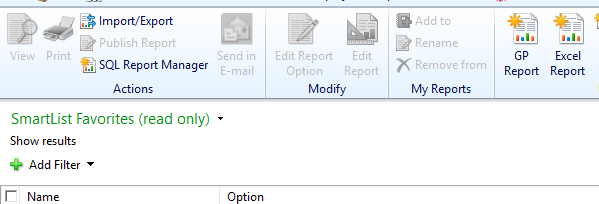
I then went to review the PowerUSer security tasks and saw that the only things listed were what you see in the picture below:
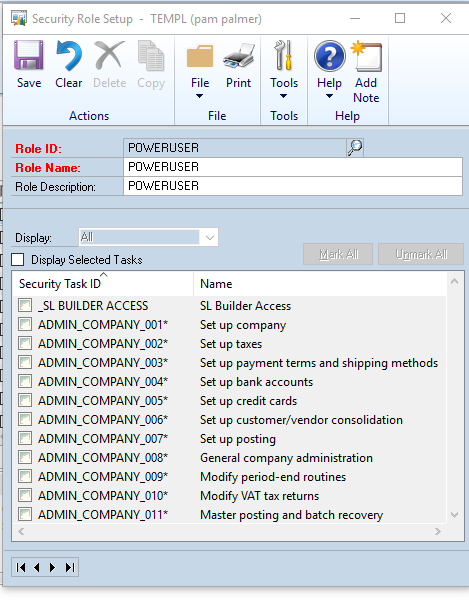
I was unable to scroll down as that was also grayed out.
I logged out and logged in as “SA” who did have more Security Tasks assigned but they too only had “READ ONLY” status on the report section.
I’ve checked with my IT guy who couldn’t find anything wrong with our system but this is most puzzling and would appreciate some feedback.
Thank you,
Pam——————————
Pam Palmer
Projects/Database Admin
Temple, Inc.
Decatur AL
—————————— -

Steve Erbach
MemberJanuary 30, 2018 at 12:58 PM
,I believe that this is all WAD (Working As Designed). The lists of reports available in each of the GP areas is “read only” because GP goes out to the folder where the reports live and catalogs them for display in the report lists. You can’t add reports to any of the report lists willy-nilly from within GP. They’re added whenever a new report is saved to the respective folders. E.g., if you create a new refex (REFreshable EXcel report) and save it to the same folder as your other Excel Reports, it will show up in the Report List.
My understanding of the “My Reports List” is that to add a report to it you must
- go to the report list that contains the report you want to add to “My Reports”; e.g., go to the Financial >> Excel Reports list
- Check the box next to the name of a report you want to include in the “My Reports” list. Then the “Add To” button is enabled.
- Click the Add To button and give the report a new name, if you wish.
- Click OK.
That will add the report to your “My Reports List”.
As far as the POWERUSER Security Role, by definition it has full access to everything. GP doesn’t allow you to remove from or add to POWERUSER Security Tasks.
Now, if you have the excellent GP Power Tools, you can add a new Security Role called SUPERUSER which has full access to everything but doesn’t have the shortcomings of the POWERUSER. Specifically, GP can audit the activities of the SUPERUSER.
Sincerely,
——————————
“Sparkly” Steve Erbach – Business Analyst & MS Dynamics Platform Administrator
WOW Logistics Company – Appleton, WI
Co-Chair, GPUG WI (Green Bay) Chapter
GP 2016 (16.00.0439) / MR 2012 CU15
Blog: https://www.gpug.com/blogs/steve-erbach
Twitter: twitter.com/serbach
——————————
Welcome to Dynamics!
You do not have permission.
Call Steve.
(hat tip: Lou Spevack)
——————————
——————————————- -
Steve,
thank you for pointing out that I had what amounts to a brain-fart. This is what happens when I’m pulled in too many directions.Thank you for your kindness in explaining the baby-steps to me, who should have known better.
I don’t know what happened to my brain yesterday so thank you.
Pam
——————————
Pam Palmer
Projects/Database Admin
Temple, Inc.
Decatur AL
——————————
——————————————- -
Beat Bucher
MemberFebruary 2, 2018 at 10:22 AM
I don’t know what happened to my brain yesterday so thank you.Pam Palmer, 01-30-2018 01:03 PMit’s Flu season.. you’re all excused 🙂 !!
once more shows that he fully deserves the #GPUG #AllStar title 😛
????——————————
Beat Bucher
Business Analyst, Dynamics GP MVP
Ultra-Electronics Forensic Technology Inc.
Montreal QC/Canada
@GP_Beat http://dyngpbeat.wordpress.com/
Montreal QC GPUG Chapter Leader
GP2013R2 / MR2012 CU14
——————————
——————————————- -
Steve Erbach
MemberFebruary 2, 2018 at 10:25 AM
,[Blush!]
Regards,?
——————————
“Sparkly” Steve Erbach – Business Analyst & MS Dynamics Platform Administrator
WOW Logistics Company – Appleton, WI
Co-Chair, GPUG WI (Green Bay) Chapter
GP 2016 (16.00.0439) / MR 2012 CU15
Blog: https://www.gpug.com/blogs/steve-erbach
Twitter: twitter.com/serbach
——————————
Welcome to Dynamics!
You do not have permission.
Call Steve.
(hat tip: Lou Spevack)
——————————
——————————————-
Pam Palmer replied 8 years, 9 months ago 1 Member · 0 Replies -
-
0 Replies
Sorry, there were no replies found.
The discussion ‘Read-Only View (even for SA & Poweruser)’ is closed to new replies.
