Randon Black Boxes on GP WIndows

  • Randon Black Boxes on GP WIndows

    Posted by greg-wahl on October 27, 2017 at 2:34 pm
    • Greg Wahl

      Member

      October 27, 2017 at 2:34 PM

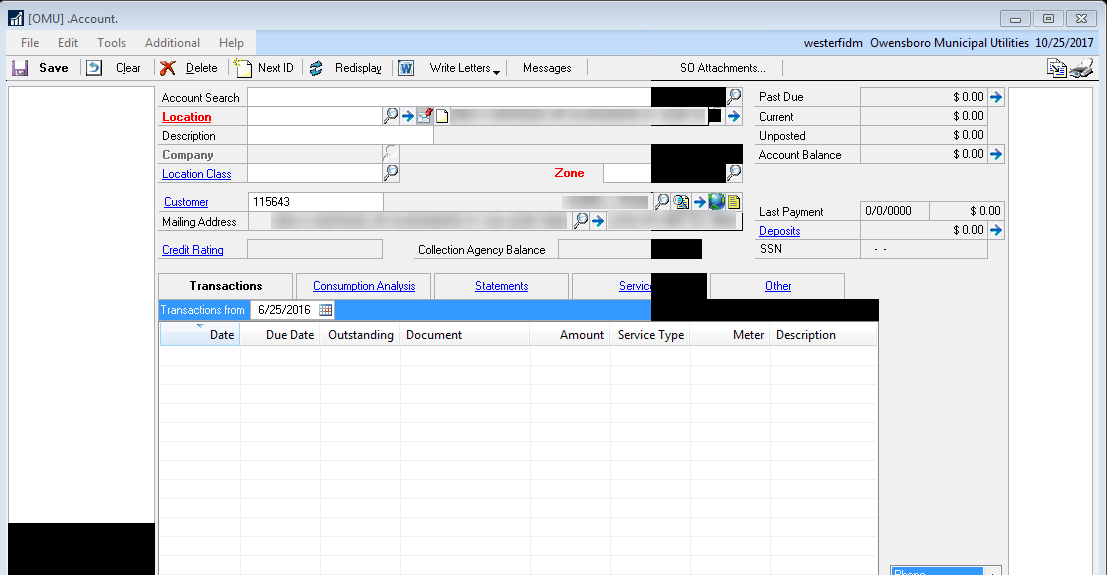
      Occasionally, we will have users complain about random black boxes on random GP windows (example shown in attachment).Ā  They sometimes go away if you click in that area or if the close out of GP and log back in.Ā  We use terminal servers and not all users experience this.Ā  We have adjusted the monitor’s refresh rate and swapped out the monitors as well with no luck.

      I was just wondering if any other user’s experienced this and was able to get it resolved.

      ——————————
      Greg Wahl
      Senior Database Administrator
      Owensboro Municipal Utilities
      Owensboro KY
      ——————————

    • Rob Klaproth

      Member

      October 27, 2017 at 6:49 PM

      The little . in front of your window name indicates this is a modified window.Ā  Try changing it back to the stock GP window in tools – setup – system – alternate/modified windows and reports, select the profile DEFAULTUSER (assuming that’s the one assigned to all your users), and locate that window and change it back to Dynamics GP by clicking the radio button next to it, and saving.Ā  Users will have to logout.

      If you do not see the black boxes on your stock GP windows, then there are issues with the customized/modified windows that may need to be addressed by your developer or partner who made the modifications for you.

      I would try that first, just to rule out a general “GP” issue and then go from there.

      ——————————
      Rob Klaproth
      Dynamics Certified Professional
      (GP Install & Configure)
      Sr. GP Consultant
      Armanino, LLP
      San Diego, CA
      ——————————
      ——————————————-

    • Greg Wahl

      Member

      October 30, 2017 at 9:09 AM

      Thanks for the response but this is happening to non-modified windows as well as the main GP Home page where the top toolbars are black as well.Ā  Sometimes, we can re-position the window and it clears it up.Ā  To me, it looks like some sort of refresh rate issue but we tinkered with those settings and it didn’t resolve the issue.Ā  We have tried changing the drivers for the monitors as well as swapping out the monitors.

      This is only happening to a few users…

      ——————————
      Greg Wahl
      Senior Database Administrator
      Owensboro Municipal Utilities
      Owensboro KY
      ——————————
      ——————————————-

    • Brian Heiple

      Member

      October 30, 2017 at 10:03 AM

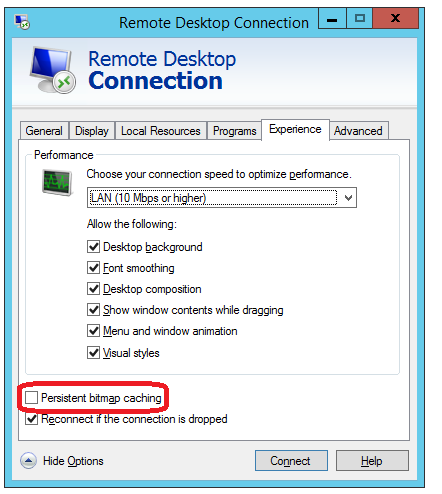
      ?This isĀ possibly being caused byĀ the Persistent bitmap caching setting on MSTC setup.Ā Try unchecking it.

      Persistent bitmap caching

      ——————————
      Brian Heiple
      Sr Application Analyst
      Lutheran Social Service of Minnesota
      Saint Paul MN
      ——————————
      ——————————————-

    greg-wahl replied 8 years, 5 months ago 1 Member · 0 Replies
  • 0 Replies

Sorry, there were no replies found.

The discussion ‘Randon Black Boxes on GP WIndows’ is closed to new replies.

Start of Discussion
0 of 0 replies June 2018
Now

Welcome to our new site!

Here you will find a wealth of information created for peopleĀ  that are on a mission to redefine business models with cloud techinologies, AI, automation, low code / no code applications, data, security & more to compete in the Acceleration Economy!