Project Closing – Can’t enter a desired closing date

  • Project Closing – Can’t enter a desired closing date
    Posted by brian.lambertz@connexusenergy.com on August 19, 2019 at 3:24 pm
    • Brian Lambertz

      Member

      August 19, 2019 at 3:24 PM

      Hello Everyone!
      It’s been a while since we have been stumped on a GP Project Account issue here at Connexus Energy!Ā  If there are any Project Accounting experts that might be available to help, we could sure use come help up here in Minnesota!

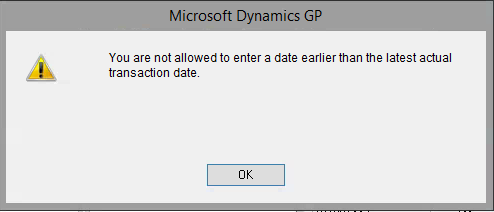
      The error message is: “You are not allowed to enter a date earlier than the latest actual transaction date.”

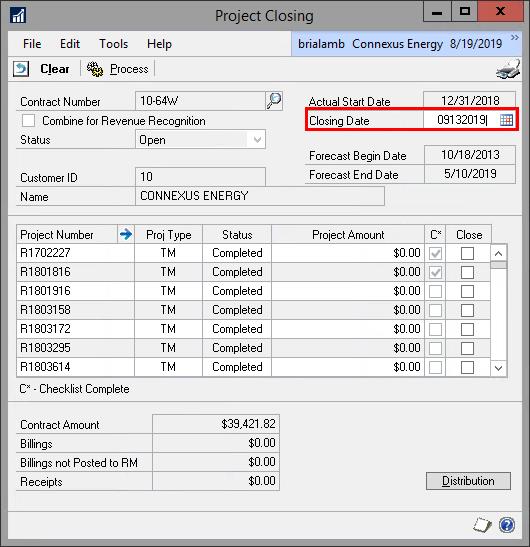
      In the Project Closing Window, we are trying to set the date to the end of the month: ’08/31/2019′ however the date is defaulting to ’09/13/2019′ when we open the program and the system will not allow us to change it to any date earlier than this date without producing the error.

      Closing Date Error

      For Instance I can set the date to ‘09122019’ and as soon as I tab off the field, here is the error that is produced:


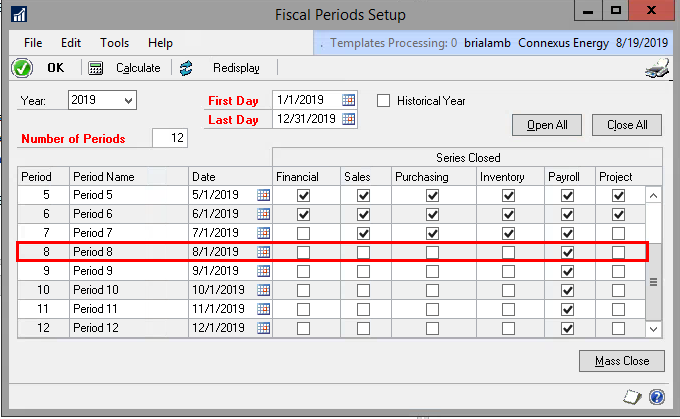
      We looked to see if the August Project Transactions were closed in the Fiscal Period Setup, but they are open.Ā  We just can’t seem to figure out why we are receiving the error, and we receive it even before we select a particular project.

      Fiscal Period

      10 points to anyone that can help!Ā  šŸ™‚

      PS> If you are near St. Paul tomorrow, drop in on our Quarter 3 meeting we have a great agenda planned for you!

      Thank you,

      ——————————
      Brian Lambertz
      Business Analyst
      Connexus Energy
      Ramsey MN
      ——————————

    • Jo deRuiter

      Member

      August 20, 2019 at 8:45 AM

      Hey ?

      In the Tables GP tracks ‘Actual’ Project Information.Ā  This message is saying that you have a PO or some other type of transaction entry that is dated in September so it is not allowing you to close this one

      If this is not accurate, run reconciles on that customer in Project>Utilities>Reconciles and see if that will clear it up.

      ——————————

      ——————————
      ——————————————-

    • Brian Lambertz

      Member

      August 21, 2019 at 10:16 AM

      Hello Jo,

      Thank you for the advice and getting back to me.Ā  We had the same thought that there could be a transaction dated 9/12 or 9/13 that is holding this up.Ā  We did query the database to see if we could locate the transaction and modify the date, however we were unable to locate anything.Ā  The plan is that we will move forward and utilize the date that the system is prompting us as the closing date ‘9/13/19’.

      Thank you,

      ——————————
      Brian Lambertz
      Business Analyst
      Connexus Energy
      Ramsey MN
      ——————————
      ——————————————-

  • 0 Replies

Sorry, there were no replies found.

The discussion ‘Project Closing – Can’t enter a desired closing date’ is closed to new replies.

Start of Discussion
0 of 0 replies June 2018
Now

Welcome to our new site!

Here you will find a wealth of information created for peopleĀ  that are on a mission to redefine business models with cloud techinologies, AI, automation, low code / no code applications, data, security & more to compete in the Acceleration Economy!