


Dynamics GP
Public Group
Active 4 weeks ago
Dynamics GP
Organizer:
- JOSE Organized by
-
-

Printing a BOM alphanumberically
-
Printing a BOM alphanumberically
Posted by Pam Palmer on March 14, 2019 at 9:59 am-
I’ve been asked if there is any way to have the Inventory BOM (not MFG module) print out the parts in alphanumberic order. I do not have a reason for this other than it’s been requested I research it. We have a new person working in one of our departments that prints several Inventory BOMs daily and would like to have the parts listed alphanumerically.
Looking for feedback/solutions.
Thank you.
[GP 2013R2 about to upgrade to GP2018]
——————————
Pam Palmer
Project Mgr/Database Admin
Temple, Inc.
Decatur AL
—————————— -

Thaddeus Suter
MemberMarch 15, 2019 at 10:37 AM
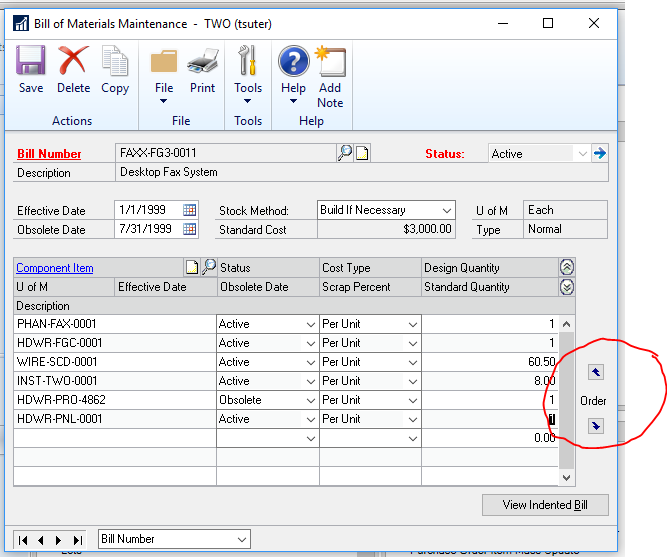
You could force the sort on the Report in RW Sort Options to be by component item number but I think you may want to show your staff where they can change the sort on the BOM themselves.This is done on the BOM itself using the up and down arrows on the right hand side. See below.
You can also use “right click insert row or delete row” to insert and delete rows where you want them.
Then when the BOM prints, the components will be in the exact order the BOM is set up for. This is better than you forcing a sort on the Report. Let the BOM users set and maintain the sort.
——————————
Thaddeus Suter
Retus, Inc
HELOTES TX
——————————
——————————————- -
@thaddeussuter Thank you for responding. Your response made me realize that I had not posted my question correctly and I appreciate you taking the time to respond to the question I did post.?
What I’ve been asked to do is get the POSTED BOM ASSY to print out in alphanumeric order, not just the actual list of materials.
I’m wondering if going into RW Sort Options for the posted BOM would do the trick and I’ll take a look at that. A concern I have with my co-workers request is “how would this sort option work for all the sub-assy”? Would it alphanumericalize within the sub-assy or take ALL the components (no matter where they are located within the BOM and sort them all alphanumerically?
Thank you
Pam——————————
Pam Palmer
Project Mgr/Database Admin
Temple, Inc.
Decatur AL
——————————
——————————————- -
Thaddeus Suter
MemberMarch 15, 2019 at 12:15 PM
If you set the sort on the BOM Card, then all the later reports will also follow that sort including Sub Assembly components.
So Reports – Inventory – Analysis – Assembly Analysis for example would print sorted the way the BOM was setup.However, if you change the sort on the BOM Assembly cards, the change is NOT retroactive to Posted Assemblies. Only to new Assemblies posted after you make the sort change.
If you start changing the SORT in the Report Writer Sort Options then it will not matter what the users do in the BOM Assembly cards sort arrows
I hope this is SORTA clear. Pun intended!
——————————
Thaddeus Suter
Retus, Inc
HELOTES TX
——————————
——————————————- -
@Thaddeussuter
LOL – loved the PUN. You explained this very well indeed.Thank you,
Pam?——————————
Pam Palmer
Project Mgr/Database Admin
Temple, Inc.
Decatur AL
——————————
——————————————-
Pam Palmer replied 7 years, 7 months ago 1 Member · 0 Replies -
-
0 Replies
Sorry, there were no replies found.
The discussion ‘Printing a BOM alphanumberically’ is closed to new replies.
