Printer adjustment

  • Printer adjustment

    Posted by Teresa Waters on April 1, 2020 at 10:11 am
    • Teresa Waters

      Member

      April 1, 2020 at 10:11 AM

      HELP!
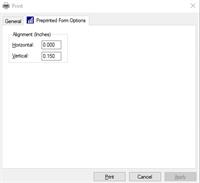
      I set the printer adjustments to move my w2 information down a bit and now it does it for all the other forms.Ā  I’ve tried to set it back to zero, but it just holds for that print run.Ā  Where can I switch it back so it holds for all preprinted forms?
      Thanks,

      ——————————
      Teresa Waters
      Controller
      La Crosse Milling Company
      Cochrane WI
      ——————————

    • Steve Erbach

      Member

      April 1, 2020 at 10:28 AM

      ,

      I presume that you mean that you adjusted it on the printer itself? Or in the printer properties in Windows?

      Regards,?

      ——————————
      “Sparkly” Steve Erbach – Green Bay, WI
      Co-Chair, GPUG WI (Green Bay) Chapter
      Blog: https://www.gpug.com/blogs/steve-erbach
      Twitter: twitter.com/serbach

      —————
      Excel Webinar List as of 12-Nov-2019
      ——————————
      ——————————————-

    • Teresa Waters

      Member

      April 1, 2020 at 10:42 AM

      It is when I say print to a form and the preprinted form options tab is there on the print window.

      ——————————
      Teresa Waters
      Controller
      La Crosse Milling Company
      Cochrane WI
      ——————————
      ——————————————-

    • Steve Erbach

      Member

      April 1, 2020 at 12:12 PM

      ,

      I’ve never had occasion to use that adjustment form before!

      My SWAG (Scientific Wild Ass Guess)? is thatĀ  the defaults for the printer could be set in GP Printer Preferences on the Microsoft Dynamics menu. I suppose you’ve tried that already?

      Regards,

      ——————————
      “Sparkly” Steve Erbach – Green Bay, WI
      Co-Chair, GPUG WI (Green Bay) Chapter
      Blog: https://www.gpug.com/blogs/steve-erbach
      Twitter: twitter.com/serbach

      —————
      Excel Webinar List as of 12-Nov-2019
      ——————————
      ——————————————-

    • Sheila Jefferson-Ross

      Member

      April 9, 2020 at 10:15 PM

      – you’ll find the settings saved in the dex.ini file on your machine.Ā Ā 

      Look in C:Program Files (x86)Microsoft DynamicsGPXXXXDatadex.ini.Ā  You can open the file in Notepad to view and edit.Ā  Make a copy of the file in case you change something you shouldn’t.

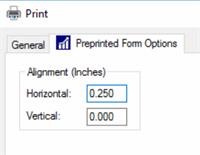
      In my test I changed the printer alignment settings in GP to 0.250 and 0.000 – my printer in this example is a PDF printer.

      Printer Alignment changes

      A line is added in the Dex.ini as follows::Ā  Ā 
      Ā  Ā PRNTALGN Microsoft Print to PDF=250;0

      To remove the settings I could remove this line from the dex.ini file or change both numbers back to 0.

      Hope this helps.
      Sheila
      ?

      ——————————
      Sheila Jefferson-Ross
      Senior Consultant
      Sheila Jefferson-Ross Co.
      Rocklin CA
      ——————————
      ——————————————-

    Teresa Waters replied 6 years ago 1 Member · 0 Replies
  • 0 Replies

Sorry, there were no replies found.

The discussion ‘Printer adjustment’ is closed to new replies.

Start of Discussion
0 of 0 replies June 2018
Now

Welcome to our new site!

Here you will find a wealth of information created for peopleĀ  that are on a mission to redefine business models with cloud techinologies, AI, automation, low code / no code applications, data, security & more to compete in the Acceleration Economy!