


Dynamics GP
Public Group
Active a day ago
Dynamics GP
Organizer:
- JOSE Organized by
-
-

PA Billing Entry Distribution(s) contain errors in GP2018
-
PA Billing Entry Distribution(s) contain errors in GP2018
Posted by DSC Communities on February 19, 2019 at 5:21 pm-

John Bagg
MemberFebruary 19, 2019 at 5:21 PM
?Good afternoon. I have an issue in Project Accounting Billing Entry, where I’m receiving a Distribution error.
I’ve done the following:
1. Since a payment was made on a deposit from a different project, I had to manually move the deposit payment from one project to another by updating the PA01201 for ACCTAMT and PAPROJNUMBER. This way, I can apply the retainer to the new project. We’ve done this hundreds of times in the past.
2. I’ve entered the fee information on the Billing Entry, applied the retainer, and now the summary distribution won’t work due to the following message. “The following errors were found while validating distributions: Distribution(s) contain errors. The receivables distribution(s) does not equal the actual amount. The Sales distribution(s) does not equal the actual amount.”
3. I’ve tried changing the Fee Distribution Entry GLs, entering “Other” types on the Billing Transaction Entry Distribution, etc., but nothing works. If I don’t apply the retainer to the fee, it’s fine.If anyone has a solution to this, or a better way to move retainer payments from one project to another, the help would be appreciated.
——————————
John Bagg
Project Accounting Manager
Salient Management
Horseheads
—————————— -
Thaddeus Suter
MemberFebruary 19, 2019 at 7:16 PM
Its not your 1. above even though people may says that but that SQL update is an OK way to move Retainer only because PA01201.ACCAMNT is not a reconciled column in PA Reconciles. If it was a reconciled column then you would not want to do that.
If I take a guess, I would say look at your PA account sourcing matrix under setup project project fee accounts and make sure the deferred revenue accounts exist for the Retainer Fee. Also make sure the Retainer Fee has been added to destination project you are billing. The account/fee may not exist in PA43001.
I’m on GP2018R2 and do not get a distributions error when applying and billing retainer for projects that retainer has been changed in PA01201.
Here is what the summary distribution should look like for a T&M with Applied Retainer of $200: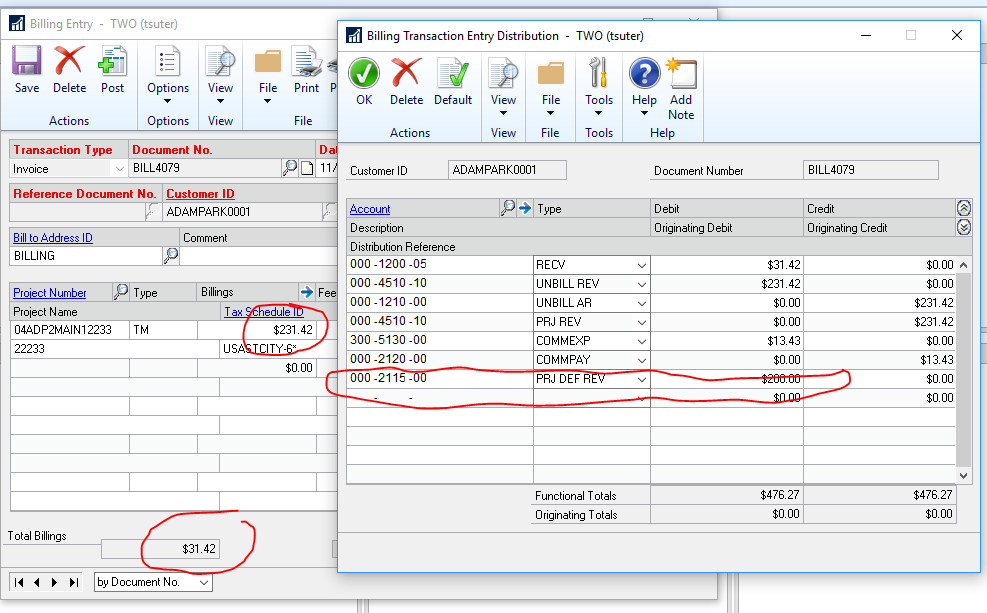
——————————
Thaddeus Suter
Retus, Inc
HELOTES TX
——————————
——————————————- -
John Bagg
MemberFebruary 20, 2019 at 11:08 AM
?Thaddeus. Thank you for the help. I agree that the SQL update is fine since it’s not a reconciled column in PA Reconciles. However, we are cautious about using it since there’s no audit trail, but have never been given a better solution.In regards to my issue, your suggestion was perfect. By adding the “Deposit” Fee to the new project, everything worked fine.
All the best,
John——————————
John Bagg
Project Accounting Manager
Salient Management
Horseheads
——————————
——————————————- -
Hi
I disagree whole-heartedly with the statement that it is okay to update tables for these types of mis-application. The UI should have been used to void entries and enter them to the correct project – as this information is in several other tables.
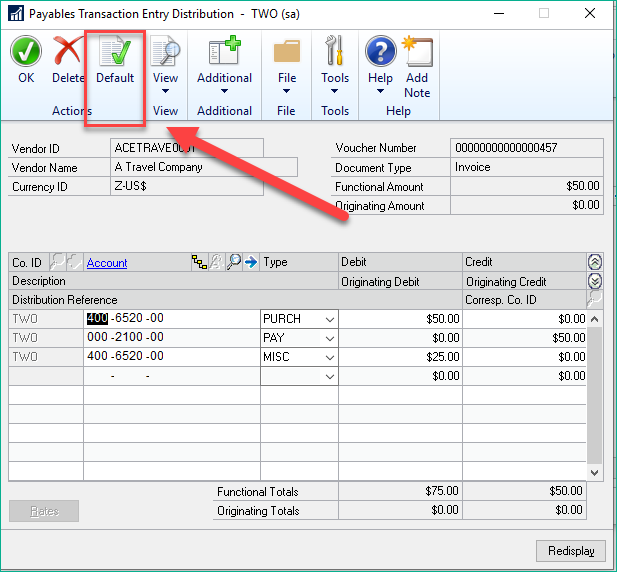
With that said – the best way to find out what GP wants you to do with distributions is to hit the “DEFAULT” ?? at the top of any distributions window.
You will then find what GP expects the distributions to be.
If you disagree with the distributions you will have to make changes to Project setups, etc to allow for the distribution types you are looking for – keep in mind it is NOT the account numbers, but the “Distribution Types” that are causing your nightmare.
——————————
Jo deRuiter, MCP, DCP
“That GP Red Head”
AISLING DYNAMICS CONSULTING, LLC
WEBSITE: https://aislingdynamics.com/
BLOG: https://community.dynamics.com/gp/b/gplife
770-906-4504 (Cell)
——————————
——————————————-
DSC Communities replied 7 years, 1 month ago 1 Member · 0 Replies -
-
0 Replies
Sorry, there were no replies found.
The discussion ‘PA Billing Entry Distribution(s) contain errors in GP2018’ is closed to new replies.
