Outstanding checks

  • Outstanding checks

    Posted by Unknown Member on February 19, 2019 at 12:11 pm
    • Heidi Love

      Member

      February 19, 2019 at 12:11 PM

      ?How do I run an outstanding check list in Great Plains?Ā  Do I need to complete a bank reconciliation to do it?
      thanks!
      Heidi

      ——————————
      Heidi Love
      Industrial Metal Supply Co
      Sun Valley CA
      ——————————

    • Maureen Martin

      Member

      February 19, 2019 at 2:26 PM

      @Heidi Love
      Heidi – has anyone in your organization used the Bank Reconciliations option before?
      1)Ā  If they have, follow the steps below (1a thru 1d).Ā  If they have not, then jump to Step 2, at the bottom of this post.Ā  Steps 1a thru 1d will allow you to see a list of checks that were outstanding on a previous reconciliation.Ā  Here’s the path – it’s kind of buried in a place that isn’t where I would look for it intuitively:
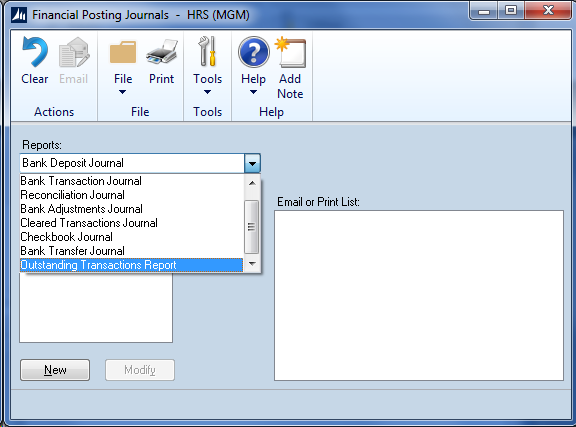
      1a)Ā  Financial > Reports > Bank Posting Journals
      1b)Ā  Then from the pulldown window, select the Outstanding Transactions Report.
      Oustanding Transactions Report

      1c)Ā Ā Ā  Then select a report that has previously been set up, (ours is called OS Checks).Ā  If there are none, go to 1d).
      If there is a report set up, then select it from the pulldown menu.Ā  In the From/To fields, use the lookup icon to select a code from the list of Audit Trail Codes available — I would select the latest one, or a range of the latest ones, which will give you the last reconciliation done. (If your company uses Bank Rec for more than one bank account, you may have to sift through a few Reconciliations to get the account you need).

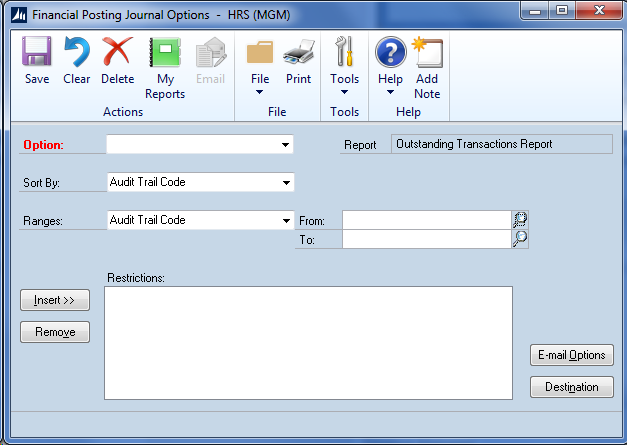
      1d)Ā  If there are no reports set up on the Outstanding Transactions Report, simply click the “new” button and on the window below, give it a name in the Option field (top of the window).Ā 
      Oustanding Transactions Report SetupYou are limited as to the parameters the report calls for, so just give it a name and save it.Ā  Then use the From/To fields to specify which reports you wish to view (example CMADJ00000752 on our system gives a recent reconciliation).

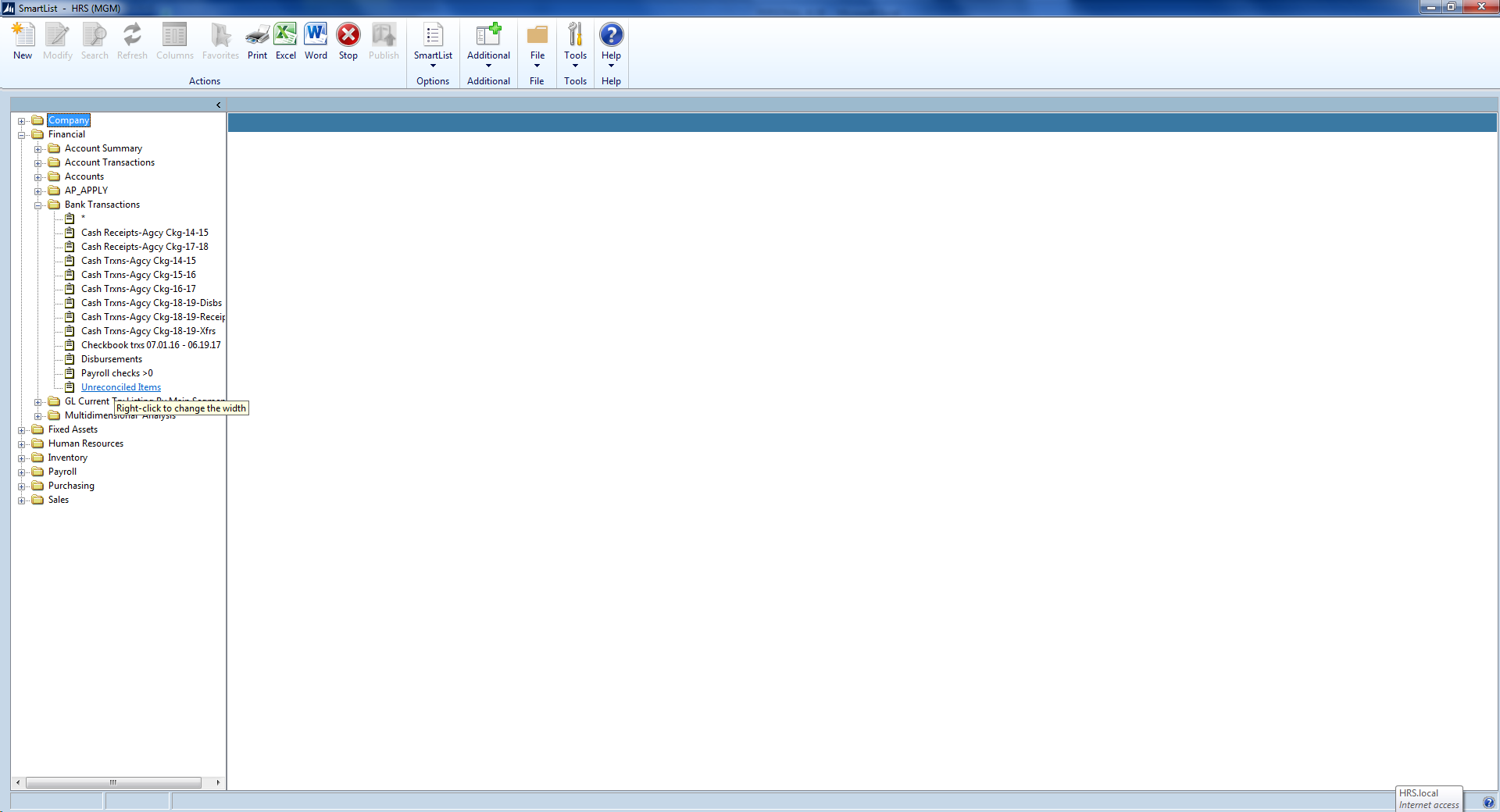
      2)Ā  If your company has not yet used Bank Reconciliation, or if you prefer SmartList as an easier option, you can set up a Smart List similar to the one we’ve set up. Under SmartList, navigate to:
      SmartList > Financial > Bank Transactions.
      SmartList Bank transactionsĀ 
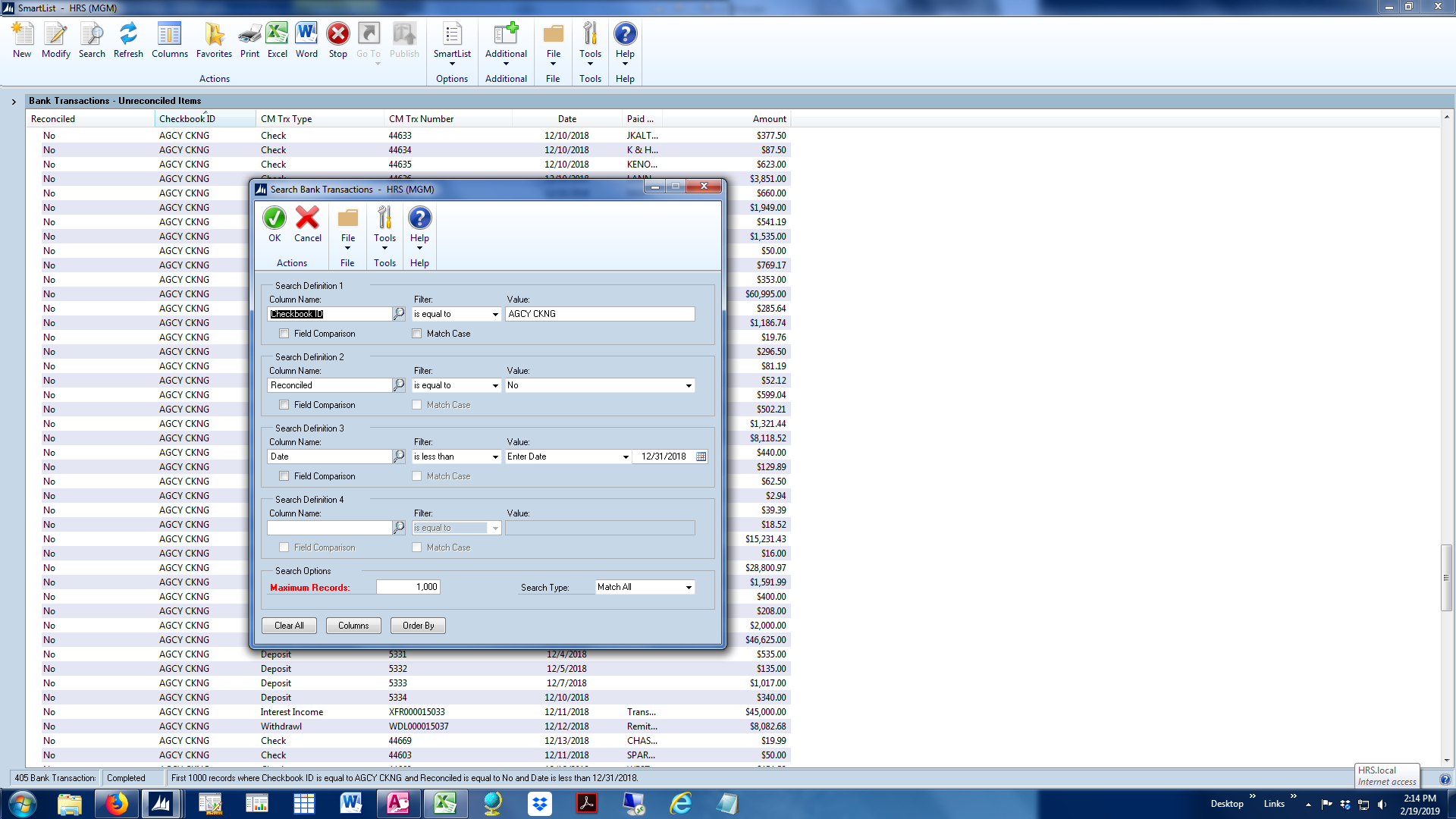
      We have set our SmartList up to include the fields we need.Ā 
      Ā Ā Ā Ā  Reconciled = No
      Ā Ā Ā Ā  Checkbook ID – enter the name of your checkbook
      Ā  Ā Ā  CM Trx Type – what type of field is this (check, deposit, withdrawal, etc)
      Ā  Ā Ā  CM Trx Number – transaction number
      Ā  Ā Ā  Date
      Ā  Ā Ā  Paid To Rcvd From
      Ā  Ā Ā  AmountĀ 
      Smart List of Outstanding Transactions
      You can use the date field to specify your cutoff date.Ā  Above, “Date is less than 12/31/18” will give us all trxns Outstanding as of 12/31/18.

      Let us know how it goes and pop back in with questions!

      Maureen

      ?

      ——————————
      Maureen Martin
      Finance Manager
      Home Repair Services
      Grand Rapids MI
      ——————————
      ——————————————-

    • Heidi Love

      Member

      February 19, 2019 at 3:33 PM

      ?Thank you Maureen!Ā  I will try it.

      ——————————
      Heidi Love
      Industrial Metal Supply Co
      Sun Valley CA
      ——————————
      ——————————————-

    Unknown Member replied 6 years, 11 months ago 1 Member · 0 Replies
  • 0 Replies

Sorry, there were no replies found.

The discussion ‘Outstanding checks’ is closed to new replies.

Start of Discussion
0 of 0 replies June 2018
Now

Welcome to our new site!

Here you will find a wealth of information created for peopleĀ  that are on a mission to redefine business models with cloud techinologies, AI, automation, low code / no code applications, data, security & more to compete in the Acceleration Economy!