


Dynamics GP
Public Group
Active 3 weeks ago
Dynamics GP
Organizer:
- JOSE Organized by
-
-

Non GP/Dynamics Related Useful Tools
-
Non GP/Dynamics Related Useful Tools
Posted by Kyle Malone on July 16, 2018 at 1:31 pm-
The New Orleans GPUG chapter is coming up and I was sitting back and thinking about potential round table discussions. One topic that came to mind is the “other” tools that are used on a daily basis by either admins and end-users that help make work lives easier. This wouldn’t include any GP ISVs or your well-known Dynamics related 3rd parties but something else…
My “cannot go without” is ASAP-Utilities. It’s an Excel Add-In that’s basically a GUI for advanced macros and formulas. It’s very handy when developing reports and integrations or working with large amounts of data. On example is there’s an option available to quickly remove trailing spaces from data that you receive from GP SQL tables (Yay!).
I’m always looking for ways to improve the workday and make better decisions. I plan on having a similar conversation with our local chapter group and will report back on what we discuss.
Without this turning into marketing post, does anyone else use something on a daily basis that they cannot go without? Maybe an add-on or some sort of product that’s outside of the well-known Dynamics space?
——————————
Kyle Malone, CPA
Dynamics GP Administrator
CGB Enterprises, Inc.
Covington, LA
Kyle.Malone@cgb.com
985-867-3591
—————————— -

Steve Erbach
MemberJuly 16, 2018 at 3:17 PM
,I see that you’re a GP Admin. I will say that I use a couple utilities every day that help me:
- SSMS Tools Pack, by Mladen Prajdic. SQL snippets; search in results pane; and SQL history; + about 30 more tools built-in. I have every query I’ve ever executed back to mid-2013 because of SSMS Tools Pack. I never lose track of what I was doing in SSMS.
- [FREE] Greenshot screen capture program.
- [FREE] AutoHotkeys Windows macro utility.
- Deskcalc calculator with virtual paper tape.
- [FREE] Notepad++… why are you still using Windows Notepad?!
- [FREE] Keypass password vault
- [FREE] IrfanView image viewer
- [FREE] Paint.net image editor
- RegexBuddy regular expression tool; one of the best utilities I’ve ever used.
- PowerGREP; fabulous global search and replace tool for Windows
- Windows PowerShell, of course!
- Microsoft OneNote
- Camtasia Studio; excellent video capture and editing
?All excellent tools that I recommend highly.
Sincerely,
——————————
“Sparkly” Steve Erbach – QMS Manager and Business Development Analyst
GLC Minerals, LLC – Green Bay, WI
Co-Chair, GPUG WI (Green Bay) Chapter
GP 2016 R2 (16.00.0579) / MR 2012 CU16
Blog: https://www.gpug.com/blogs/steve-erbach
Twitter: twitter.com/serbach
——————————
Welcome to Dynamics!
You do not have permission.
Call Steve.
(hat tip: Lou Spevack)
——————————
——————————————- -
Aleiha Hanson
MemberJuly 16, 2018 at 3:41 PM
?My team and I are avid users of MS Planner. Love it!
Keeps us organized for short-term and long-term projects, goals and more.——————————
Aleiha Hanson
Royal Basket Trucks, Inc – IT Manager
GPUG Milwaukee WI Chapter Leader
ahanson@royal-basket.com
——————————
——————————————- -
Today I presented a webinar for GPUG that outlines free resources within GP and outside. GP Resources Galore.
The deck and recording should be posted shortly. that should have some great tools that you can show folks.——————————
Kim Peterson
218-862-5002
Kim@DynamicsConnections.com
#KimPetersonGP
——————————
——————————————- -
Fantastic stuff everyone, thank you! I’ll be a busy person the next few days digging into these to see what I can add to my personal tool belt.
, please do share when available!
??——————————
Kyle Malone, CPA
Dynamics GP Administrator
CGB Enterprises, Inc.
Covington, LA
Kyle.Malone@cgb.com
985-867-3591
——————————
——————————————- -
While we wait for the recording and deck. I posted my deck on OneDrive for anyone to grab: Free Resources Webinar.pptx
Live remove preview 
Free Resources Webinar.pptx Store photos and docs online. Access them from any PC, Mac or phone. Create and work together on Word, Excel or PowerPoint documents. View this on Live > ——————————
Kim Peterson
218-862-5002
Kim@DynamicsConnections.com
#KimPetersonGP
——————————
——————————————- -
Joni Finnell
MemberJuly 18, 2018 at 11:19 AM
?:Awesome information!! Thanks!?
——————————
Joni Finnell
GP Projects/Troubleshooter
Consumer Support Services, Inc.
Newark OH
——————————
——————————————- -
Tiffany Ziegler
MemberJuly 17, 2018 at 12:28 PM
Great idea for a discussion! I may borrow this for one of our meetings 🙂Also in the spirit of Excel, I ?use Kutools for Excel which sounds similar to your add in. There is a small cost (I think around $40 one time) but it adds some nice functionality. I use it to count the number of unique cells in a data range (i.e. one column may contain multiple rows with the same ID number in it, but I only want Excel to count it one time, etc.). To be honest, I know the add in has much more capabilities than that, but that’s the purpose I installed it for and haven’t had time to play around with it otherwise. I know there is a formula helper for commonly used formulas:
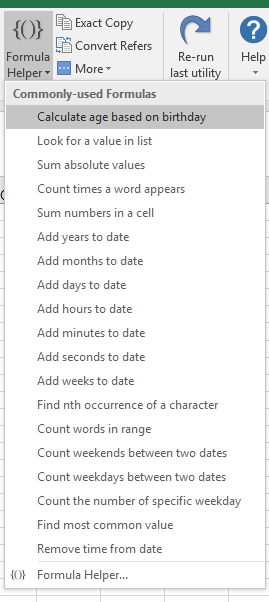
And here is the main toolbar:
——————————
Tiffany Ziegler
Vice President & Controller
Velcor Leasing Corporation
Madison WI
——————————
——————————————- -
Bruce Strom
MemberJuly 17, 2018 at 2:42 PM
This is a developer utility that I do not use often, but when needed it is VERY useful.It is a hex file viewer, it views the ACTUAL content of a text file.
You can also view the string/text fields of SQL tables if you copy their contents to a text file.This is needed because string or text fields, (i.e., names) will fail a comparison test when one of them has high-bit characters (i.e., tabs, line feeds, CR, EOL) that look like spaces in Notepad, but are really something very different. You especially run into this when you are doing EDI/EFT/import projects.
Some legacy environments are inconsistent on whether lines end with both a CR (carriage return) and LF (line feed) character, or maybe just LF.
I am using an ancient version, the newest version has alot of new capabilities.
Fileviewer remove preview 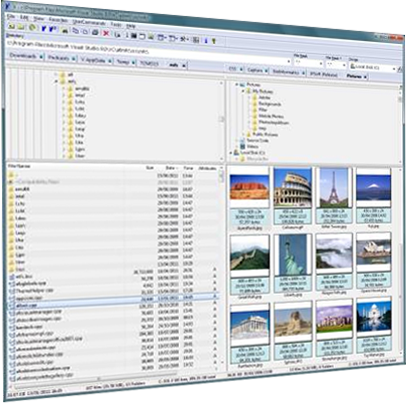
The V File Viewer The V File Viewer. A file manager for Windows with a powerful inbuilt text file viewer. View this on Fileviewer > ——————————
Bruce Strom
Programmer Analyst
Associated Grocers of Florida / Supervalu
sunrise FL
——————————
——————————————-
Kyle Malone replied 8 years, 3 months ago 1 Member · 0 Replies -
-
0 Replies
Sorry, there were no replies found.
The discussion ‘Non GP/Dynamics Related Useful Tools’ is closed to new replies.
