Navigation Lists – Owner vs. Read Only

  • Navigation Lists – Owner vs. Read Only

    Posted by Amber Bell on September 6, 2019 at 6:51 pm
    • Amber Bell

      Member

      September 6, 2019 at 6:51 PM

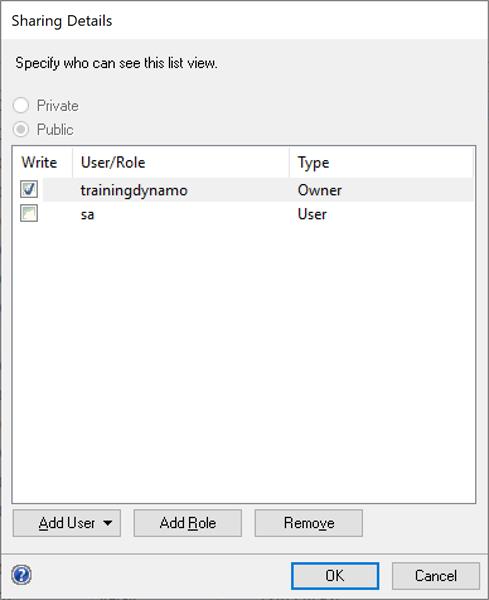
      I am pretty sure in older versions of GP that when a Navigation List was created, the person that created it was setup as the “Owner” by default. Other users could see the Navigation List view but it was tagged as “Read Only”…they couldn’t modify without doing a “Save As”. The only way that they could change it would be if “Write” was checked under Sharing Details.

      I am testing in GP2018R2 and when I create new Navigation List view, all users who can see the Navigation List…can modify and delete it…even when they are not setup as “Owners”. The only thing that other users cannot change is which company the Navigation List is visible to and whether or not it is Private or Public.

      Does anyone know how this is supposed to work?

      Navigation List Sharing Details

      ——————————
      Amber Bell
      Training Dynamo LLC
      Email: amber@trainingdynamo.com
      Website: http://www.trainingdynamo.com
      Twitter: @trainingdynamo
      ——————————

    Members

    Amber Bell replied 6 years, 11 months ago 1 Member · 0 Replies
  • 0 Replies

Sorry, there were no replies found.

The discussion ‘Navigation Lists – Owner vs. Read Only’ is closed to new replies.

Start of Discussion
0 of 0 replies June 2018
Now

Welcome to our new site!

Here you will find a wealth of information created for peopleĀ  that are on a mission to redefine business models with cloud techinologies, AI, automation, low code / no code applications, data, security & more to compete in the Acceleration Economy!