Modifying Word Templates

  • Modifying Word Templates

    Posted by Pam Palmer on December 15, 2020 at 3:29 pm
    • Pam Palmer

      Member

      December 15, 2020 at 3:29 PM

      We are on GP 2018 and the decision has finally been made to start using word templates.
      I’ve been researching and testing this process in our test database and am completely flumoxed.

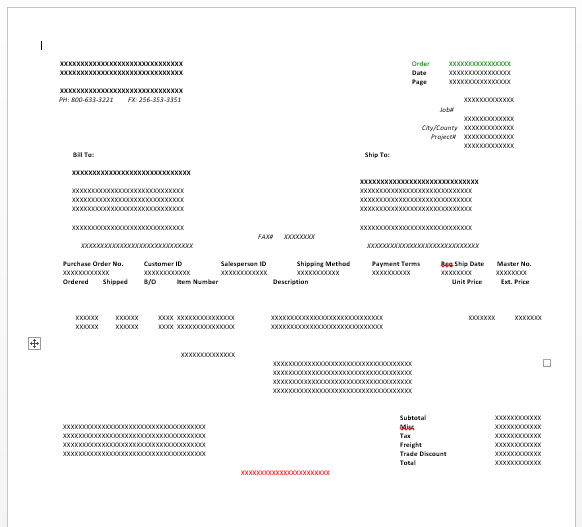
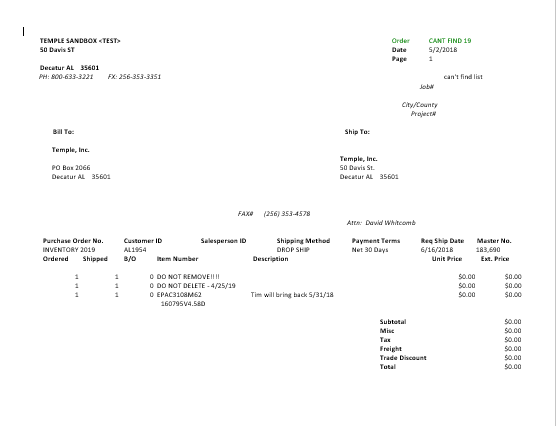
      All the documentation I see shows the xml and the word template output with lines (both horizontal and vertical)…yet ours modified reports (both xml and templates) are completely void of any graphics.

      Attached is an example of the modified report in xml and again in word.

      modified report

      Am I supposed to add all the color and lines myself?

      If I look at the standard template (without any changes whatsoever) I get this:

      WHAT am I doing wrong?

      ——————————
      Pam Palmer
      Project Mgr/Database Admin
      Temple, Inc.
      Decatur AL
      ——————————

    • Charles Allen

      Member

      December 16, 2020 at 2:14 AM

      When you created the template, did you base it on an existing template or did you start from scratch?

      ——————————
      Charles Allen
      Senior Managing Consultant
      BKD Technologies
      Houston, TX
      ——————————
      ——————————————-

    • Pam Palmer

      Member

      December 16, 2020 at 7:39 AM

      –
      I guess it would be from scratch?

      I followed the instructions concerning printing all your modified reports to the screen and then saving them as an .xml file.
      Then I went to Template Maintenance, selected the modified report then hit “modify” to bring up word.Ā  I hadn’t made any changes in the template so I left as is simply because there is no graphics/lines etc and that is what I showed.

      I understand if I make changes to a Word template then I need to remove the original source and add the new source.

      If I go with the original default, then I would have to go back into Report Writer and add all the fields that we want to show and basically make a new modified report.

      My other issue is that I am having to use another computer with Word 2013 on it since Word 365 will no longer print templates because of that update in Sept and we’re trying to figure out how to get around that one but first I need to make the templates, then we’ll worry about printing and whether we’ll be able to email.?

      ——————————
      Pam Palmer
      Project Mgr/Database Admin
      Temple, Inc.
      Decatur AL
      ——————————
      ——————————————-

    Pam Palmer replied 5 years, 10 months ago 1 Member · 0 Replies
  • 0 Replies

Sorry, there were no replies found.

The discussion ‘Modifying Word Templates’ is closed to new replies.

Start of Discussion
0 of 0 replies June 2018
Now

Welcome to our new site!

Here you will find a wealth of information created for peopleĀ  that are on a mission to redefine business models with cloud techinologies, AI, automation, low code / no code applications, data, security & more to compete in the Acceleration Economy!