

Missing Checkbox for Bank Reconciliation after upgrading to v18.3

  • Missing Checkbox for Bank Reconciliation after upgrading to v18.3
    Posted by Pam Palmer on March 1, 2021 at 1:58 pm
    • Pam Palmer

      Member

      March 1, 2021 at 1:58 PM

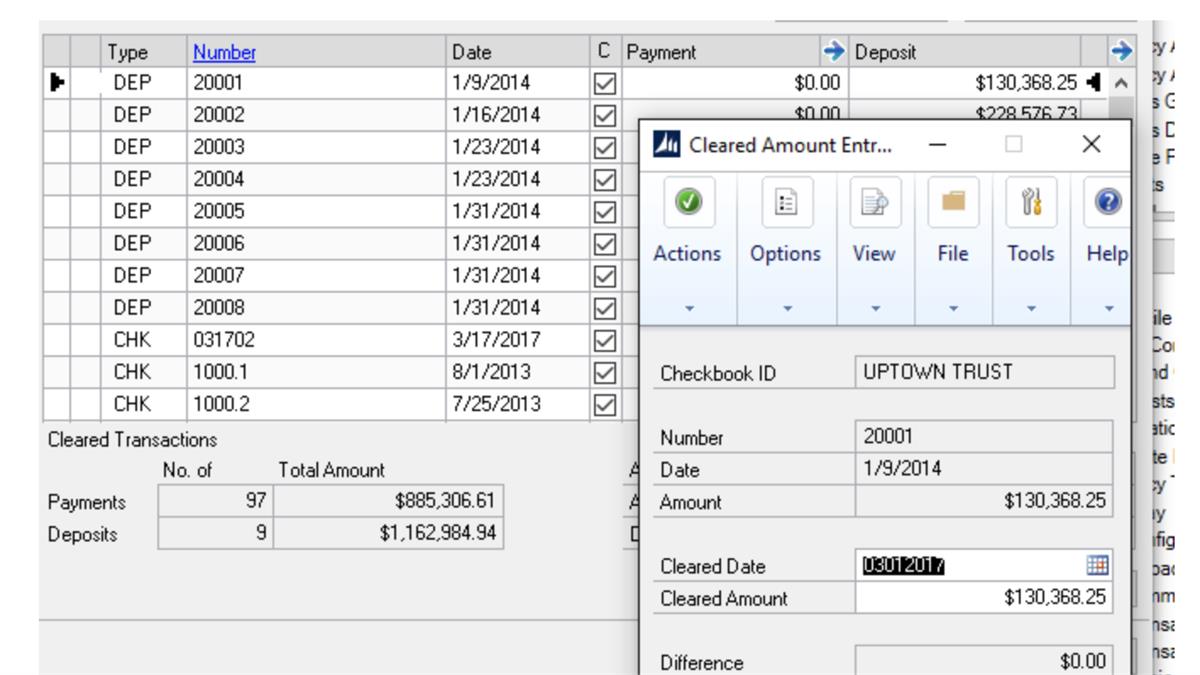
      We recently upgraded from GP 18.0 to 18.3 a week ago. The owner has pointed out to me that a checkbox is missing in bank reconciliation:

      “One thing I noticed this morning, on the example, it shows a column that used to be available prior to the upgrade… 
      The column, C, is still there but the checkbox is no longer present, nor when you mark the bank item do you get a ‘checkmark.’
      Ā We can still do the reconcile but it does create a higher level of difficulty for the operator.”

      Since this is the CEO of the company, I’m reaching out to see if there are any solutions?Ā  Or if it’s just an error in our system?

      Thank you,
      Pam

      #GP2018 v18.3
      #bankreconciliation
      #financials

      ???

      ——————————
      Pam Palmer
      Project Mgr/Database Admin
      Temple, Inc.
      Decatur AL
      ——————————

    • Samantha Higdon

      Member

      March 2, 2021 at 7:45 AM

      Hi ,

      My local GP is on GP 18.?3.1173, and my bank reconciliation shows the checkbox and the checks when they are marked (see below).

      Do you happen to run GP on a terminal server?Ā  I have seen where check boxes can sometimes not appear if you’re using terminal servers or sometimes with the use of Citrix.Ā 

      A few follow up questions to dig into:
      1.) Is it happening to other users on other machines?
      2.) Do you run on a terminal server?Ā  If so, does it happen on the SQL server install or on a local install (meaning installed directly on a computer as opposed to a server everyone accesses).
      3.) Does it happen to the same person if they log into GP on a different machine?

      Just a few things to consider and look into.

      Thanks,

      Samantha

      ——————————
      Samantha Higdon ,CPA,CGMA
      Consultant
      Lagom, LLC
      Carmel IN
      ——————————
      ——————————————-

    • Pam Palmer

      Member

      March 2, 2021 at 7:55 AM

      Samantha – thanks for responding.Ā Ā 
      We do not use a terminal server.
      Only the CEO and his wife use that module so I will ask them to change log-ins and to try logging in from other machines.Ā  It’s possible that we will need to give the wife a new log-in as one of the issues that popped up after the upgrade, our payables person was no longer able to edit purchase orders. I checked her security, roles, tasks etc and everything was set correctly.Ā  I then logged in as me on her machine and was able to do what was needed.Ā  I then gave her a new log in and she was able to do everything she should be.Ā  We figured it was a quirk.

      I’ll have the CEO and his wife check this out and I will give her a new log-in if necessary.

      Thank you,
      Pam

      ——————————
      Pam Palmer
      Project Mgr/Database Admin
      Temple, Inc.
      Decatur AL
      ——————————
      ——————————————-

    • Pam Palmer

      Member

      March 2, 2021 at 8:37 AM

      Had the CEO log in and all was well…..he had his wife sign in and it worked for her again!Ā  CEO said all it “apparently” took was a simple re-boot.

      Thanks for the response.

      Pam

      ——————————
      Pam Palmer
      Project Mgr/Database Admin
      Temple, Inc.
      Decatur AL
      ——————————
      ——————————————-

    Pam Palmer replied 5 years, 8 months ago 1 Member · 0 Replies
  • 0 Replies

Sorry, there were no replies found.

The discussion ‘Missing Checkbox for Bank Reconciliation after upgrading to v18.3’ is closed to new replies.

Start of Discussion
0 of 0 replies June 2018
Now

Welcome to our new site!

Here you will find a wealth of information created for peopleĀ  that are on a mission to redefine business models with cloud techinologies, AI, automation, low code / no code applications, data, security & more to compete in the Acceleration Economy!

