


Dynamics GP
Public Group
Active 4 weeks ago
Dynamics GP
Organizer:
- JOSE Organized by
-
-

Mass Account Deactivation
-
Mass Account Deactivation
Posted by Denise Lewis on April 10, 2018 at 2:56 pm-
I want to mass deactivate thousands of accounts that aren’t in any sequential order. I read a post on the Microsoft GP Communities Forum from years ago about using the Navigation List to do it, but when I created a Navigation List of the account numbers and whether the account is active or inactive, I get no results. Can someone help with how to build the Navigation List to mass deactivate accounts? Thanks!
——————————
Denise Lewis
Folience
Cedar Rapids IA
—————————— -
?Hi
I think this is the post you are thinking of:
How to inactive the account? – Microsoft Dynamics GP Community Forum
Dynamics remove preview 
How to inactive the account? – Microsoft Dynamics GP Community Forum Read the forum post on the Microsoft Dynamics Community. View this on Dynamics > Couple of things though. You need SmartList Builder’s Navigation List Builder, AND I just tried it on my test system and there is NO action for inactivating accounts.
If you have a ton of them then a SQL Script can be run to inactivate them, but be careful!!
I see that the Mass Modify won’t work for you because they are not chronological. I know this is quite a pain, but you could use the Nav list or a SmartList with a Go-To and just open them one at a time and inactivate them from the list.
?
——————————
Kindest Regards,Jo deRuiter
“That GP Red Head”
Senior Financial Systems Consultant
Advanced Credentialed Professional-Dynamics GP
Heartland Business Systems, LLC
Milwaukee, WI
770-906-4504 (Cell)
——————————
——————————————- -
?Hi
? has given you a great method. However, I wanted to share with you my technique for writing the complex scenarios – I use Excel and then copy and paste my script into SQL.
I would download a SmartList of Accounts after you’ve added the Account Index to the SmartList – I’d also recommend filtering this as much as possible to save needing to delete the accounts you want to keep.
??
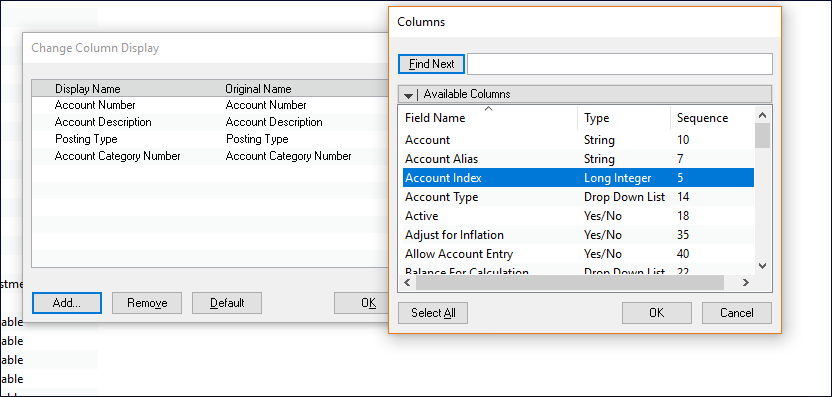
Then run this out to Excel and add some code to create your SQL Script:
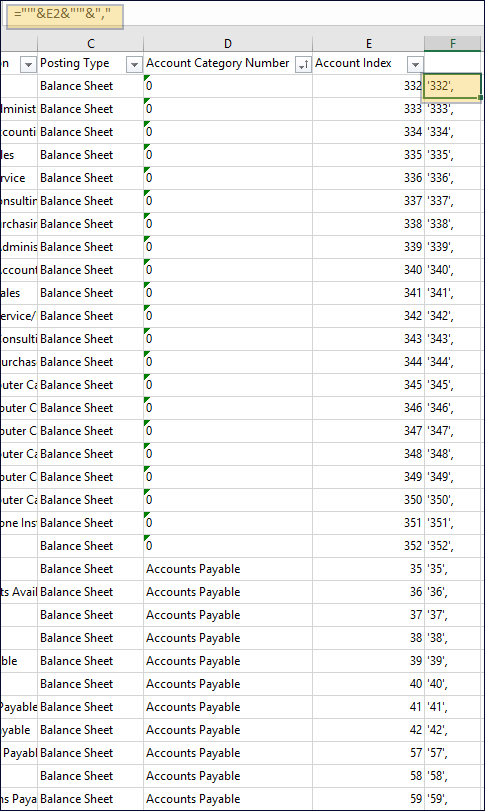
Then create the script in Excel like this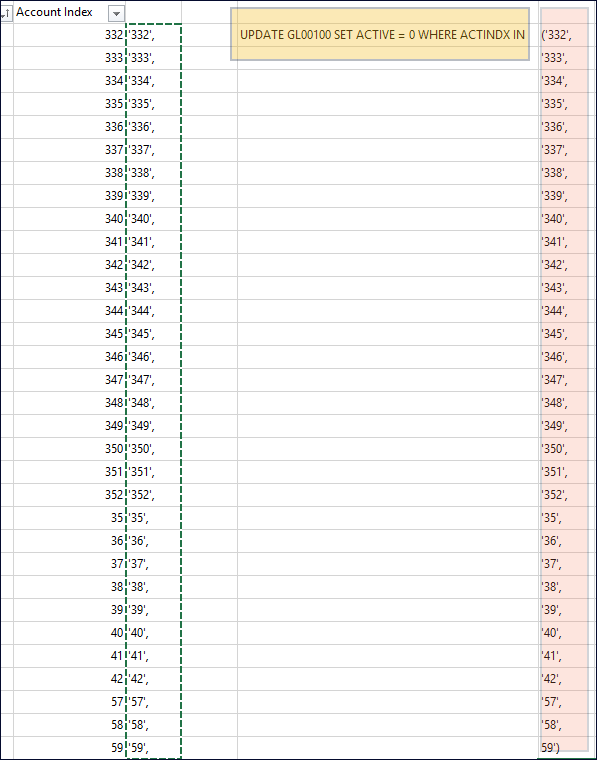
Copy and paste the values from the account index concatenation – be sure to add an open parenthesis on the fist row and to add a closed parenthesis on the last row.
Then just copy and paste this into SQL and run it. *Do as Shawn says and get a great backup of either the database or the table – or both before running this*
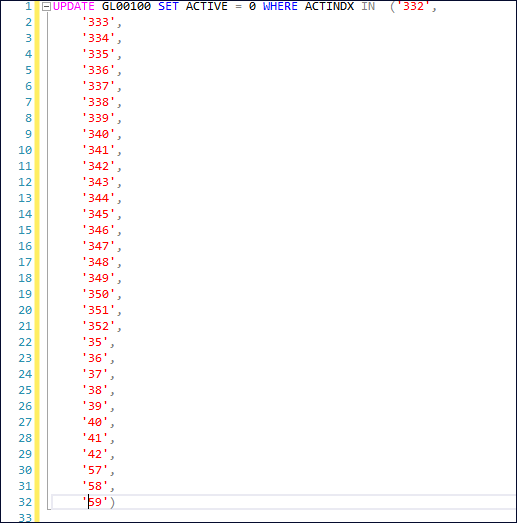
When I have to do multi row scripts I always build them in Excel – it’s much faster and with the copy and paste functionality it sure makes it easier!!
——————————
Kindest Regards,Jo deRuiter
“That GP Red Head”
Senior Financial Systems Consultant
Advanced Credentialed Professional-Dynamics GP
Heartland Business Systems, LLC
Milwaukee, WI
770-906-4504 (Cell)
——————————
——————————————- -

Thaddeus Suter
MemberApril 10, 2018 at 4:17 PM
Ahh, the old Gazette Company. We deal with thousands or records all the time and since they are usually not sequential, this is a SQL exercise for Kevin or one of the Seans.You need to get the accounts you want to inactivate into Excel with two columns: one being the account number (called account string) and the other being the account index.
See Smartlist below: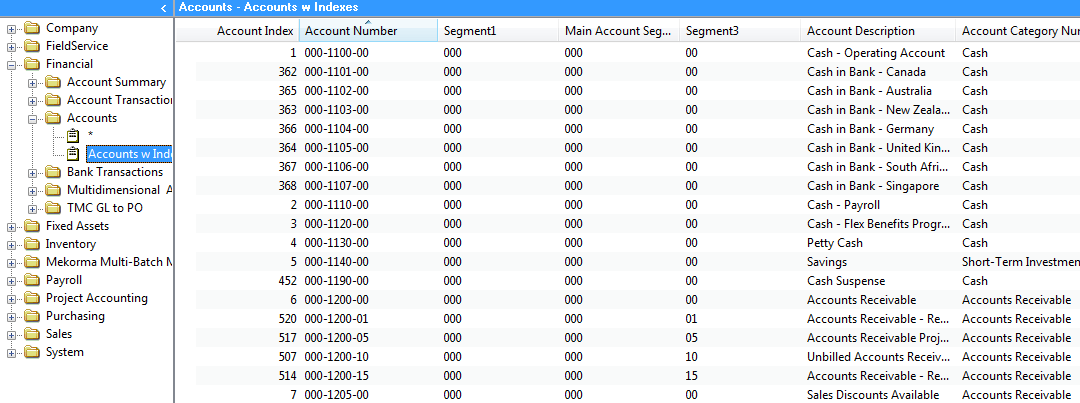 Now have Kevin or Sean create a two column SQL table in the database like I show below. Mine is called ZZGLINACTIVES and use the SQL Excel wizard to load up your thousands of accounts from Excel into this new table with these two columns. ACTINDX and ACTNUMST Assign DYNGRP permsissions.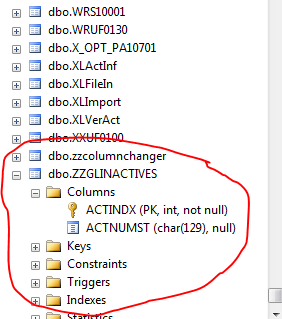
If you didn’t get the Account Index, it can be joined by GL00100 and GL00105 but better is provide the index from Smartlist. The last step is run the following script to inactivate your accounts:update GL00100 set ACTIVE = 0
where ACTINDX in (select ACTINDX from ZZGLINACTIVES)Beware, GP lets you inactivate accounts with balances! Personally, I would not do that so you may want to first cull your accounts to those with no open year balance.
Delete the ZZGLINACTIVES table when done. Or keep it for the future
——————————
Thaddeus Suter
Retus, Inc
HELOTES TX
——————————
——————————————- -
Thousands of accounts? I would do that via SQL – just my two cents. This of course has dependency on any 3rd parties you have… but generally speaking, this is not hard to do. Your partner or DBA should be able to help with specifics but generally, here is what I would do:
Create a Smartlist that shows ACTINDX. (Financial/Accounts – and then add the Account Index column to the smartlist.
Export a complete list of accounts to excel. Get rid of the accounts you want to keep, leaving only the ones you want to flag as ‘inactive’. Be sure to export the entire list – the smartlist may cap out at 1000 records so change that to get get your entire list.
Using the Account Index (ACTINDX) field in Excel, create a simple SQL Script using ‘concatenate’ or a similar excel function:
=CONCATENATE(“UPDATE GL00100 SET ACTIVE = 0 WHERE ACTINDX =”, A2 )
(A2 above references the field in excel where the account index is for the row that you want to inactivate)
(ACTIVE = 0 above – 0 is the value for ‘inactive’)This script gets run against GL00100.
Try it in test, be safe, and don’t forget to check ‘maintain inactive accounts’ when running your year end close 🙂
End results:
UPDATE GL00100 SET ACTIVE = 0 WHERE ACTINDX = 1
UPDATE GL00100 SET ACTIVE = 0 WHERE ACTINDX = 362
UPDATE GL00100 SET ACTIVE = 0 WHERE ACTINDX = 365Hope that helps!
Thousands using a macro – it can be done, sure, but this is just how I would do it.
——————————
Shawn Dorward [Designation]
Dynamics GP Practice Lead
Microsoft MVP, Business Solutions
Twitter: @ShawnMDorward
InterDyn Artis
Blog: http://www.GPLifeHacks.com
——————————
——————————————- -
Leslie Vail
MemberApril 10, 2018 at 5:24 PM
Hi,
Like others, I would use a macro for accounts that do not follow a sequential series. I would utilize the ‘mail-merge’ technique. Using this technique insures that any third party software tables are updated if they have a reference as to whether the account is inactive. To make the macro run at least twice as fast, include the Dex.ini switch: ShowAdvancedMacroMenu=TRUE. Then, launch the Advanced Macro Menu while the macro is running, or pause the macro and check the box next to ‘No User Interface Flash’ in the Macro Status window. Be sure to resume the macro to get it started again.
Kind regards,
Leslie——————————
Leslie Vail
Accounting Systems Consulting, Inc.
DALLAS TX
leslievail@earthlink.net 972-814-8550
——————————
——————————————- -
Kimberly Lomax
MemberApril 11, 2018 at 8:02 AM
If you’re an end user and don’t want to take the techy route using SQL, you can also use Integration Manager and do it yourself if you own that module. Just a suggestion. Sometimes it’s hard to get on the priority list unless you have a dedicated dba.——————————
Kimberly Lomax
Manager, Financial Systems
Rayonier
Jacksonville FL
——————————
——————————————- -
?
That is an awesome suggestion. I think that those of us that know SQL well tend to automatically think in that route, but using Integration Manager or SmartConnect and updating these accounts with inactive is a more than excellent work-around to the SQL route! That too would only take a few minutes to do once you had the integration running!
?
——————————
Kindest Regards,Jo deRuiter
“That GP Red Head”
Senior Financial Systems Consultant
Advanced Credentialed Professional-Dynamics GP
Heartland Business Systems, LLC
Milwaukee, WI
770-906-4504 (Cell)
——————————
——————————————- -
Wow! Thanks for all the great ideas and feedback!
——————————
Denise Lewis
Folience
Cedar Rapids IA
——————————
——————————————-
Denise Lewis replied 8 years, 6 months ago 1 Member · 0 Replies -
-
0 Replies
Sorry, there were no replies found.
The discussion ‘Mass Account Deactivation’ is closed to new replies.
