Management Reporter

  • Management Reporter

    Posted by Tracy Yaklyvich on December 16, 2016 at 8:27 am
    • Tracy Yaklyvich, MBA

      Member

      December 16, 2016 at 8:27 AM

      Is there a way to format columns with shading or borders?  I am trying to make some columns on a report stand out.  Any suggestions would be greatly appreciated.  Thanks, Tracy

      ——————————
      Tracy Yaklyvich, MBA
      Assistant Controller
      ASHP
      Bethesda MD
      ——————————

    • Steve Burney

      Member

      December 16, 2016 at 9:39 AM

      Hello Tracy,

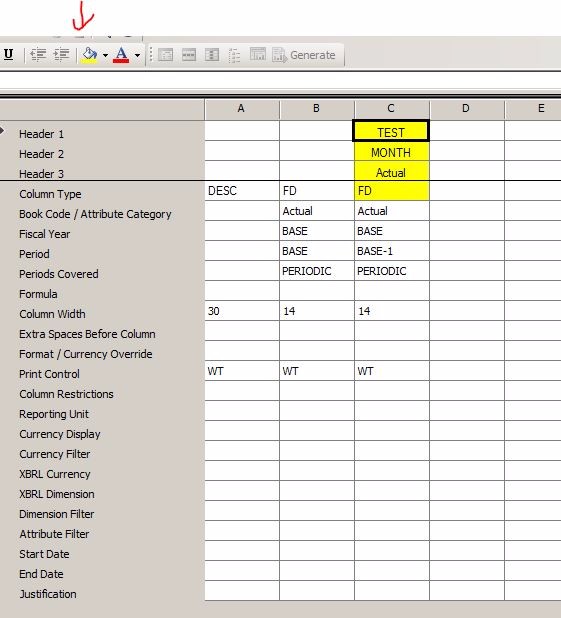
      In your Management Reporter Column Definitions area you can select the column and then choose the Fill Color option to add some background to your report.

      Steve

      ——————————
      Steve Burney
      Senior Financial Systems Administrator
      Correct Care Solutions
      Nashville, TN United States
      sburney@correctcaresolutions.com
      615-312-7272
      Twitter @SteveBurney
      ————————————————————————-

    • Frank Heslin

      Member

      December 16, 2016 at 9:42 AM

      Hi Tracy,

      You can format the Column Definition just like you would in Excel.  In the screen shot below, I selected the whole column, and clicked on the ‘Fill Color’ button.  In the definition, only the top ‘cells’ of that column will actually be highlighted, but once you run the report the whole column will be highlighted.  If this toolbar isn’t visible, just go to View > Toolbars > Formatting 

      DYSCcIRQNWxXO8d71Rcc_MR Column Shading.JPG

      Hope this helps!

      Happy shading!

      ——————————
      Frank Heslin
      Financial Systems Administrator
      ExamWorks, Inc.
      Atlanta GA

      Member, GPUG Advisory Committee
      Chairman, Georgia Regional GPUG Chapter
      Summit 2016 Track Leader

      GP2015 R2
      MR CU14

      Follow me on Twitter: @Automate_It

      GPUGGA – http://www.gpug.com/Atlanta

      *** Help Us, Help You…provide enough info so that we don’t have to ask for more:) ***
      *** If you solve your issue please share the solution to assist others! ***
      ————————————————————————-

    • Noah Moseley

      Member

      December 20, 2016 at 10:02 AM

      Hi Tracy.

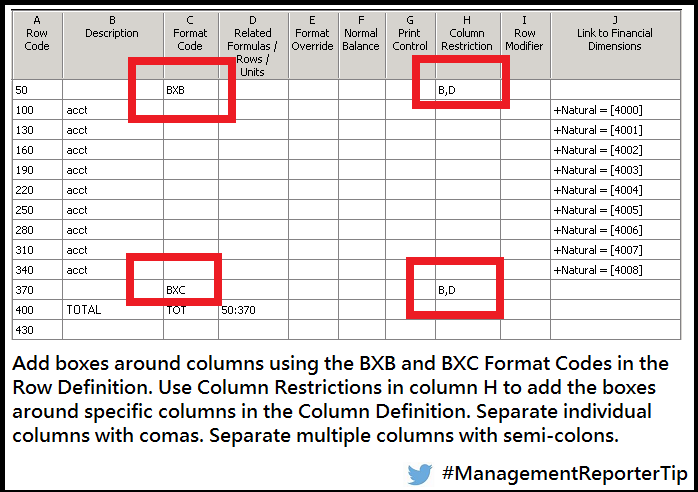
      You can add borders/boxes around report columns using the BXB and BXC Format Codes in the Row Definitions. Specify specific columns from the Column Definition in the Column Restrictions column.

      aHszSGGSWHsm5D0Fozwl_MR Tip 10011.png

      ——————————
      Noah Moseley, Senior Consultant at the MSX Group
      Noah.Moseley@MSXGroup.com
      Email me if you need training or consulting services for Management Reporter, Forecaster or FRx.

      Also, see our new Prospero offering for GP – Your new replacement for Management Reporter and Forecaster – Financial Reporting and Budgeting, all in one application.
      http://www.msxgroup.com/ProsperoGP
      ————————————————————————-

    Tracy Yaklyvich replied 9 years, 9 months ago 1 Member · 0 Replies
  • 0 Replies

Sorry, there were no replies found.

The discussion ‘Management Reporter’ is closed to new replies.

Start of Discussion
0 of 0 replies June 2018
Now

Welcome to our new site!

Here you will find a wealth of information created for peopleĀ  that are on a mission to redefine business models with cloud techinologies, AI, automation, low code / no code applications, data, security & more to compete in the Acceleration Economy!