


Dynamics GP
Public Group
Active 10 hours ago
Dynamics GP
Organizer:
- JOSE Organized by
-
-

Management Reporter – Report Viewing Error
-
Management Reporter – Report Viewing Error
Posted by DSC Communities on December 5, 2017 at 10:27 am-

Kali Anthony
MemberDecember 5, 2017 at 10:27 AM
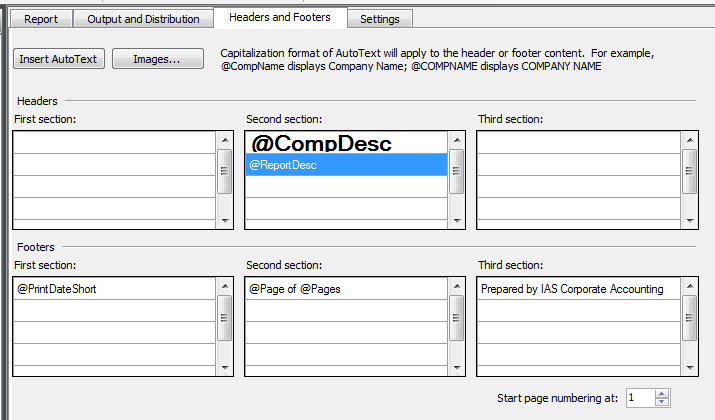
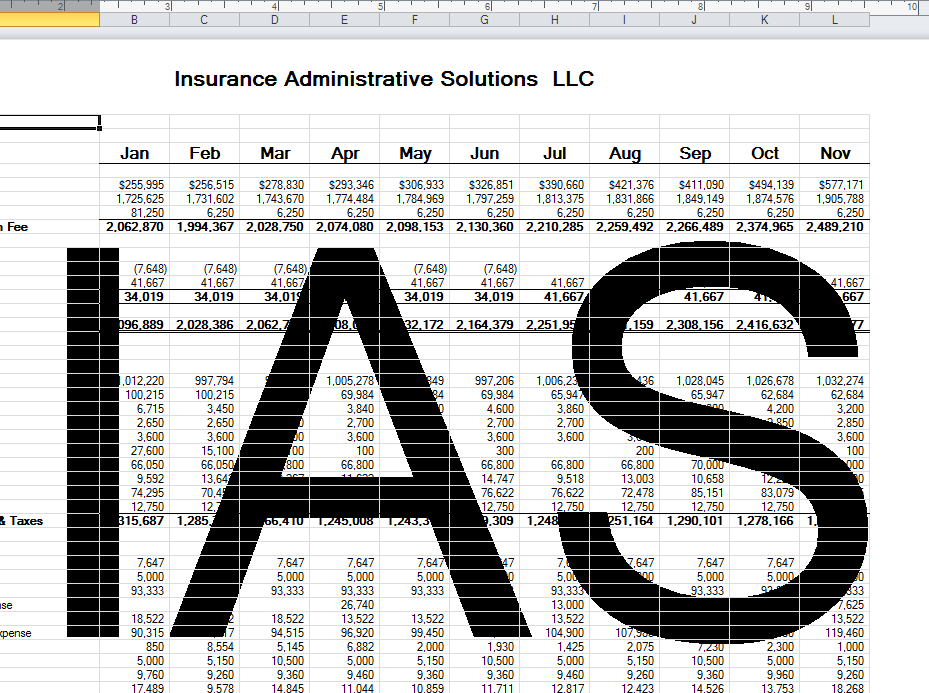
Can someone tell me why my report is showing the letters “IAS” in the middle of each page? Yes, that is the name of our company, but I’m not understanding why it shows up like that? The first row of my Header is correct, but the 2nd Header Row should be the Report Description.
——————————
Kali Anthony
Insurance Administrative Solutions
Clearwater FL
—————————— -
Kali Anthony
MemberDecember 5, 2017 at 11:03 AM
?For some reason my 2nd row of the Header is showing up in the middle of ea page….but I don’t know why or how? It only shows like this when I export it to Excel…but it looks perfect when viewing on Management Reporter.——————————
Kali Anthony
Insurance Administrative Solutions
Clearwater FL
——————————
——————————————- -
Hi
This has got me scratching my head:-O I would try removing one thing at a time until you can narrow down what is causing it.
Have you tried deleting the header, saving, and then adding it back?
I’m really curious about this now:-)?
——————————
Frank Heslin
Financial Systems Administrator
ExamWorks, Inc.
Atlanta GAGPUG Advisory Committee Member
Summit Track Leader
GPUG All Star 2016GP2015 R2
MR CU14
——————————
——————————————- -
Steve Burney
MemberDecember 5, 2017 at 2:41 PM
?Hey – Is it possible that she could have the Excel spreadsheet defaulting to print the Headings also?
Or maybe another default setting in Excel?
Look in Excel under Page Layout and see if the box is checked for “Print” under the Sheet Options and Headings.——————————
Steve Burney
GP Administrator
Nissan Trading Corporation Americas
Franklin, TN United States
s_burney@nitco-us.com
615-821-6792
Chairman, Nashville (TN) GPUG Chapter
GPUG All Star 2017
Twitter @SteveBurneyGP2016 R2
MRCU14
——————————
——————————————- -
Kali Anthony
MemberDecember 6, 2017 at 9:50 AM
?The options for Headings is only selecting VIEW
I’ll continue going back and making 1 change at time…process of elimination type entries in hopes I find it! Still welcoming ANY & ALL advice/tips!!——————————
Kali Anthony
Insurance Administrative Solutions
Clearwater FL
——————————
——————————————- -
?,
Check to see if you have something setup as a quasi watermark in the Excel book. That is under Insert > Header & Footer. Found this link on google.
Add a watermark in ExcelOffice remove preview 
Add a watermark in Excel Add a watermark, such as draft, confidential, or one of your own design like a company logo, to a worksheet in Exce View this on Office > Don’t know if this is the issue or not, but something to look at.
——————————
Bert Green
GP Developer/GP Administrator
Berger Transfer & Storage, Inc.
Saint Paul MN
GP2015/MR CU11
GPUG All Star 2017
——————————
——————————————- -
I think is on to something here. I noticed that your screen shot from Excel is in Page Layout view (which is the default when MR exports it to Excel). What happens if you change Excel to Normal view. My guess is that you won’t see the “Watermark” in Normal view.??
——————————
Frank Heslin
Financial Systems Administrator
ExamWorks, Inc.
Atlanta GAGPUG Advisory Committee Member
Summit Track Leader
GPUG All Star 2016GP2015 R2
MR CU14
——————————
——————————————- -
Kali Anthony
MemberDecember 7, 2017 at 9:26 AM
?When I switch it to Normal View I lose all my Headers, that’s the case with all my MR exported to excel reports 🙁
——————————
Kali Anthony
Insurance Administrative Solutions
Clearwater FL
——————————
——————————————-
DSC Communities replied 8 years, 1 month ago 1 Member · 0 Replies -
-
0 Replies
Sorry, there were no replies found.
The discussion ‘Management Reporter – Report Viewing Error’ is closed to new replies.
