


Dynamics GP
Public Group
Active 12 hours ago
Dynamics GP
Organizer:
- JOSE Organized by
-
-

Management Reporter – Report Groups
-
Management Reporter – Report Groups
Posted by DSC Communities on June 10, 2020 at 11:51 am-

Doris Thompson
MemberJune 10, 2020 at 11:51 AM
We are trying to utilize the Report Groups function on Management Reporter (Report Designer).
We have selected the Option (Tools – Options) – “Use Management Reporter Report Viewer as default viewer”.
Reports have been added to the Report Group.
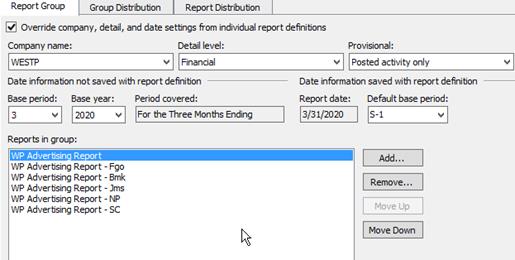
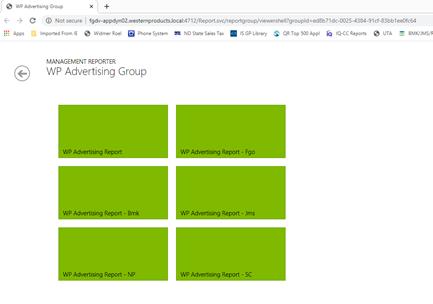
Group Distribution Tab – “View Report Group when generated” – per Help, you select this box to have Web Viewer open after the reports are generated & we do not want Web Viewer (we have tested by checking the box & reports pull up in Web Viewer (see below).
We just want reports to pull up on the screen & then we can print all at once or save to pdf. Has anyone used the Report Groups function? Not sure if we missed something in setup or possibly there’s a bug.
——————————
Doris Thompson
Western Products, Inc
Fargo ND
—————————— -
We’ve been down this seemingly simple but frustrating path…
No, no way to view the group in Report Viewer… 🙁No, no way to mass print generated reports… 🙁
We ended up publishing the reports to SharePoint and that would essentially be our report library where we could quickly go & print reports.
Tagging the MR guru who might have some additional input.
——————————
Kyle Malone, CPA, CPA
GP Admin – CGB Enterprises, Inc.
Lead Consultant/Blogger – https://alacarteGP.com
Chapter Leader – Louisiana (New Orleans)
Solugence | Find the software that FITS your business + integrates with GP. Find Software Smarter. https://solugence.com
——————————
——————————————- -
Hey Kyle. Thanks for the mention. I just saw this post, snuck past me.
I agree with Annette Brown. View the Report Group in Web Viewer (only option) and download all of the green tiles to a single Excel file (only option available for sending groups to Excel). There is nothing in Report Viewer to help with this.
——————————
Noah Moseley, MSX Group Senior Consultant
Academy Instructor for Management Reporter
Noah.Moseley@MSXGroup.comView our GPUG Partner MSX Group listing: https://www.gpug.com/engage/findacompany/companyprofile?UserKey=275d1f3a-73b4-4a58-b0d8-7395d682dbc3
——————————
——————————————- -
Annette Brown
MemberJune 11, 2020 at 8:51 AM
HI Doris,Your are not missing anything. It works like that by design to open in Web Viewer. You do have the option in the bottom right corner of the report distribution page (the one with all the green boxes) to download to excel. This will download all the reports to a single workbook, where each tab is a different report. IF you are looking to print you could then choose to print the entire Excel workbook.
(NOTE: if you include Financial, Account, and Transaction in your generation process you will get 3 tabs for each report/tree combo in the file. For printing purposes you might want to run the report group with just the Financial level.)
There is a print to XPS option in the lower right corner as well, but I haven’t had a ton of success in trying to print all the reports to an XPS. The formatting of the individual reports when done in a batch was always off. But downloading to Excel and printing from there works pretty well for my clients if you are trying to print in mass.
——————————
Annette Brown
Sr. GP Implementation Consulant
Columbus Global
Troy MI
——————————
——————————————-
DSC Communities replied 5 years, 9 months ago 1 Member · 0 Replies -
-
0 Replies
Sorry, there were no replies found.
The discussion ‘Management Reporter – Report Groups’ is closed to new replies.
