


Dynamics GP
Public Group
Active 4 weeks ago
Dynamics GP
Organizer:
- JOSE Organized by
-
-

Management Reporter
-
Management Reporter
Posted by Tracy Yaklyvich on September 5, 2018 at 8:59 am-
We added a box around a row in MR using the format codes of BXB and BXC. This added additional rows above each underline in the report. Any idea how to get rid of the additional rows? They are not in the row format to delete.
Thanks! Tracy
——————————
Tracy Yaklyvich, MBA
Controller
American Society of Health-System Pharmacists
Bethesda MD
tyaklyvich@ashp.org
—————————— -

Steve Erbach
MemberSeptember 5, 2018 at 9:08 AM
,?Are you talking about the — underline or the LINE1 underline?
Extra lines above every underline on the report? So, if you remove the BXB and BXC codes, the extra lines go away?
What version of MR do you have?
Regards,
——————————
“Sparkly” Steve Erbach – QMS Manager and Business Development Analyst
GLC Minerals, LLC – Green Bay, WI
Co-Chair, GPUG WI (Green Bay) Chapter
GP 2016 R2 (16.00.0579) / MR 2012 CU16
Blog: https://www.gpug.com/blogs/steve-erbach
Twitter: twitter.com/serbach
——————————
Welcome to Dynamics!
You do not have permission.
Call Steve.
(hat tip: Lou Spevack)
——————————
——————————————- -
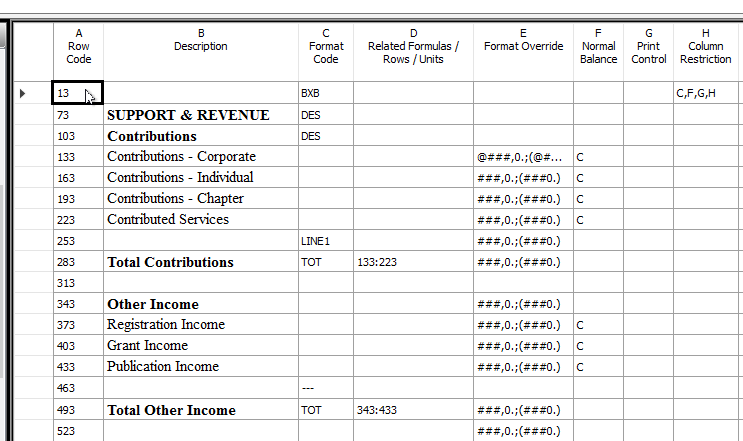
A screenshot is below. I did try LINE1 in row 253 and the extra line is still there. Thanks!
——————————
Tracy Yaklyvich, MBA
Controller
American Society of Health-System Pharmacists
Bethesda MD
tyaklyvich@ashp.org
——————————
——————————————- -
Steve Erbach
MemberSeptember 5, 2018 at 12:12 PM
,Do you get an extra line above the — underline?
I also note that the LINE1? on Row 253 has a Format Override code. What happens when you remove the override?
Regards,
——————————
“Sparkly” Steve Erbach – QMS Manager and Business Development Analyst
GLC Minerals, LLC – Green Bay, WI
Co-Chair, GPUG WI (Green Bay) Chapter
GP 2016 R2 (16.00.0579) / MR 2012 CU16
Blog: https://www.gpug.com/blogs/steve-erbach
Twitter: twitter.com/serbach
——————————
Welcome to Dynamics!
You do not have permission.
Call Steve.
(hat tip: Lou Spevack)
——————————
——————————————- -
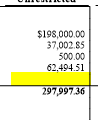
Hi again. The extra row is above the line. Example is below with extra row highlighted. I did remove the override but no change. Thanks!
——————————
Tracy Yaklyvich, MBA
Controller
American Society of Health-System Pharmacists
Bethesda MD
tyaklyvich@ashp.org
——————————
——————————————- -
Steve Erbach
MemberSeptember 5, 2018 at 4:59 PM
,OK, next possibility: could you post that part of your Row Definition where you’ve got the BXB and BXC box defined? Possibly it’s enclosing something that doesn’t need to be or shouldn’t be enclosed in a box?
Hold on… I see in the piece of your Row Def that you posted that there’s a Column Restriction on the same line as the BXB. That piece of the Row Def doesn’t include the BXC, though. Where is that?
Regards,?
——————————
“Sparkly” Steve Erbach – QMS Manager and Business Development Analyst
GLC Minerals, LLC – Green Bay, WI
Co-Chair, GPUG WI (Green Bay) Chapter
GP 2016 R2 (16.00.0579) / MR 2012 CU16
Blog: https://www.gpug.com/blogs/steve-erbach
Twitter: twitter.com/serbach
——————————
Welcome to Dynamics!
You do not have permission.
Call Steve.
(hat tip: Lou Spevack)
——————————
——————————————- -
BXC is on the last row of the report. It is rather long so did not want to copy all rows. Here are the last few rows:

Thanks for all of your help!——————————
Tracy Yaklyvich, MBA
Controller
American Society of Health-System Pharmacists
Bethesda MD
tyaklyvich@ashp.org
——————————
——————————————- -
Steve Erbach
MemberSeptember 5, 2018 at 8:27 PM
,I see! You get the prize for most ambitious use of BXB/BXC!
OK, my SWAG (Scientific Wild-Ass Guess)? is that MR doesn’t want you to use the box capability to box the entire report! It’s more for outlining a small group of rows.
An additional SWAG is that using a Column Restriction on the same line as the BXB/BXC isn’t something that MR can deal with.
Is your intent to box individual or groups of columns? Creative approach! I gave up trying to draw vertical lines on MR reports four years ago! Can’t be done! I would ask or ??? to confirm, but I’ll bet I’m right!
What happens when you remove the Column Restriction on the BXB/BXC lines?
Regards,
——————————
“Sparkly” Steve Erbach – QMS Manager and Business Development Analyst
GLC Minerals, LLC – Green Bay, WI
Co-Chair, GPUG WI (Green Bay) Chapter
GP 2016 R2 (16.00.0579) / MR 2012 CU16
Blog: https://www.gpug.com/blogs/steve-erbach
Twitter: twitter.com/serbach
——————————
Welcome to Dynamics!
You do not have permission.
Call Steve.
(hat tip: Lou Spevack)
——————————
——————————————- -
Joni Finnell
MemberSeptember 6, 2018 at 9:45 AM
?Hi Sparkly :I read that you gave up on drawing vertical lines on MR reports so I wanted to pass on a tip that I found a few years ago.
If you use a separate column you can create the illusion of vertical lines in MR. Use FILL ‘|’? as the column type. The | is the shift option on the key. I found that the column width works best as 2.
Thanks
——————————
Joni Finnell
GP Projects/Troubleshooter
Consumer Support Services, Inc.
Newark OH
——————————
——————————————- -
Steve Erbach
MemberSeptember 6, 2018 at 10:42 AM
,Yes! I actually did figure that out eventually… and I used it on the massive specialized P&L I created at my last job to “create the illusion of vertical lines”! I kept hoping that there’d be some sort of hybrid BXB/BXC option that would let me add continuous vertical lines.
I’ve wrestled with printers for decades, and vertical lines have been dodgy all along in text-based reports. Printer drivers, different apps handling printing tasks themselves, Windows, DOS… ack!
Regards,
——————————
“Sparkly” Steve Erbach – QMS Manager and Business Development Analyst
GLC Minerals, LLC – Green Bay, WI
Co-Chair, GPUG WI (Green Bay) Chapter
GP 2016 R2 (16.00.0579) / MR 2012 CU16
Blog: https://www.gpug.com/blogs/steve-erbach
Twitter: twitter.com/serbach
——————————
Welcome to Dynamics!
You do not have permission.
Call Steve.
(hat tip: Lou Spevack)
——————————
——————————————- -
Hi Sparkly, yes, when we remove the BXB and BXC the extra lines disappear. We are on version 2.12.16002.0.
Thanks, Tracy
——————————
Tracy Yaklyvich, MBA
Controller
American Society of Health-System Pharmacists
Bethesda MD
tyaklyvich@ashp.org
——————————
——————————————- -
Steve Erbach
MemberSeptember 5, 2018 at 11:30 AM
,Could you post a screen shot of part of your Row Definition? I’m wondering whether using LINE1 vs. — would help… though I don’t think you indicated which underline code you use.
Regards,?
——————————
“Sparkly” Steve Erbach – QMS Manager and Business Development Analyst
GLC Minerals, LLC – Green Bay, WI
Co-Chair, GPUG WI (Green Bay) Chapter
GP 2016 R2 (16.00.0579) / MR 2012 CU16
Blog: https://www.gpug.com/blogs/steve-erbach
Twitter: twitter.com/serbach
——————————
Welcome to Dynamics!
You do not have permission.
Call Steve.
(hat tip: Lou Spevack)
——————————
——————————————- -
Thanks . You are correct. The boxes place a | on every row including the LINE1 rows. LINE1 makes that row’s height just tall enough for the underline but the vertical box | increases the height. I do not have MR open to test, but you could try highlighting that row in the Row Def and making the font size as small as possible. See if it will let you type in a 1 for font size. Just an idea.?
——————————
Noah Moseley, Senior Consultant at the MSX Group
Noah.Moseley@MSXGroup.com
Email me if you need training or consulting services for Management Reporter, Forecaster or FRx.View our GPUG Partner MSX Group listing: https://www.gpug.com/engage/findacompany/companyprofile?UserKey=275d1f3a-73b4-4a58-b0d8-7395d682dbc3
——————————
——————————————- -
Updating the row font to 1 worked! Thanks to both of you for your help. Have a great day.
——————————
Tracy Yaklyvich, MBA
Controller
American Society of Health-System Pharmacists
Bethesda MD
tyaklyvich@ashp.org
——————————
——————————————- -
?…and I usually just use the — (dashes for underline like on row 463) instead of the LINE1 type.
——————————
Derek Krebs
Sr Consultant
MSX Group
derek.krebs@msxgroup.com
——————————
——————————————- -
Steve Erbach
MemberSeptember 6, 2018 at 10:43 AM
,As usual, you take the complex and turn it into something workable! Excellent.
Regards,?
——————————
“Sparkly” Steve Erbach – QMS Manager and Business Development Analyst
GLC Minerals, LLC – Green Bay, WI
Co-Chair, GPUG WI (Green Bay) Chapter
GP 2016 R2 (16.00.0579) / MR 2012 CU16
Blog: https://www.gpug.com/blogs/steve-erbach
Twitter: twitter.com/serbach
——————————
Welcome to Dynamics!
You do not have permission.
Call Steve.
(hat tip: Lou Spevack)
——————————
——————————————-
Tracy Yaklyvich replied 8 years, 2 months ago 1 Member · 0 Replies -
-
0 Replies
Sorry, there were no replies found.
The discussion ‘Management Reporter’ is closed to new replies.
