


Dynamics GP
Public Group
Active 4 weeks ago
Dynamics GP
Organizer:
- JOSE Organized by
-
-

Long Delay Before Login into Dynamics GP
-
Long Delay Before Login into Dynamics GP
Posted by greg-wahl on May 25, 2021 at 8:55 am-
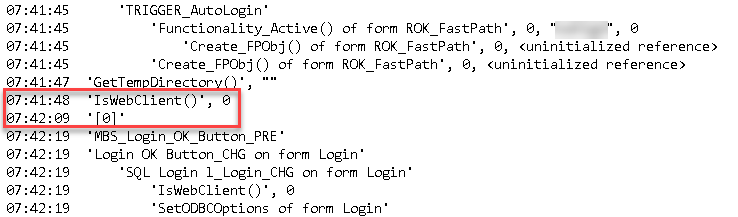
We have a test environment that has a long delay before it allows a user to begin logging into Dynamics GP. The login box opens up but the user has to wait 20-30 seconds before the user and password fields open up. I did a Dex trace and the delay is occurring after what it appears to be some sort of webclient verification which we do not currently use. I was wondering if anyone else had experienced this delay as well…
——————————
Greg Wahl
IT Applications Supervisor
Owensboro Municipal Utilities
Owensboro KY
—————————— -
Hi
Where you able to use GP Power Tools to also capture the Profile*.txt file (Dexterity Script Profile) on login?
This has the timings for every script run which really helps analyse performance issues.
While it does look like there is a delay on the IsWebClient() call, this is a common check and you can see another a few lines below with no time lag.
The [0] script is possibly dynamic run time executed code as this does not have a proper script name.
The script log writes the entry when the scripts start so the delay is between the call to IsWebClient() and the dynamic code, what I would like to see is further up to see who the parent script is.
Feel free to send me a full set of logs on Startup captured by GP Power Tools and I will review them.
Regards
David
?——————————
David Musgrave MVP, GPUG All-StarManaging Director
Winthrop Development ConsultantsPerth, Western Australia
http://www.winthropdc.com
——————————
——————————————- -
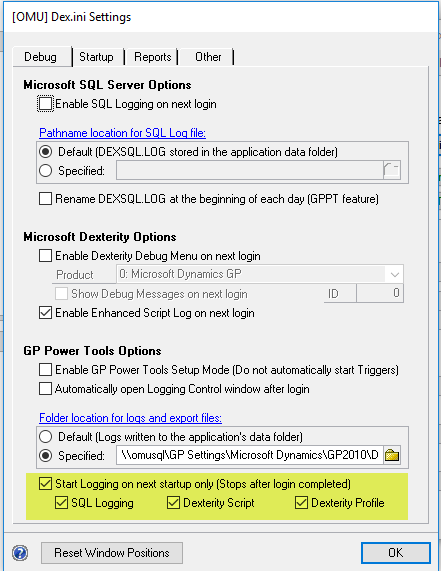
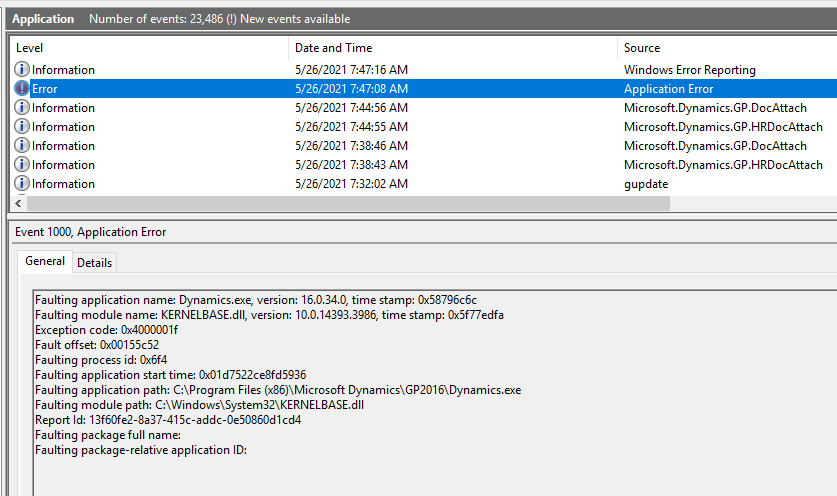
Unfortunately, I have not been able to get a profile script at login even though I select it. Dynamics GP ends up erroring out after I try to login. It works otherwise when I enable it and I don’t have to login.

——————————
Greg Wahl
IT Applications Supervisor
Owensboro Municipal Utilities
Owensboro KY
——————————
——————————————- -
Hi GregPlease make sure you are using the latest build 28.7 code or temporarily remove the eOne products from your Dynamics.set launch file.
The crashes are caused by? for some reason when the script profile is enabled and Extender or Smartlist Builder check their tables are created.
The latest build of GPPT stops logging for a bit while this eOne code is running. It should prevent the crashing.
RegardsDavid
——————————
David Musgrave MVP, GPUG All-StarManaging Director
Winthrop Development ConsultantsPerth, Western Australia
http://www.winthropdc.com
——————————
——————————————- -
We have the same issue using an RDS environment with 3 session hosts. It has been this way since we installed 2 years ago and I could never find a reason for it. It works fine after the system allows you to key into the user and password fields.
——————————
Dave Webb
MCCC
Prestonsburg KY
——————————
——————————————- -

Patrick Roth
MemberMay 27, 2021 at 11:46 AM
The [0] is what we would show from a vstools script executing and accessing a GP resource.
Off the top of my head, I don’t recall whether the actual vstools script execution shows this (unlike pass through sanScript which DOES show with weird resids).
But any call to GP or accessing a global shows as [0] in the logs.Also the MBS_Login_OK_Button_PRE script would appear to be a trigger by some application – my guess is maybe PSTL or another GP app as the prefix is MBS_xxxx and that prefix is often by “who wrote it”.
You could run a GP Customization Status report and look for the words MBS_Login_OK_Button_PRE and you’ll find it and then the product it is from.
And as David pointed out, we can see the isWebClient call a few lines down and that was “fast” so i don’t think the isWebClient call that is what took 21 seconds there. But the profile script that David notes should conform that and how long the _PRE button script took. I really doubt that you be able to see anything about that vstools time.
——————————
Patrick Roth
eOne Solutions
Fargo
——————————
——————————————- -
Thank
Did not realize that [0] was VST code not Dexterity execute() code.
The MBS_ calls are GP Power Tools, which was originally the MBS Support Debugging Tool ?(MBS for Microsoft Business Solutions). The MBS part of the name was dropped when the Support Debugging Tool was released publicly, but is the prefixed used in the product.
If you have GP Power Tools installed, identifying which product a script (function or procedure) belongs to is simple using the Resource Information window in Procedure and Function mode. Just type or paste in the name and it will identify the product(s) it exists in.
Regards
David
——————————
David Musgrave MVP, GPUG All-StarManaging Director
Winthrop Development ConsultantsPerth, Western Australia
http://www.winthropdc.com
——————————
——————————————- -
For those of you using a remote desktop environment, we have found this issue on windows server 2012, 2016, and 2019, and resolved it by changing the registry key as documented in this thread:
——————————
Jeff Woodard
Chief Technical Officer
Transportation Financial Services, Inc.
West Palm Beach FL
——————————
——————————————-
greg-wahl replied 5 years, 5 months ago 1 Member · 0 Replies -
-
0 Replies
Sorry, there were no replies found.
The discussion ‘Long Delay Before Login into Dynamics GP’ is closed to new replies.
