

Letter Writing Assistant – Error/Not Finding File

  • Letter Writing Assistant – Error/Not Finding File
    Posted by Amber Bell on June 22, 2018 at 12:43 pm
    • Amber Bell

      Member

      June 22, 2018 at 12:43 PM


      Letter Writing Assistant Error
      Hello everyone,

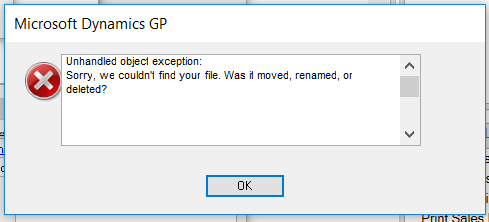
      I had a wacky error pop-up when I was doing a demo of the Letter Writing Assistant. I was able to open the Letter Writing Assistant Wizard and I saw the templates….but when I tried to create a letter, I had a popup of this message:

      Error: Unhandled object exception: Sorry, we couldn’t find your file. Is it possible it was moved, renamed, or deleted?

      I googled the error and found this question:Ā https://community.dynamics.com/gp/f/32/p/230492/816762#816762

      I figured out how to “fix” it for my test workstation (here is what I wrote on the open GP Forum Question. Does anyone have any ideas for the cause? Has anyone else had this error? It just started happening for me.


      I just had this error (Running GP2018 on Windows 10 with Office 365 for MS Word). I copied the Letters Directory to the C:Program Files (x86) folder. I created a new folder to save into so now it is in:
      Word Macro File=C:Program Files (x86)GP 2018 LettersLettersWordIntegration.dot
      Letters Directory=C:Program Files (x86)GP 2018 LettersLetters
      I tested and now it works. I tested by switching back to the old location…and I got the error again. Not sure what is causing the error…but this fixed it. If anyone has any ideas for the cause, let me know.

      ——————————
      Amber Bell
      Training Dynamo LLC
      Email: amber@trainingdynamo.com
      Website: http://www.trainingdynamo.com
      Twitter: @trainingdynamo
      ——————————

    • Steve Erbach

      Member

      June 22, 2018 at 1:45 PM

      ,

      Since this whack-a-doo error occurred at our Green Bay Chapter meeting, I thought I’d chime in here!

      As an obsolete programmer, I saw this sort of error when the program pointed to a different “root” folder than the folder I expected. In this case, you figured that GP would “honor” the path down to where the Letters folder normally lives.

      We haven’t made use of document templates at our company so we don’t have that folder set up on our system… so I’m speculating as to the cause of the problem. I speculate that GP is looking at the Program Files folder as the “root” folder for locating the templates in GP 2018.

      Or might this be an issue with the deployment of Word templates, kind of like when Excel Reports are deployed in GP? Might there be an option in GP for selecting where the templates go… and the deployment folder path default was the Program Files folder?

      Sincerely,

      ——————————
      “Sparkly” Steve Erbach – QMS Manager and Business Development Analyst
      GLC Minerals, LLC – Green Bay, WI
      Co-Chair, GPUG WI (Green Bay) Chapter
      GP 2016 R2 (16.00.0579) / MR 2012 CU16
      Blog: https://www.gpug.com/blogs/steve-erbach
      Twitter: twitter.com/serbach
      ——————————
      Welcome to Dynamics!
      You do not have permission.
      Call Steve.
      (hat tip: Lou Spevack)
      ——————————
      ——————————————-

    • Amber Bell

      Member

      June 22, 2018 at 1:51 PM

      The crazy thing is that it was working…and then it stopped working…

      That sounds like what the person that posted on the other GP Open Forum experienced as well.

      Most clients have this pointing to a shared location…but I’ve had it on C in that same location forever and it’s never had that error.

      ——————————
      Amber Bell
      Training Dynamo LLC
      Email: amber@trainingdynamo.com
      Website: http://www.trainingdynamo.com
      Twitter: @trainingdynamo
      ——————————
      ——————————————-

    Members

    Amber Bell replied 8 years, 2 months ago 1 Member · 0 Replies
  • 0 Replies

Sorry, there were no replies found.

The discussion ‘Letter Writing Assistant – Error/Not Finding File’ is closed to new replies.

Start of Discussion
0 of 0 replies June 2018
Now

Welcome to our new site!

Here you will find a wealth of information created for peopleĀ  that are on a mission to redefine business models with cloud techinologies, AI, automation, low code / no code applications, data, security & more to compete in the Acceleration Economy!
