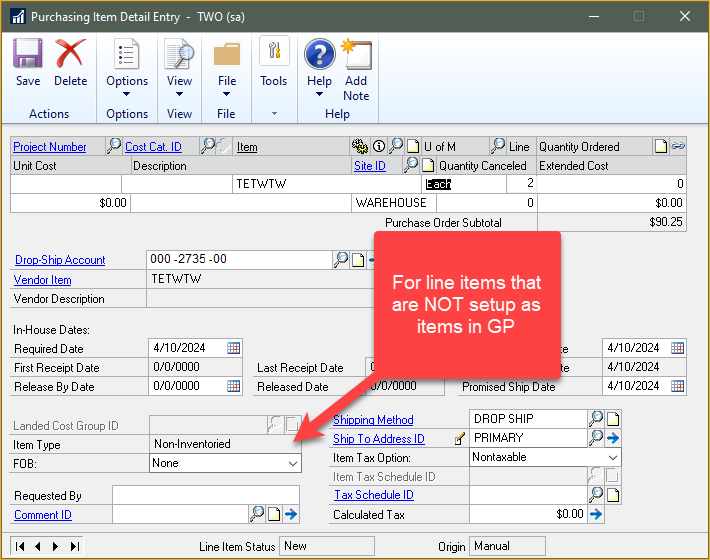
We’re in the process of attempting to post a received item (supplies) to a batch, but we keep receiving the following error message: Item is an inventoried item, the NONINVEN flag is set incorrectly to a 1 for Non Inventoried.
I checked the item card and it was set to “Supplies.” I even went so far as to delete the item and then recreate it. I’m not sure where to look for this inventory flag. None of the items should be set to “inventory.” We recently went through and upgrade and I’m wondering if something got switched on or off? I’m hoping this is something I can fix versus calling our partner.
—————————— Kim Bougas Controller Westport Corporation Pine Brook NJ ——————————
The issue is not with the item, the issue is that on the Receipt and/or Purchase Order you have Non-Inventory marked, when it should not beĀ because you have an item set up for it.
Non-Inventory does NOT mean that it is a countable item, it means do you have an item setup for it or not.
?
—————————— Jo deRuiter ?? GPUG ALL STAR ??Granite Award Winner Atlanta Chapter Leader Aisling Dynamics Business Solutions Business Applications Practice Manager jo.deruiter@aislingdynamics.com 9518674366 aislingdynamics.com —————————— ——————————————-
Please note:
This action will also remove this member from your connections and send a report to the site admin.
Please allow a few minutes for this process to complete.

Report
You have already reported this .
Welcome to our new site!
Here you will find a wealth of information created for peopleĀ that are on a mission to redefine business models with cloud techinologies, AI, automation, low code / no code applications, data, security & more to compete in the Acceleration Economy!