I have two separate instances of GP running and on one instance when a user enters an item in the Sales Order line and the item is not in the Item Master they receive a GP message “Item Not Found”. In the other instance of GP it allows any item to be entered on the Sales Order Line item even if not in the Item Master.
Is there a setting to prevent invalid items from being entered on a Sales Order?
—————————— Jeff Roe Kele Inc Bartlett TN ——————————
On the sales side of the house, there is a way to prevent non inventoried items from being entered on sales orders.Ā I’d start by comparing the settings in your two instances.
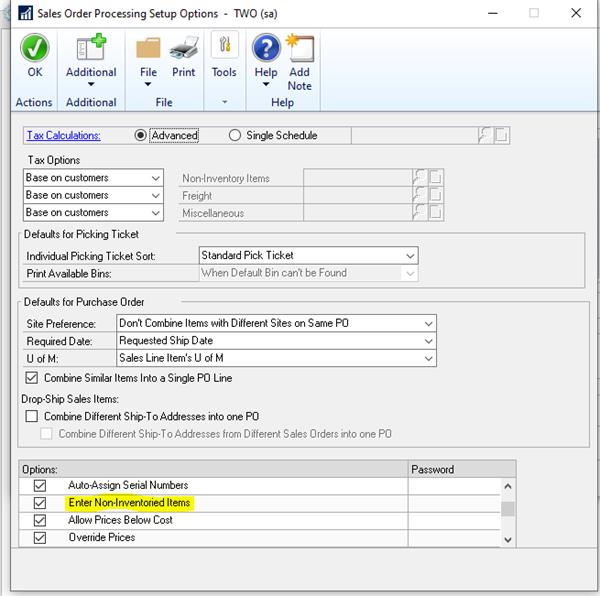
Navigate to Sales>>Setup>>Sales Order Processing>>Options (will be a button in lower right corner of the Sales Order Processing setup window).
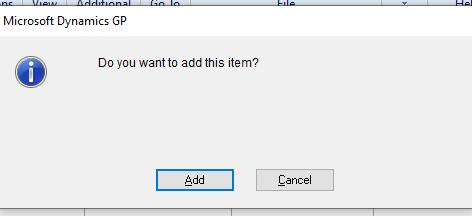
There is an option to Enter Non-Inventoried Items.Ā If checked, they can be entered. If checked and a password is included then the user must supply the appropriate password before GP will let you keep the non inventory item on the sales order. Ā If unchecked, they cannot-they will be prompted with “do you want to add this item”. Nothing stops them from adding the item to the item master (other than hopefully security that says your sales people can’t be creating new items on item maintenance).
The message that GP prompts with natively for this is different than what you’re describing.Ā Below is a picture of that standard GP message.Ā So it is possible that you have a third party on top of GP or a customization somewhere that is returning your specific error message.
Please note:
This action will also remove this member from your connections and send a report to the site admin.
Please allow a few minutes for this process to complete.

Report
You have already reported this .
Welcome to our new site!
Here you will find a wealth of information created for peopleĀ that are on a mission to redefine business models with cloud techinologies, AI, automation, low code / no code applications, data, security & more to compete in the Acceleration Economy!