


Dynamics GP
Public Group
Active 4 weeks ago
Dynamics GP
Organizer:
- JOSE Organized by
-
-

Inactivate Vendors
-
Inactivate Vendors
Posted by Tammy Harper on February 6, 2019 at 10:22 am-
Hi. I’m hoping someone can help me. We are trying to clean up our Vendor listing by making Vendors we haven’t used for a while inactive. The problem we are running into is we are receiving an error message that says, “This Vendor has been assigned a Purchase Order or an unapplied receipt. The status can’t be changed to inactive.” We are noticing this is happening on Vendors that have been in the system a long time. We have checked and there are not any open PO’s for these Vendors, or unapplied receipts. Has anyone else run across this problem and if so, were you able to get the Vendor marked inactive?
Thanks for any help anyone can give.
——————————
Tammy Harper
Charlotte County Airport
PUNTA GORDA FL
—————————— -

Steve Burney
MemberFebruary 6, 2019 at 11:29 AM
Hello Tammy.
It appears that you have made the correct steps to verify that there are no open documents for these vendors.One thing that I would recommend, if it has not already been performed recently, is to have your system administration person run the Check Links function.
They can go to Maintenance – Check Links – Purchasing and perform this. They would know to perform this preferably when there is no one logged in.
I hope this helps.
Steve——————————
Steve Burney
Senior Systems Architect
Nissan Trading Corporation, Americas
Lebanon, TN United StatesChairman, Nashville (TN) GPUG Chapter
GPUG Ruby Award 2018
GPUG All Star 2017
Twitter @SteveBurneyGP2016 R2
MRCU14
——————————
——————————————- -
?Hi
We have this issue because there are certain POs that are not put into History but we may never use the vendor again. Since we couldn’t mark these vendors Inactive due to being active on a PO we created an “Inactive” vendor Class ID so we can use that as a sort. To prevent those vendors from being accidentally used, we change the Name, Short Name and Check Name to INACTIVE.
——————————
Shari Bruno
Accounting Operations Manager
Bible League International
Crete, IL
——————————
——————————————- -
Hi Tammy
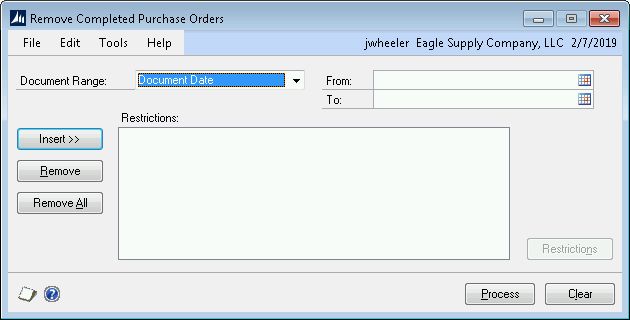
Have you run the Remove Completed Purchase Orders routine? Below is a screen shot of the window. You could run it by Document Date and it will move the completed PO’s to history. I would try that to see if it helps with your vendor issue.
——————————
Jennifer Wheeler
Applications Solutions Administrator
Dairy Farmers of America
East Syracuse NY
——————————
——————————————- -
Jennifer,
Thank you so much! That worked and now I’m getting our Vendor List cleaned up! This was something we didn’t know anything about, so needless to say we will be running it periodically from now on. How often do you run it?
Thanks again!!
Tammy Harper | Accounts Payable Tech

Punta Gorda Airport (PGD)
28000 A-1 Airport Road
Punta Gorda, FL 33982
Office: 941.639.1101 ext: 139
Email: tharper@flypgd.comNOTICE: This communication may contain confidential and privileged information that is for the sole use of the intended recipient. Any viewing, copying or distribution of, or reliance on this message by unintended recipients is strictly prohibited. If you have received this message in error, please notify me immediately by phone, fax or e-mail.
Tammy Harper | Accounts Payable Tech

Punta Gorda Airport (PGD)
28000 A-1 Airport Road
Punta Gorda, FL 33982
Office: 941.639.1101 ext:
Email: tharper@flypgd.comNOTICE: This communication may contain confidential and privileged information that is for the sole use of the intended recipient. Any viewing, copying or distribution of, or reliance on this message by unintended recipients is strictly prohibited. If you have received this message in error, please notify me immediately by phone, fax or e-mail.
——Original Message——
Hi Tammy
Have you run the Remove Completed Purchase Orders routine? Below is a screen shot of the window. You could run it by Document Date and it will move the completed PO’s to history. I would try that to see if it helps with your vendor issue.
——————————
Jennifer Wheeler
Applications Solutions Administrator
Dairy Farmers of America
East Syracuse NY
—————————— -
Hi Tammy
We run the Remove Completed Purchase Orders once a month.
——————————
Jennifer Wheeler
Applications Solutions Administrator
Dairy Farmers of America
East Syracuse NY
——————————
——————————————-
Tammy Harper replied 7 years, 8 months ago 1 Member · 0 Replies -
-
0 Replies
Sorry, there were no replies found.
The discussion ‘Inactivate Vendors’ is closed to new replies.
