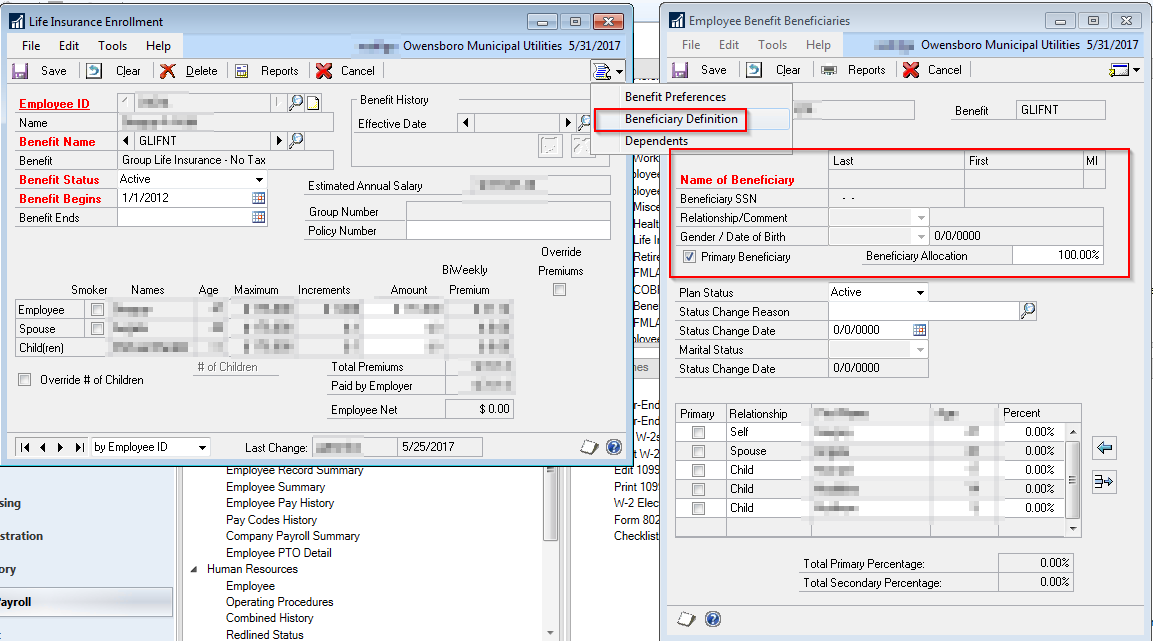
How do you add Employee Benefit Beneficiaries in GP 2016 R2?Ā We just recently upgraded to GP 2016 R2 from GP 2013 and not sure how to add them in this version. The area where it looks like you would add them is grayed out but it isn’t a security issue since I am a power user.
—————————— Greg Wahl Systems Analyst/Programmer Owensboro Municipal Utilities Owensboro KY ——————————
Charles Allen
Member
June 1, 2017 at 2:34 AM
First, add the beneficiary as a dependent.
Then open the benefit enrollment window and click the Go To button and choose Beneficiary Definition.
—————————— Charles Allen Senior Managing Consultant BKD Technologies Houston, TX —————————— ——————————————-
Chris Hadden, CPP
Member
June 1, 2017 at 9:00 AM
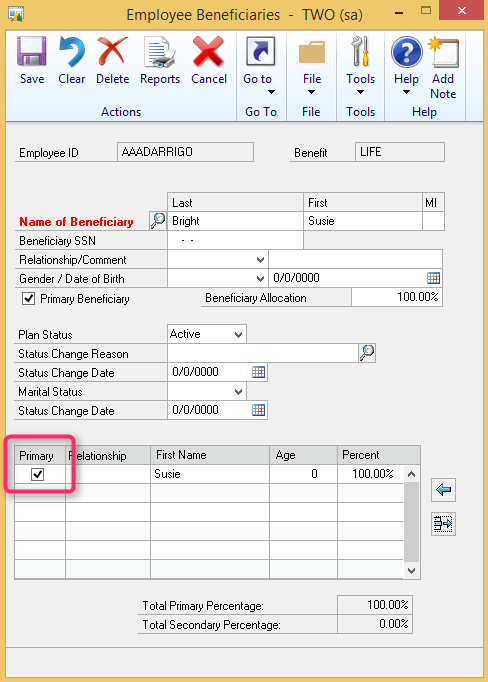
What happens when you select the check box next to the dependents listed at the bottom of the page (see below screenshot). My area is not grayed out like yours is, however when I select the check box it does populate the area that is gray on your end. Perhaps selecting the individual would help.
As Charles mentioned, make sure they are already entered as a dependent, and then they will be included on that list.
Please note:
This action will also remove this member from your connections and send a report to the site admin.
Please allow a few minutes for this process to complete.
Report
You have already reported this .
Welcome to our new site!
Here you will find a wealth of information created for peopleĀ that are on a mission to redefine business models with cloud techinologies, AI, automation, low code / no code applications, data, security & more to compete in the Acceleration Economy!