


Dynamics GP
Public Group
Active 5 days ago
Dynamics GP
Organizer:
- JOSE Organized by
-
-

Heading on a SSRS Report
-
Heading on a SSRS Report
Posted by MARY MALLAZZO on February 11, 2019 at 2:42 pm-
Hello
Running GP2018
We have invoices printing via an SSRS report. We want the heading to repeat on each page. I have changed the properties of the Tablix, and the static members, but I cannot get the header to repeat on each page.Any suggestions?
Thank you
——————————
Mary Mallazzo
Fromkin Brothers
Edison NJ
—————————— -

Steve Erbach
MemberFebruary 11, 2019 at 4:30 PM
,?It can be tricky, for sure. But this may not be your best bet for getting an answer to your question.
I did a Google search for “ssrs sql server 2016 invoice design” and got quite a few hits. Here’s one:
https://www.intertech.com/Blog/use-sql-server-reporting-services-to-generate-an-invoice-document/
Sorry I can’t help more directly.
Sincerely,
——————————
“Sparkly” Steve Erbach – Green Bay, WI
Co-Chair, GPUG WI (Green Bay) Chapter
Blog: https://www.gpug.com/blogs/steve-erbach
Twitter: twitter.com/serbach
—————
Excel Webinar List
——————————
——————————————- -
Rebeccah Grimes
MemberFebruary 12, 2019 at 8:50 AM
Steve’s link is awesome! I wish I had found that 2.5 years ago when I was last attempting to fix our ssrs invoices! But it doesn’t really address how to make ssrs repeat headers on subsequent pages. I have used the fill in blank lines and alternate row backgrounds to great effect, so I will be keeping that handy 😉This has good screen shots, people asking questions and getting more detail, but if you still can’t find it, I will be happy to walk you through it!
——————————
Rebeccah Grimes
Application Specialist, MS Dynamics GP
Tech24
A Commercial Foodservice Repair, Inc Company
——————————
——————————————- -
Steve Erbach
MemberFebruary 12, 2019 at 9:33 AM
?,Nice StackOverflow link. I looked at that one, too, in trying to figure out a way to help . But I saw in her (brief) message that she had tried changing properties in the tablix, so I figured that I’d skip that one. But maybe she hasn’t tried the Advanced Mode properties, so bravo! for bringing it to light!
I don’t suppose that you’d consider making a GPUG blog post about repeating SSRS headers, would you???
I’m glad that you found the link I posted useful. And, Mary, I hope that the combination of the two can help you.
Sincerely,
——————————
“Sparkly” Steve Erbach – Green Bay, WI
Co-Chair, GPUG WI (Green Bay) Chapter
Blog: https://www.gpug.com/blogs/steve-erbach
Twitter: twitter.com/serbach
—————
Excel Webinar List
——————————
——————————————- -
I have used the advanced option and coded both static members under “Row Groups” to “repeat on new page”… see attached.
Still no header on 2nd page.
When I change static members under Column Groups to “repeat on new page” I receive error that the property must be set to false…see attached.Puzzling…
——————————
Mary Mallazzo
Fromkin Brothers
Edison NJ
——————————
——————————————- -
Rebeccah Grimes
MemberFebruary 12, 2019 at 11:49 AM
? you are so close! I promise. Static under column group should all be set to false. It is the Static under ROW groups that you want to set the RepeatOnNewPage to True.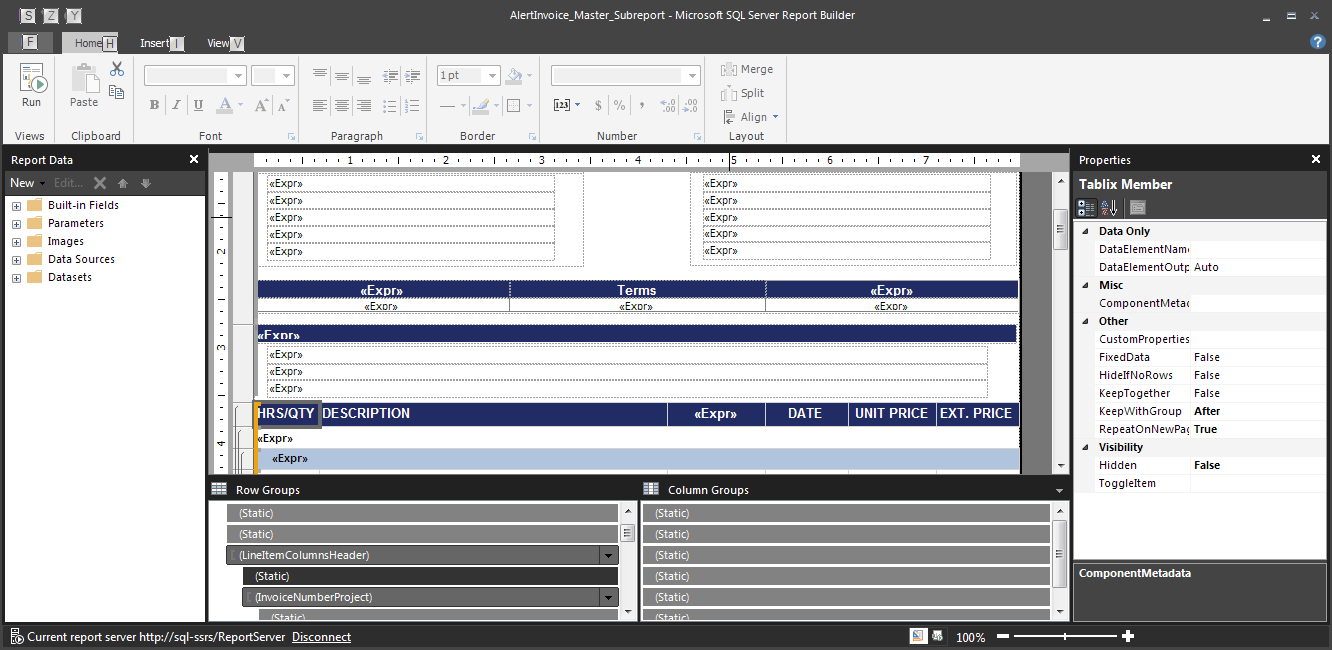
I chose the last static line to have RepeatOnNewPage set to True on, the static lines above are set the same way. All Static under Column Groups are set to False. Try switching KeepTogether to False for everything you want to repeat. My ([InvoiceNumberProject]) line is the first line I have KeepTogether set to True, the KeepWithGroup = After you have correct.While I don’t remember the exact trick, I do remember being stuck in this stage of matching my settings to what everyone says works, and I feel like it was something as simple and nonobvious as KeepTogether being false on the rows you want repeated.
I will have to see what I can pull together for a blog post!?
——————————
Rebeccah Grimes
Application Specialist, MS Dynamics GP
Tech24
A Commercial Foodservice Repair, Inc Company
——————————
——————————————- -
Steve Erbach
MemberFebruary 12, 2019 at 12:42 PM
,When your blog is ready, I will make sure that everyone here knows about it! It’s no small thing to create a blog entry.? Thank you for considering it!
Sincerely,
——————————
“Sparkly” Steve Erbach – Green Bay, WI
Co-Chair, GPUG WI (Green Bay) Chapter
Blog: https://www.gpug.com/blogs/steve-erbach
Twitter: twitter.com/serbach
—————
Excel Webinar List
——————————
——————————————- -
This link from Microsoft may help, SSRS: How to Repeat Headers on Each Page
——————————
Rich LaMarche
Senior IT Specialist
Norwich Public Utilities
Norwich CT
——————————
——————————————- -
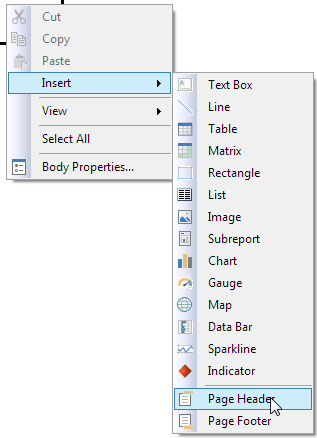
There are actually two separate items you can have the document repeat. There is a page header and there is a report header. You have to know which one you want to repeat. You can add a page header by right-clicking in the body of the report and going to Insert -> Page Header (or footer). Every page that prints will get that header.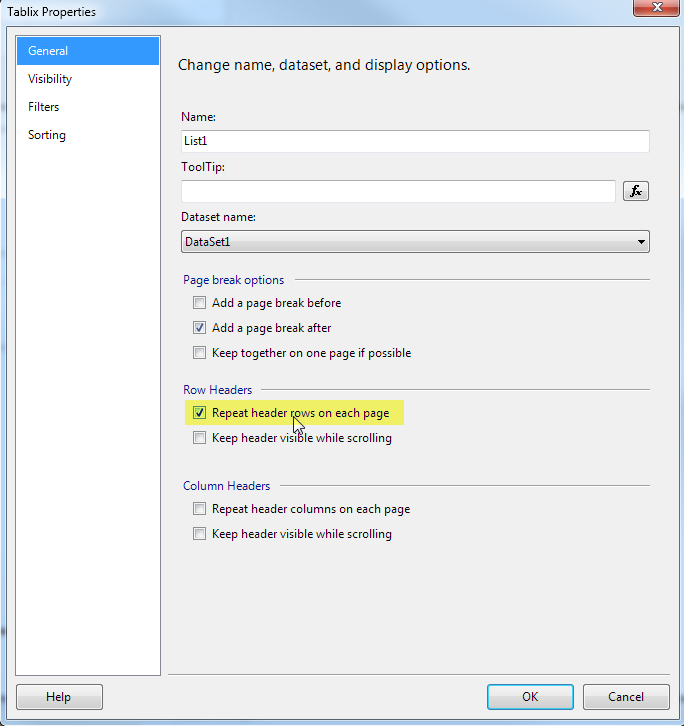 ?
?There is also a report header, which is what others have touched on: a header specific to the report (usually the row headers) which repeats on every page of a multi-page report. This can be accessed by clicking on the upper left corner of your report area (Tablix) and going to Properties. Set the box on “Repeat header rows on each page”.
There is an option to repeat the Column headers, but I haven’t found any use for it. There are two other boxes marked “Keep header visible while scrolling” which may be useful if the report user gets the report through SSRS – though this behavior is sometimes flaky.
——————————
Blair Christensen
Database Administrator
Oppenheimer Companies, Inc.
Boise ID
——————————
——————————————- -
Steve Erbach
MemberFebruary 14, 2019 at 10:26 AM
,Hard to imagine why someone would want a Report Header ?to repeat on each page. Like, a Report Header is, essentially, a cover page for the report, yes? Title, Author, Purpose, description of contents, etc., right?
Sincerely,
——————————
“Sparkly” Steve Erbach – Green Bay, WI
Co-Chair, GPUG WI (Green Bay) Chapter
Blog: https://www.gpug.com/blogs/steve-erbach
Twitter: twitter.com/serbach
—————
Excel Webinar List
——————————
——————————————- -
Or as we use it: Company, Report name, date, filters, even column headers on a few reports.
——————————
Blair Christensen
Database Administrator
Oppenheimer Companies, Inc.
Boise ID
——————————
——————————————- -
Steve Erbach
MemberFebruary 14, 2019 at 11:26 AM
,You remind me that Report Writer usually duplicates report headers as page headers… so its definition of “report header” gets blurred.
Regards,?
——————————
“Sparkly” Steve Erbach – Green Bay, WI
Co-Chair, GPUG WI (Green Bay) Chapter
Blog: https://www.gpug.com/blogs/steve-erbach
Twitter: twitter.com/serbach
—————
Excel Webinar List
——————————
——————————————-
MARY MALLAZZO replied 7 years, 7 months ago 1 Member · 0 Replies -
-
0 Replies
Sorry, there were no replies found.
The discussion ‘Heading on a SSRS Report’ is closed to new replies.
