


Dynamics GP
Public Group
Active a week ago
Dynamics GP
Organizer:
- JOSE Organized by
-
-

Greenshades Implementation
-
Greenshades Implementation
Posted by MARY MALLAZZO on September 23, 2020 at 11:01 am-
Hello
We are currently in the process of implementing Greenshades for payroll tax services.
We are being told we need to set up “work locations”. We do not see “work Locations” listed anywhere in payroll.
Does anyone familiar with “work locations”?
Also, we use KeyAct as a bolt on for job costing.
We have employees that have Pa local tax withheld based on where they live.
If an employee works on a job in Phila, which is driven by the job setup in Key2Act, they have both the home local tax and the Phila tax withheld.
We are told that Greenshades cannot handle this, that in this scenario only the Phila tax should be withheld.
Does anyone know how within GP, to not have the local tax withheld if the employee is working on a job in Phila?
The employee could work only 1 or 2 days in Phila, and the rest of the week on other jobs.Thank you!!
——————————
Mary Mallazzo
Fromkin Brothers
Edison NJ
—————————— -
The Work locations pulls from the “Company Address” card found here:
Administration >> Setup >> Company >> Company >> Address button
Regarding your local tax question, I’m not clear – it sounds like the employees should have both residence tax and workplace tax withheld? You can have multiple local taxes set up for an employee, we have several employees who have more than one, but we are not using Greenshades to inform us of this, they’re just set up in GP (Greenshades apparently can’t handle Ohio Local taxes or Ohio School District taxes). It still shows up in the appropriate places on Greenshade’s Tax Service Center, on the employee’s paystubs, etc. We do have an employee with multiple worksites with different tax rates, and unfortunately, we have a spreadsheet to calculate the correct amount of tax to withhold and then we enter it manually in the transaction entry screen on that employees’ pay for that week (one line for each city).
——————————
Vanessa Halacsy
Controller
Wooster Motor Ways, Inc.
Wooster OH
——————————
——————————————- -
Vanessa
Thanks for the info. The multi local tax works in GP, it is within Greenshades that it is unclear.Thank you
——————————
Mary Mallazzo
Fromkin Brothers
Edison NJ
——————————
——————————————- -
Ah, okay. Unfortunately I can’t help with inside Greenshades, as I mentioned, it can’t handle Ohio local taxes the way I’d prefer either. Though I know some people from Greenshades to frequent these forums, hopefully one of them will be able to help you.
——————————
Vanessa Halacsy
Controller
Wooster Motor Ways, Inc.
Wooster OH
——————————
——————————————- -

Chris Hadden, CPP
MemberSeptember 25, 2020 at 7:30 AM
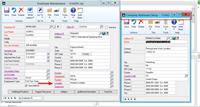
Hi Mary,I believe our team is referring to the ‘Location’ that is assigned to the employee on the Employee Maintenance card in GP. I’ve included a screenshot of this. While it sounds like your employee’s work locations are driven exclusively from the Key2Act application which feeds into the payroll transaction entry window in GP (please correct me if I am wrong), Greenshades does need a ‘location’ assigned to the employee’s master record in order to complete some of the tax calculations for PA Act 32. While the ‘local tax’ withheld from the employee on the employee’s paycheck (which sounds like is driven from Key2Act job assignment) will be consumed by the Greenshades tax engine, there is additional data that is factored into the tax calculation based on the ‘location’ the employee is assigned to at the master level (Employee Maintenance card) in GP.
I hope this helps. If you have any additional questions regarding this, please let me know and I’ll be happy to coordinate the appropriate resources on our end to have a phone call so we can work through this together.
——————————
Chris Hadden, CPP
Product Management
Greenshades Software
jacksonville FL
——————————
——————————————-
MARY MALLAZZO replied 5 years, 5 months ago 1 Member · 0 Replies -
-
0 Replies
Sorry, there were no replies found.
The discussion ‘Greenshades Implementation’ is closed to new replies.
