GP: Remove purged years from field drop down

  • GP: Remove purged years from field drop down
    Posted by Heidi-Farnham on July 24, 2019 at 1:55 pm
    • Heidi Farnham

      Member

      July 24, 2019 at 1:55 PM

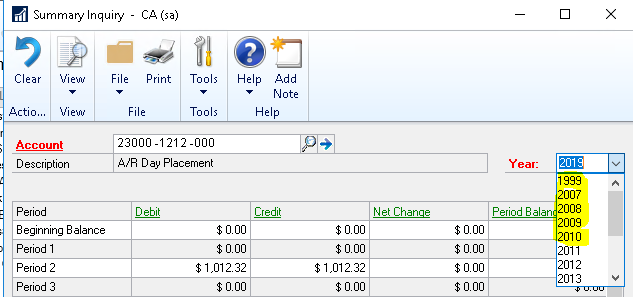
      Is it possible to remove the years from the drop-down list after a data purge has been done?Ā  If so, how?

      Remove years from drop-down list

      #AccountingĀ #Technical

      ——————————
      Heidi Farnham
      Dungarvin
      Mendota Heights MN
      ——————————
      ????

    • Jo deRuiter

      Member

      July 24, 2019 at 2:04 PM

      Hi ??

      Try running reconcile in Financial (after a backup of the DB)

      ——————————

      ——————————
      ——————————————-

    • Heidi Farnham

      Member

      July 24, 2019 at 2:10 PM

      Jo,
      We just did an update to GP 2018 and ran reconciles on all companies.Ā  This did not update the list of year.
      Thank you,
      Heidi

      ——————————
      Heidi Farnham
      Dungarvin
      Mendota Heights MN
      ——————————
      ——————————————-

    • Jo deRuiter

      Member

      July 24, 2019 at 2:55 PM

      Hi

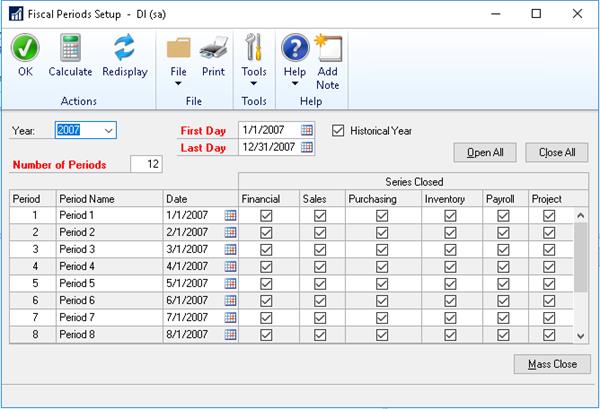
      If you’re sure all prior years have been purged, then grab a backup and go to Administration>Setup>Company>Fiscal Periods and delete the fiscal period in question?

      ——————————

      ——————————
      ——————————————-

    • Heidi Farnham

      Member

      August 1, 2019 at 11:26 AM

      Jo,

      I do not see a delete button in that windows.

      Are you familiar with doing this process?

      Heidi

      ——————————
      Heidi Farnham
      Dungarvin
      Mendota Heights MN
      ——————————
      ——————————————-

    • Deanne Rasmussen

      Member

      August 1, 2019 at 11:51 AM

      Choose Microsoft Dynamics GP – Tools – Setup – Company – Fiscal Periods

      ——————————
      Deanne Rasmussen
      ePlanPartners
      Houston TX
      ——————————
      ——————————————-

    • Heidi Farnham

      Member

      August 2, 2019 at 11:23 AM

      I don’t see a delete option.

      ——————————
      Heidi Farnham
      Dungarvin
      Mendota Heights MN
      ——————————
      ——————————————-

    • Beat Bucher

      Member

      August 5, 2019 at 10:34 AM

      Hi
      There is no way thru GP to delete prior FY setups without using either PSTL (which deletes everything !) and re-create them, or use SQL script to selectively delete your previous FY’s.
      See this older (but still valid) blog post from :
      https://dynamicsgpblogster.blogspot.com/2013/01/how-to-delete-fiscal-year-that-was.html
      ??

      ——————————
      Beat Bucher
      Business Analyst, Dynamics GP SME
      Montreal QC/Canada
      @GP_Beat http://www.gp-geek.com
      Montreal QC GPUG Chapter Leader
      MBS MVP (2015-2018)
      All-Star 2013
      ——————————
      ——————————————-

    • Heidi Farnham

      Member

      August 5, 2019 at 10:44 AM

      Beat,

      Thank you.Ā  This was my guess.Ā  I appreciate the confirmation.

      Heidi

      ——————————
      Heidi Farnham
      Dungarvin
      Mendota Heights MN
      ——————————
      ——————————————-

    Heidi-Farnham replied 6 years, 11 months ago 1 Member · 0 Replies
  • 0 Replies

Sorry, there were no replies found.

The discussion ‘GP: Remove purged years from field drop down’ is closed to new replies.

Start of Discussion
0 of 0 replies June 2018
Now

Welcome to our new site!

Here you will find a wealth of information created for peopleĀ  that are on a mission to redefine business models with cloud techinologies, AI, automation, low code / no code applications, data, security & more to compete in the Acceleration Economy!