


Dynamics GP
Public Group
Active 5 weeks ago
Dynamics GP
Organizer:
- JOSE Organized by
-
-

GP Macro & AvaTax
-
GP Macro & AvaTax
Posted by David Morinello on October 24, 2019 at 9:29 am-
I have several automated GP Macros that log in and post a batch, then log out. (Some have to do the Allocate & Fulfil step first, so no 3rd party batch solutions possible yet.) This has worked well for us for years.
GP Macro & AvaTax
Well, now I have a new company needing this GP Macro solution, but it seems that AvaTax, active and used in this company, is not behaving nicely with the GP’s Macro engine. GP Macros pause as expected while the GP Menu finishes drawing, and I have seen it pause while 1-300, or more invoices post in a batch and are complete. However the Macro just rolls right along to the next command while the Avalara Progress bar is still up.No matter the command combos I have used, including switching out between CheckActiveWin, NewActiveWin, or ActivateWindow, I can’t get the Macro to wait until the AVAProgressbar has completed.
If I put a pause ahead of or between the
NewActiveWin dictionary ‘default’ form ‘SOP_Batch_Entry’ window ‘SOP_Batch_Entry’
and this
CloseWindow dictionary ‘default’ form ‘SOP_Batch_Entry’ window ‘SOP_Batch_Entry’
the AVAProgressbar is still up both ways.It always chokes at this command because of the AVAProgressbar .
CloseWindow dictionary ‘default’ form ‘SOP_Batch_Entry’ window ‘SOP_Batch_Entry’
If I don’t add the Avalara Macro line, it still does the same thing. If I try to open up anything in-between (like SmartList) it still errors with the modal dialog open, pointing back to the same cause.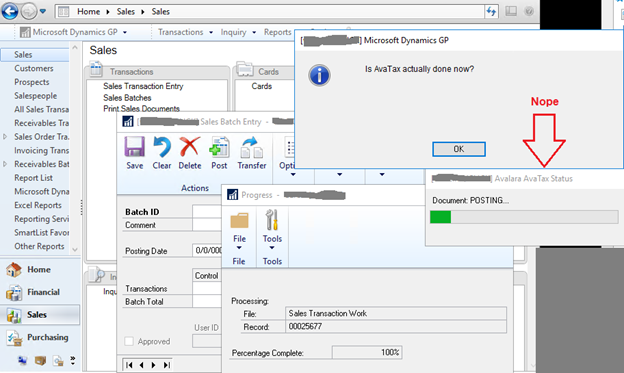
Macro
Logging file 'ClickDailyPostMacro.log'
CheckActiveWin dictionary 'default' form Login window Login
 TypeTo field 'User ID' , '************'
 MoveTo field '(L) Password21'
 TypeTo field '(L) Password21' , '**********'
 MoveTo field 'OK Button'
 ClickHit field 'OK Button'
NewActiveWin dictionary 'default' form sheLL window sheLL
NewActiveWin dictionary 'default' form sheLL window sheLL
 ShellCommand 'Navigate to cmdNavigationPaneSalesButtonSalesAreaPage' # Sales
ClickHitIE , 'http://dexterity/product=0/script=ExecuteAreaPageLink/args=0,1567,70/' # http://dexterity will be pre-pended
#
NewActiveWin dictionary 'default' form 'SOP_Batch_Entry' window 'SOP_Batch_Entry'
 TypeTo field 'Batch Number' , 'DAILYPOST'
 MoveTo field Origin item 0
 ClickHit field Origin item 1 # 'Sales Transaction Entry'
 MoveTo field 'Batch Comment'
 MoveTo field 'GL Posting Date'
 MoveTo field 'Checkbook ID'
 MoveTo field 'Control TRX Count'
 MoveTo field 'Control Total'
 MoveTo field 'Transactions Button C'
 CommandExec dictionary 'default' form 'SOP_Batch_Entry' command 'Post Button_w_SOP_Batch_Entry_f_SOP_Batch_Entry'
NewActiveWin dictionary 'default' form 'Progress_Control' window 'Progress_Window'
NewActiveWin dictionary 'Avalara' form AVAProgressBar window AVAProgressBar
NewActiveWin dictionary 'default' form 'Progress_Control' window 'Progress_Window'
#----------------------
#Pause, 'Is AvaTax actually done now?'
#----------------------
NewActiveWin dictionary 'default' form 'SOP_Batch_Entry' window 'SOP_Batch_Entry'
CloseWindow dictionary 'default' form 'SOP_Batch_Entry' window 'SOP_Batch_Entry'      <<--------------------------Row 31
#NewActiveWin dictionary 'default' form sheLL window sheLL
ShellCommand 'Navigate to cmdListShortcutBarShortcuts' # Shortcuts
ShellCommand 'Navigate to cmdListShortcutBarShortcuts~"Exit Macro~"' # Exit Macro
 CommandExec form BuiLtin command cmdQuitApplication
After remarking out the Pause and running again…
ClickDailyPostMacro.log
===============================================================================
:E:AutoRun/Automated DailyPosts/CLICK_DailyPost_Macro_v1_0.mac Started   10/23/2019 16:43:13
:E:AutoRun/Automated DailyPosts/CLICK_DailyPost_Macro_v1_0.mac Aborted   10/23/2019 16:43:55
:E:AutoRun/Automated DailyPosts/CLICK_DailyPost_Macro_v1_0.mac Elapsed                 0:49     Last Line   31
Error:       CloseWindow with modal dialog open.
Last Line:   31
Line:         CloseWindow dictionary 'default' form 'SOP_Batch_Entry' window 'SOP_Batch_Entry'
Location:   dictionary 'Microsoft Dynamics GP' form 'SOP_Batch_Entry' window 'SOP_Batch_Entry' field 'Batch Number'
Front window: form '[Not Found]' window '[Not Found]' field

Window Contents:
[ 'Batch Number': "" ]
   Origin: "0"
     Sales Transaction Entry
   'Batch Comment': ""
   'GL Posting Date': "0/0/0000"
   'Checkbook ID': "OPERATING-BOA"
   'Control TRX Count': "0"
   L:'Number Of TRX': "0"
   'Control Total': "$0.00"
   L:'Batch Total': "$0.00"
   D:Approval: "FALSE"
   D:'Approval User ID': ""
   D:'Approval Date': "0/0/0000"
   'Transactions Button C': Button
   'Save Button': Button
   'Clear Button': Button
   'Delete Button': Button
   'Post Button': Button
   'Transfer Button': Button
   L:BrowseBox: ""
   'Top of File Button - Toolbar': Button
   'Previous Button - Toolbar': Button
   'Next Button - Toolbar': Button
   'End of File Button - Toolbar': Button
   'Note Absent Button - Toolbar ': Button
   'Note Absent Button - Window Area': Button
   'Lookup Button 1': Button
   'Note Array Absent - Window Area'[1]: Button
   'Lookup Button 2': Button
   WindowHelp: Button
   WindowPrint: Button

Front Window:
   L:'(L) AVAProgressBar': "11"
   L:'Text Value': "Document: POSTING..."
GP 2018 R2
Windows Server 2016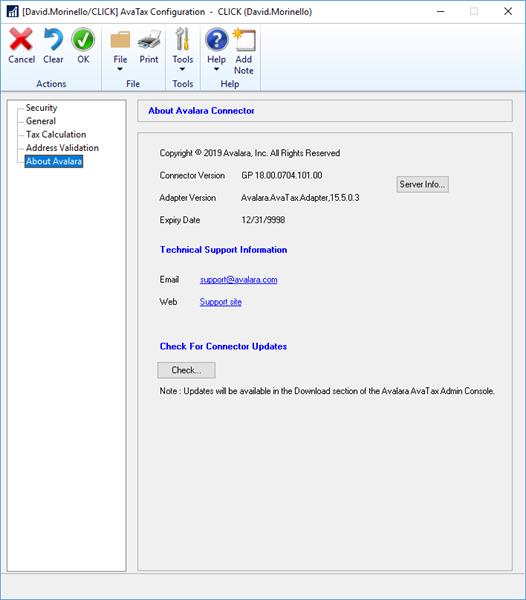
——————————
David Morinello
Senior Dynamics GP Systems Architect
Ascend Learning, LLC
Leawood KS
—————————— -
Hi David,
Sounds like a support case with Avalara. I would send this to their support and run it by them. They have fixed some weird bugs for us recently.——————————
Shannon Mullins
GPUG Academy Instructor
Microsoft Practice Director
Kraft Enterprise Systems
Brentwood TN
——————————
——————————————- -
Thanks
I have submitted a ticket to Avalara. I have more faith in the GPUG community, but I am hitting all normal channels also.Someone privately mentioned the issue might be AvaTax using a .NET window for their progress bar, but that is unconfirmed. I like AvaTax for what it does, but am less confident in a quick turnaround to a solution. Big company inertia… Maybe they will surprise me.
?——————————
David Morinello
Senior Dynamics GP Systems Architect
Ascend Learning, LLC
Leawood KS
——————————
——————————————- -
Just from appearance I would also lean to believe that the progress bar window is a .NET window.
——————————
Matthew Arp
Business Systems Developer
Hunton Group
Houston TX
——————————
——————————————-
David Morinello replied 7 years ago 1 Member · 0 Replies -
-
0 Replies

Sorry, there were no replies found.
The discussion ‘GP Macro & AvaTax’ is closed to new replies.
